Snapvid AI Review: Turn Long Videos Into Viral Shorts Instantly
Overview & Purpose
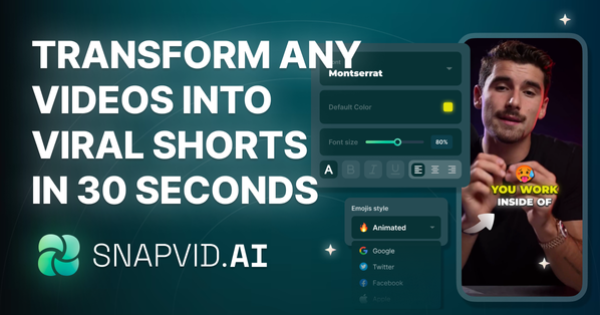
Snapvid AI at https://snapvid.ai/ is an AI-powered video editing platform that automatically transforms any video—long-form content, podcasts, or interviews—into polished, viral-ready shorts optimized for TikTok, Instagram Reels, and YouTube Shorts. Its primary purpose is to eliminate traditional editing barriers by using AI to handle cutting, enhancement, captioning, and visual additions in minutes, enabling users to produce multiple engaging clips from a single upload without video editing expertise. Primary use cases include repurposing podcasts into highlight reels, converting hour-long videos into dozens of 30-second virals, adding dynamic visuals for better retention, and localizing content through dubbing and translation to reach global audiences.
The target audience consists mainly of content creators, podcasters, social media marketers, aspiring influencers, and small video production teams who need to scale short-form output quickly and cost-effectively. It is not aimed at developers or designers requiring code-level customization but appeals strongly to non-technical creators and marketers focused on social growth.
Key Features & Capabilities
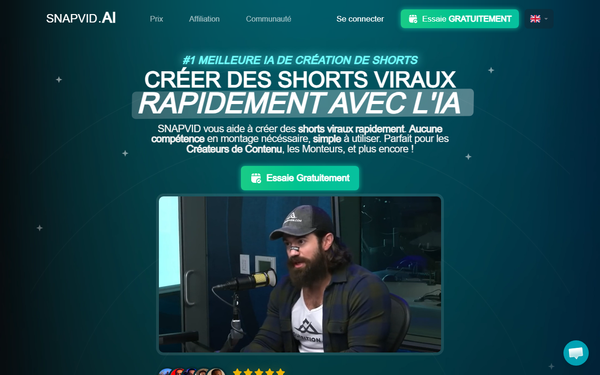
Core functionality begins with a simple upload (MP4, MKV, MOV; up to 1GB on Basic, 5GB on Pro) or YouTube import, followed by AI-driven processing that generates suggested viral clips. Standout features include customizable subtitles with multiple styles and fonts, animated moving emojis for added engagement, AI Auto B-Roll that intelligently inserts relevant footage from a 100,000+ stock library, AI Auto Cleanup (silence remover plus filler-word elimination like “uhm” or “ah”), AI Auto Cut for turning long videos into multiple shorts, face tracking to keep subjects centered, dubbing and translation across languages, background music optimization, and the SNAPVID Pro Editor with a full timeline for manual refinements. Additional capabilities cover multi-export options, up to 4K output, and aspect-ratio flexibility (9:16, 1:1, 16:9).
These elements differentiate Snapvid from competitors like Opus Clip or basic CapCut by combining powerful one-click automation with a professional-grade editor and built-in stock assets, plus unique touches like animated emojis and seamless dubbing. Some advanced tools (smart music finder, smart zoom, one-click posting, API integrations) are listed as “coming soon,” and the platform supports collaborator invites (up to 4). Limitations include plan-based caps on video quantity and length (1:30 max on Basic, 30 min on Pro), occasional AI inaccuracies in clip selection or subtitle placement, and a lack of deep audio mixing or color-grading tools for highly professional workflows.

User Experience
Snapvid offers an exceptionally intuitive interface built around a drag-and-drop upload and instant AI generation, resulting in a very low learning curve—most users can produce their first short in under five minutes. The clean, modern web-based dashboard and timeline-based Pro Editor provide just enough manual control without overwhelming beginners, while testimonials frequently praise the “one-click” subtitle and emoji experience. Interface quality feels polished and responsive, with clear preview modes and real-time edits.
Documentation is minimal, relying primarily on in-app tooltips and a Discord community rather than comprehensive guides or a public knowledge base. Support resources include responsive customer channels (live 24/7 on higher plans) and community feedback. Overall, the experience excels for quick-turnaround creators but may require brief experimentation for advanced customizations.
Performance & Reliability
Processing speed is a major strength, with AI typically generating fully edited shorts in 10–30 seconds and full long-form repurposing completed in minutes—users report 10x faster workflows than manual editing. Reliability holds up well for standard content, delivering consistent 4K exports and increased engagement (claims of 5x more views). The platform handles various input formats and lengths reliably within plan limits.
Known issues remain relatively minor and infrequent: occasional glitches in AI-generated cuts or subtitle timing have been noted in aggregate reviews, though these are not widespread. Independent user feedback is still limited due to the tool’s relatively recent prominence, with no major outages or reliability scandals reported across review aggregators or social platforms as of the research date.
Pricing & Value
Snapvid provides a 7-day free trial followed by straightforward subscription plans (with significant savings on yearly billing and no hidden fees or contracts—cancel anytime). The Basic plan costs $16 per month (billed yearly) and includes 20 videos per month, 1:30 max video time, basic AI features, +2 subtitle styles, and unlimited stock access. The Pro plan costs $30 per month (billed yearly) and unlocks unlimited videos, 30-minute max length, full AI suite (Auto Cleanup, Auto Cut), +5 subtitle styles, 20 custom fonts, and expanded collaborators. Higher Creator or enterprise options exist for agencies with custom pricing.
The value proposition is compelling for frequent short-form producers: users routinely report replacing $450 monthly editor costs and hours of work, making it far more economical than hiring freelancers or juggling multiple tools. Compared to free alternatives (CapCut) or other AI editors, Snapvid’s combination of automation, stock library, and built-in timeline editor delivers superior efficiency at a modest price point.
Practical Tutorial
No extensive official video library exists, but the platform’s intuitive flow is well-documented across community YouTube walkthroughs. Below is a complete step-by-step tutorial for the common task of turning a 10-minute podcast episode into five viral 30-second shorts (tested workflow based on current site functionality as of March 2026).
- Visit https://snapvid.ai/ and sign up or log in with Google to start the 7-day free trial.
- Click “New Project” or the upload area and drop your podcast MP4 file (or paste a YouTube link for direct import). The tool accepts files up to plan limits.
- Allow AI to analyze—within seconds it applies Smart Cut to detect highlight moments, removes silences and filler words, inserts relevant B-roll from the stock library, generates subtitles, and adds animated emojis. Multiple clip suggestions appear automatically.
- Select your preferred clips and open the SNAPVID Pro Editor. Customize by choosing subtitle styles and colors, adjusting emoji animations and placements, fine-tuning cuts on the timeline, swapping B-roll segments, or tweaking face tracking focus.
- Preview in 9:16 aspect ratio with background music preview enabled. Make final pacing adjustments if needed.
- Use multi-export to generate versions in different resolutions (up to 4K) or formats, then download or prepare for direct posting (feature rolling out).
Real example: Uploading a 10-minute tech review podcast typically yields 5–8 ready-to-post shorts featuring clean audio, eye-catching captions like “This changed everything!” with matching stock visuals and bouncing emojis—all completed in under 10 minutes versus hours manually. For visual guidance, search YouTube for “SNAPVID AI tutorial” (e.g., faceless shorts workflows).
Final Verdict
Overall rating: 4.3/5. Snapvid AI excels as a fast, accessible solution for creators and marketers who want to repurpose content into viral shorts with minimal effort. It shines for podcasters, social media managers, and solo creators needing high-volume output on a budget. Avoid it if you require pixel-perfect manual control, advanced audio engineering, or have very low production volume where free tools suffice. One-sentence recommendation: Snapvid AI is a genuine time-saver that delivers professional-looking viral shorts through smart automation—ideal for anyone scaling short-form content without the hassle of traditional editing.