Socialwalls Review: Boost Engagement with AI-Powered UGC Walls
Overview & Purpose

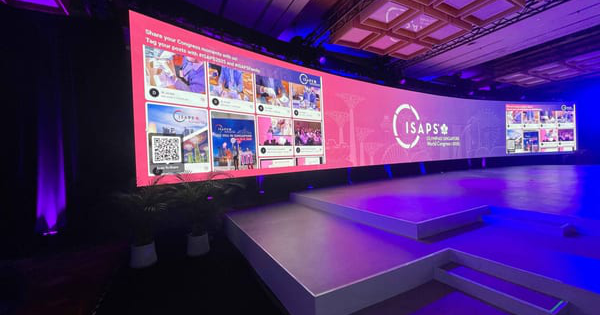
Social Walls by Taggbox is an AI-powered social media aggregator and display platform that collects user-generated content (UGC) from 15+ platforms—including Instagram, X/Twitter, TikTok, Facebook, LinkedIn, YouTube, and more—via hashtags, mentions, handles, stories, URLs, RSS feeds, or direct uploads. It then curates, moderates, and displays this content in real-time on customizable digital walls for events, websites, digital signage, and physical spaces. The primary purpose is to boost audience engagement, showcase authentic social proof, encourage participation through interactive elements, and provide actionable analytics on sentiments and performance.
Key use cases include live events (conferences, trade shows, weddings, graduations), hybrid/virtual events, digital signage in retail or public spaces, website embeds for social proof, hashtag campaigns, in-store marketing, employee engagement, and photo-booth-style experiences. The target audience encompasses event organizers, marketers, brand agencies, educational institutions, retailers, non-profits, hospitality businesses, HR teams, and any organization seeking to turn social conversations into dynamic visual experiences. As of March 2026 research, the platform positions itself as the only AI-powered social wall app for seamless collection-to-display workflows.
Key Features & Capabilities
Core functionality revolves around a four-step process: collect content from multiple sources, moderate and personalize with AI, publish to unlimited displays or embeds, and analyze performance. Users can aggregate posts, videos, stories, and reviews in real time while leveraging AI for automatic filtering of inappropriate or duplicate content, sentiment analysis, and smart recommendations to highlight high-engagement posts via TruSense visual search.
Standout features that differentiate it from competitors include SnapUp (QR-code direct uploads without requiring social accounts), Photo Booth (live snapping, styling, and sharing with frames/stickers), Studio (add interactive overlays like live polls, timers, leaderboards, countdowns, and weather), Reactions (real-time hearts for audience feedback, boosting engagement 3x), Auto Pilot (keyword/image-triggered auto-publishing), Spotlight themes for top posts, full custom CSS/backgrounds/banners, and gamification elements. AI capabilities—moderation, recommendations, smart curation, and sentiment tracking—set it apart by reducing manual effort while ensuring brand safety. Additional strengths are unlimited displays/embeds, real-time updates, API access, SSO/MFA security, and GDPR compliance.
Limitations include heavy reliance on social platform APIs (which can cause occasional sync delays or require re-authentication after platform changes), AI recommendations sometimes needing manual overrides for nuanced brand guidelines, and more advanced analytics being visual but not as deeply customizable as dedicated BI tools. Missing features for some advanced users: native mobile management app, built-in e-commerce shopping integration in walls, or automated alternating display scheduling without custom CSS.
User Experience
The platform offers a low learning curve, with many users and official guides claiming full setup in under three minutes thanks to an intuitive dashboard and guided workflows. The interface is modern, visually appealing, and highly customizable, allowing drag-and-drop elements, theme previews, and real-time editing—praised for professionalism and ease of navigation. Beginners may initially feel overwhelmed by the depth of options (e.g., Studio components or AI rules), but onboarding flows and tooltips mitigate this effectively.
Documentation is robust, with a dedicated support portal, extensive blog guides, case studies, and YouTube tutorials. Customer support receives consistent high marks for responsiveness and helpfulness, including dedicated assistance on paid plans. Overall ratings reflect strong satisfaction: 4.8/5 on G2 across hundreds of reviews and approximately 4/5 on Trustpilot.
Performance & Reliability
Content updates appear in real time on paid plans (free tiers have slower refreshes, e.g., Twitter every 4 days), with efficient handling of high volumes as evidenced by case studies showing thousands of posts and hundreds of thousands of impressions. Analytics dashboards load quickly and provide clear graphs for impressions, clicks, sentiments, and top voices. The AI moderation and curation perform reliably for most users, maintaining brand-appropriate displays without constant oversight.
Known issues are minor and industry-typical: occasional delays or missing posts due to changes in Instagram/Facebook APIs, moderation algorithms occasionally flagging borderline content incorrectly (requiring quick manual approval), and rare reports of display glitches during very high-traffic events. Common complaints in reviews center more on scaling costs than reliability; major outages are not widely reported, and the platform is described as dependable for live events by users on G2 and Trustpilot.
Pricing & Value
Social Walls by Taggbox offers a free tier (1 feed, 500 views/month, manual moderation, limited updates) suitable for testing or small sites. Paid options include website/widget plans starting at approximately $19/month (Starter) up to $39+/month (Growth/Advance) with more feeds, views, auto-moderation, and analytics. For event/display-focused Social Walls, flexible one-time event passes are available: Event Weekly Pass around $199 and Event Monthly Pass around $499 (one-time purchase for mid-size events), plus yearly subscriptions with up to 20% savings and enterprise/custom pricing. A free trial/demo is available, with non-profit and education discounts.
Value is strong for users needing interactive UGC experiences, delivering clear ROI through documented engagement boosts (e.g., 200% more interactions, 2x brand connection in case studies). Compared to alternatives like Walls.io, it excels in AI depth and direct-upload tools at competitive or slightly higher pricing, making it worthwhile for regular events or campaigns but potentially expensive for infrequent, low-volume use.
Practical Tutorial
A common task is creating a live event social wall to display attendee UGC in real time (e.g., for a conference). The official process takes minutes and is detailed in Taggbox’s complete guide.
Step-by-step walkthrough (based on the official 2025/2026 guide; test in a free account):
- Visit https://socialwalls.com/ and sign up for a free account (or log in at https://app.socialwalls.com).
- Create a new wall/feed and select a source platform (e.g., Instagram). Choose collection method: Hashtags, then enter event-specific tags like #TechConf2026 or #MyEvent.
- Add multiple sources if desired (e.g., Twitter mentions @YourBrand, TikTok hashtags, LinkedIn company page, or enable SnapUp for direct QR uploads).
- Click Moderate: Enable AI moderation and Auto Pilot for automatic filtering/profanity removal; review AI recommendations (Recommended/Considerable) and manually spotlight or approve posts.
- Personalize: Select or customize a theme, add Studio elements (e.g., live poll: “Favorite session?”; countdown timer; custom banner with sponsors), enable Reactions, and set up SnapUp QR code for on-site uploads.
- Preview the wall, then click Display: Generate a full-screen link for digital signage/projectors or copy embed code for websites. Publish instantly for real-time updates.
- Monitor via the analytics dashboard (impressions, sentiments, top posts) and adjust moderation rules live.
Real example: For Kansas University commencement (#KCUGrad2022), organizers collected graduate photos via the hashtag, moderated with AI for appropriateness, added a poll and branding, and displayed on venue screens—resulting in hybrid participation and high engagement. For full visuals and troubleshooting, see the official tutorial at https://taggbox.com/blog/social-media-wall-guide/ or the YouTube video “How to create a social wall under 3 minutes” by Social Walls by Taggbox.
Final Verdict
Overall rating: 4.6/5. This platform shines for organizations that want to transform social media buzz into captivating, interactive displays with minimal effort thanks to strong AI and engagement tools. Event organizers, marketers, and brands seeking authentic UGC experiences with measurable ROI should use it—especially for conferences, retail activations, or hybrid events—because of the seamless collection, moderation, and real-time interactivity. Avoid it if you have a very tight budget for one-off needs (free tier is limited and alternatives may suffice) or require deeply technical custom integrations beyond no-code options. Social Walls by Taggbox is a reliable, AI-enhanced choice that turns passive social feeds into dynamic audience magnets worth considering for any engagement-focused campaign.