Sonauto Review: The Best Free Unlimited AI Music Generator
Overview & Purpose
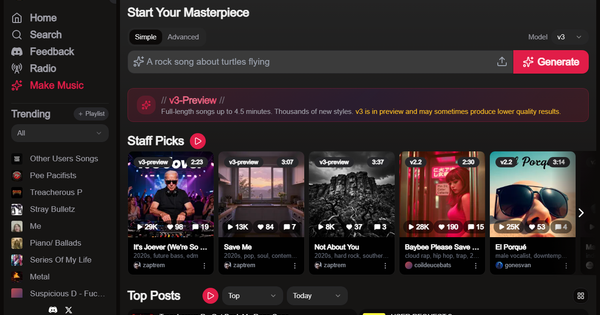
Sonauto is a free, unlimited AI music generator that transforms simple text prompts, ideas, or custom lyrics into full-length songs complete with vocals, instrumentation, and structure—typically up to 4.5 minutes in its v3-preview model. Users generate original tracks in seconds across thousands of styles and genres, then share them directly on the platform's built-in community feed, join collaborative groups, and engage with trending rankings such as Top Posts, Staff Picks, and category-based playlists.
Primary use cases include rapid song ideation for hobbyists, creating demo tracks or background music for videos/social content, experimenting with niche genres (e.g., "death metal lullaby for my cat" or "brainrot Euro-disco"), and participating in a social music ecosystem for feedback and discovery. The platform emphasizes accessibility—no musical skills required—while fostering community through likes, comments, shares, and group collaboration.
Target audience encompasses amateur songwriters, casual music producers, content creators (YouTubers, TikTokers), indie artists seeking quick inspiration, and music enthusiasts exploring AI creativity. It appeals less to professional studios needing guaranteed high-fidelity output or strict commercial licensing clarity, and more to beginners or those on a budget who want frictionless experimentation. As of March 13, 2026, it stands out as a Y Combinator-backed tool positioned against paid competitors like Suno and Udio.
Key Features & Capabilities
Core functionality revolves around prompt-based song generation using the web UI (v3-preview for variable-length tracks or v2 for fixed ~1:35 durations), with options for instrumental mode, custom lyrics input, tags (e.g., [male vocalist], [downtempo]), and BPM/tempo guidance. Songs appear instantly with play counts, and users can post to personal profiles or community groups for visibility in Trending and Top of All Time lists.
Standout features differentiating it from competitors include truly unlimited free generations on the web (no credit system or daily limits), integrated community ranking and sharing (groups like "Nice Voice" or "Weird & Wacky Texts"), section-level editing via inpainting (regenerate specific parts like a chorus without restarting the track), song extension (add 60–90+ seconds with energy prompts), and demonstrated stems export (separate vocals, drums, bass, etc., for DAW import—free, unlike some rivals that charge). The public API adds developer controls for scripting generations, real-time streaming, lyrics alignment, and webhooks.
Limitations include variable audio quality in v3-preview (occasional artifacts, weaker vocals, or lyric misalignment requiring rerolls), no officially documented stems specifications (sample rate, naming, or phase alignment), temporary song URLs that may expire after 7 days on API-generated tracks, and ambiguous commercial rights details despite user ownership assignment in the Terms of Service—users bear full responsibility for copyright legality. Missing features: advanced DAW-style mixing in-app, guaranteed commercial licensing clarity for monetized releases, and comprehensive official user tutorials beyond the API reference.
User Experience
Ease of use is excellent for beginners with a minimal learning curve: simply visit the site, log in (free account), type a prompt, and hit Generate. The interface is clean and modern—prominent "Start Your Masterpiece" prompt box, instant audio previews, Trending playlists, and one-click sharing to groups or feeds. Advanced editing (inpainting/extension) feels intuitive via UI selections, though API users gain finer programmatic control.
Interface quality scores high for accessibility: responsive web design, real-time playback, engagement metrics visible on every post, and category filters. No steep onboarding—most users generate their first track in under a minute. Documentation is light: a dedicated developers page with API endpoints, code examples (Python requests), and parameter references (prompt_strength, seed, sections for inpaint), but no in-depth user guide or knowledge base. Support routes through a public Discord (discord.gg/pfXar3ChH8) for feedback and community tips; third-party YouTube tutorials fill the gap effectively.
Performance & Reliability
Generation speed is a highlight—full songs render in seconds with low latency on v3, and streaming support enhances real-time feel. Efficiency shines for high-volume testing thanks to unlimited free web access. Reliability is solid for basic use, with consistent uptime observed across reviews, but output quality varies by prompt complexity and model version (v3-preview explicitly notes potential lower results).
Known issues include occasional audio artifacts (clicks, pops, or unnatural transitions), inconsistent voice control or genre adherence, and the need for multiple generations to achieve polished tracks—common complaints in YouTube tests and Reddit threads. No widespread outages reported, but stems export and advanced edits rely on unofficial tutorial demonstrations rather than bulletproof documentation, leading to occasional import hiccups in DAWs. Overall, performance suits casual workflows better than mission-critical professional production as of March 2026.
Pricing & Value
Sonauto operates on a dual model: the web UI delivers completely free, unlimited generations with no subscription, credits, or usage caps—explicitly marketed as "Free AI Music Generator." The separate API requires paid plans (Starter $11/mo for 20k credits; Pro $88/mo for 160k; higher tiers up to Enterprise), with pay-as-you-go at ~$0.06 per 100 credits. Website creations incur zero cost, making it ideal for experimentation.
Value proposition excels for cost-conscious users: free stems export, inpainting, and community tools deliver more than many paid rivals' base tiers (e.g., Suno/Udio require subscriptions for meaningful volume). Commercial use carries caveats due to unclear licensing specifics, reducing value for monetized projects compared to competitors with explicit rights policies. For hobbyists and quick demos, the unlimited free access offers unmatched ROI; professionals may supplement with paid alternatives for reliability.
Practical Tutorial
No official step-by-step user tutorials exist beyond the API reference, but the workflow is straightforward. Below is a complete walkthrough for a common task—generating, editing, and sharing a custom song—based on verified platform behavior and community demonstrations as of March 2026.
Step-by-step: Create, refine, and share an original track
-
Visit https://sonauto.ai/ and sign up/log in with a free account (email or social login).
-
Click "Generate" or the prominent "Start Your Masterpiece" button on the homepage.
-
Enter a detailed prompt in the text box. Example: "Upbeat indie pop song about a barista's morning rush, female vocalist, 120 BPM, bright guitars and synths, verse-chorus structure." Add optional tags like [female vocalist] [indie pop] or switch to Instrumental mode.
-
Hit Generate. The song processes in seconds (v3-preview recommended for longer tracks). Listen via the embedded player; it auto-saves to your profile.
-
For refinement: Open the song page, select a weak section (e.g., chorus) using the inpainting tool, enter a revised prompt (e.g., "stronger hook with layered harmonies"), and regenerate just that part. Use the extension feature to append 60–90 seconds: prompt "build energy with rising drums and fade outro."
-
Export options: Download the full track (MP3/OGG/etc.). Stems export (vocals, drums, etc.) is available via the track menu—separate files for DAW use.
-
Share: Click Post to feed, add description/tags, or join a group (browse /explore-groups) like "Chill Vibes." Engage with likes/comments; monitor Trending for exposure.
-
Iterate: Reroll generations or tweak seed/prompt_strength in advanced mode for variations. For API power users, reference https://sonauto.ai/developers for scripted batches.
Example result from similar prompts: A cohesive 3-minute track with aligned lyrics and genre fidelity. For video walkthroughs, search YouTube for "Sonauto AI Tutorial 2026" (multiple creator guides cover inpainting/stems visually). Always test rights before public distribution.
Final Verdict
Overall rating: 8.5/10—exceptional accessibility and zero-cost innovation, tempered by quality variability and licensing ambiguity.
Who should use this tool: Hobbyists, amateur songwriters, content creators, and casual producers seeking unlimited free experimentation, community feedback, and quick editable tracks for personal projects or social sharing—especially those frustrated by credit limits on competitors.
Who should avoid this tool: Professional musicians or commercial enterprises requiring consistent studio-grade quality, ironclad commercial licensing, or extensive official documentation—opt for Suno/Udio until Sonauto clarifies rights and stabilizes v3 output.
One-sentence recommendation: If you're looking for a truly free, fun, and feature-rich way to turn wild ideas into shareable songs without limits, start with Sonauto today—it's the best no-barrier entry point into AI music creation as of March 2026.