Sourcetable Review: The Ultimate AI-Powered Spreadsheet Tool

Overview & Purpose

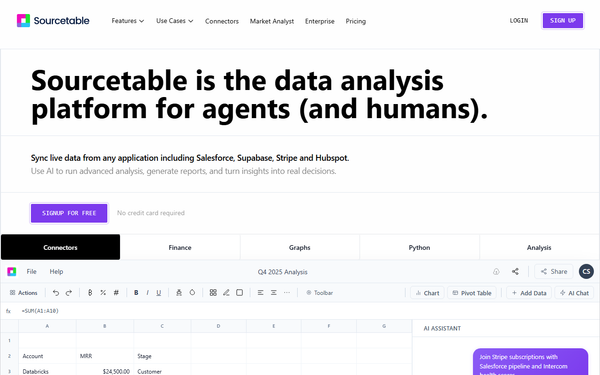
Sourcetable is an AI-native spreadsheet platform that functions as both a familiar spreadsheet tool and an intelligent data analyst. It syncs live data from business applications, databases, and APIs; enables natural language queries for analysis, insights, and automation; and supports advanced tasks like formula generation, charting, and reporting—all without requiring coding or data engineering skills.
Its primary purpose is to democratize data analysis by turning complex workflows into simple conversations with your data, serving as “the last spreadsheet you’ll ever need” for turning raw information into actionable decisions.
Key use cases include building financial models, analyzing marketing campaigns, generating automated operations reports, processing scientific or experimental data, tracking stock portfolios with Python integrations, and creating ad-hoc business intelligence dashboards.
The target audience includes startup founders, business analysts, marketers, finance and operations teams, educators, researchers, and other non-technical professionals who need to handle large datasets efficiently. It is especially valuable for teams that want to avoid switching between multiple tools or waiting for engineering support.
Key Features & Capabilities
Core functionality revolves around an Excel-like spreadsheet interface with full formula support, real-time collaboration, pivots, and XLSX compatibility, enhanced by AI that powers everything from data cleaning to multi-step analysis.
Standout features include:
- Live data connectors and Superagents for seamless sync from sources like Salesforce, Stripe, Supabase, Google Analytics, Airtable, GitHub, MySQL, Postgres, and any custom API or database.
- AI chatbot for plain-English commands (e.g., “clean this dataset,” “generate a revenue forecast chart,” or “write SQL for top customers”).
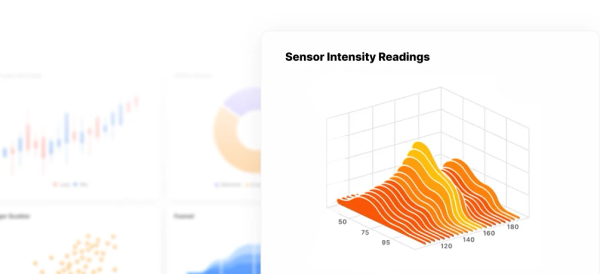
- Automatic chart and dashboard generation, insight summaries, anomaly detection, and exportable reports in PDF/HTML/Word.
- Full Python ecosystem (Pandas, NumPy, SciPy, Scikit-learn, Matplotlib, Plotly) plus SQL generation without leaving the sheet.
- Self-driving “autopilot” mode for autonomous multi-step workflows, template creation, synthetic data generation, and voice-to-text input.
- Handling of massive files (over 1 million rows or 10 GB) via server-side processing and smart pivots/summaries.
These capabilities differentiate Sourcetable from traditional spreadsheets (Excel, Google Sheets) and even AI add-ons like Copilot or Gemini by embedding a full data-science layer and live business data directly into the familiar grid, eliminating tool-switching and coding barriers.
Limitations include usage-based AI message quotas (even on paid plans), a 10 GB standard file-size cap (larger available on request), occasional need to verify AI outputs for complex logic, and connectors that may require Pro-tier approval or custom setup. Missing compared to dedicated BI platforms: ultra-advanced enterprise dashboarding or native mobile apps, though it excels in spreadsheet flexibility and speed for most business users.
User Experience
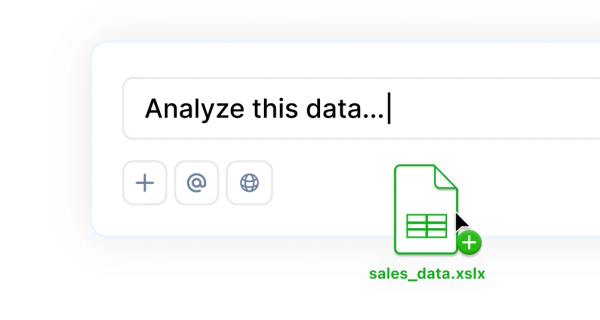
Sourcetable offers a low learning curve for anyone familiar with Google Sheets or Excel, thanks to its clean, intuitive interface that combines the classic grid with a helpful AI sidebar/chat (accessible via Cmd + ). New users can upload a file and start getting insights in minutes.
The interface quality is modern and responsive, with real-time collaboration, drag-and-drop uploads, and natural-language command bar that feels like having a data expert beside you. Prompting skills improve results for advanced tasks, but basic usage is immediately productive.
Documentation and support resources consist of high-quality YouTube tutorials (including the official “Sourcetable 101” series), an AI Tool Library with interactive walkthroughs, blog guides, in-app templates, and responsive email support at [email protected]. Paid plans receive priority assistance; traditional written docs are light but sufficient given the strong in-product AI guidance.
Performance & Reliability
Performance is strong for most workflows: cloud-based processing handles large datasets faster than desktop Excel, with quick AI responses (leveraging optimized models) and automatic live sync that keeps reports current without manual refreshes. Users report significant time savings on repetitive tasks.
Known issues are minimal as of March 2026. Some users note occasional slowdowns on unoptimized multi-million-row files (mitigated by pivots and summaries) and the standard AI credit limits. No widespread complaints about downtime, data loss, or major bugs appear in public reviews; enterprise-grade security (SOC 2 Type 2, HIPAA, PCI) and encrypted data handling contribute to high reliability. G2 users consistently praise speed and stability.
Pricing & Value
Sourcetable offers a generous free tier and straightforward paid plans:
- Free: Unlimited spreadsheets and basic use; 30 AI messages per month.
- Pro: $20 per user per month — 500 AI messages, full app integrations, and reporting suite.
- Max: $200 per user per month — unlimited AI messages, premium models, early feature access.
- 50% discount for students, professors, and faculty (email support for activation).
- Enterprise options available via custom request (on-prem, dedicated support).
Value is excellent for teams needing AI-powered analysis without hiring specialists or subscribing to multiple tools. At $20/month, Pro delivers more capability than Google Sheets + Gemini or basic Excel Copilot for many users, while avoiding the high costs of enterprise BI platforms. The free tier alone outperforms most competitors for occasional use.
Practical Tutorial
Official resources include the excellent “Sourcetable 101 – Learn how to use Sourcetable” video series on YouTube.
Here is a step-by-step walkthrough for a common task—analyzing a sales CSV file and generating an automated report (works in Free tier for basic steps; Pro unlocks deeper integrations):
- Go to app.sourcetable.com/signup and create a free account (no credit card required).
- Click “New Workbook” or drag-and-drop your sales.csv file directly into the sheet (supports CSV, XLSX, JSON, PDF, etc.).
- Once loaded, press Cmd + \ (or click the AI chat icon) to open the assistant.
- Type: “Clean this dataset, remove duplicates, and calculate total revenue by region.” The AI will execute the steps and show results in the grid.
- Next prompt: “Create a bar chart of revenue by region and add a trend line for Q4 growth.” AI generates and inserts the visualization instantly.
- Follow up with: “Summarize key insights, flag any anomalies, and export this as a professional PDF report with charts.” The AI produces a polished summary and downloadable file.
- For recurring use, save the workbook; data refreshes automatically if you later connect a live source like Stripe or Google Analytics.
- Share the interactive dashboard link or embed it in your team’s tools.
The entire process typically takes under 10 minutes and produces production-ready output. For video guidance, watch the official Sourcetable 101 tutorial linked above.
Final Verdict
Overall rating: 4.5/5. Sourcetable excels as a powerful, accessible AI spreadsheet that genuinely accelerates data work for non-technical users.
It is ideal for startup founders, analysts, marketers, operations teams, and educators who want live-synced business data and AI assistance without learning SQL or Python. Users who should avoid it include those needing deeply specialized statistical modeling beyond built-in libraries, teams already locked into the Microsoft 365 ecosystem with heavy Copilot investment, or organizations requiring fully custom on-prem enterprise integrations without contacting support.
One-sentence recommendation: If you’re tired of manual spreadsheet drudgery and want AI to handle the heavy lifting with live business data, Sourcetable is an excellent choice.