Sparks AI Review: Build Your Own AI Workforce Without Coding

Overview & Purpose
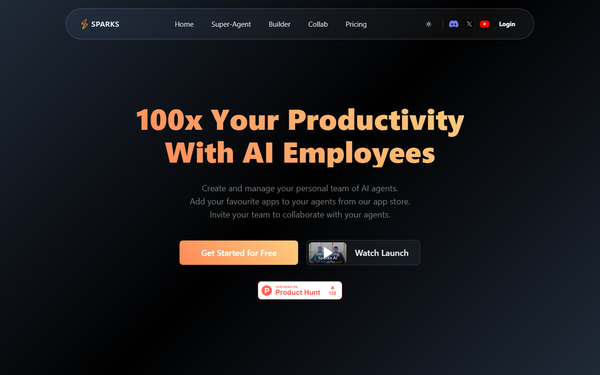
Sparks AI is a no-code platform designed as an "AI Super App" that lets users build, deploy, share, and manage custom AI agents—referred to as "AI Employees"—within collaborative workspaces. It automates repetitive tasks, handles research, coding, and complex workflows autonomously, while integrating third-party tools via an app store and enabling real-time collaboration between humans and multiple agents. Primary use cases include streamlining business operations (e.g., data analysis, customer support automation), accelerating research projects, enhancing team communication, and creating specialized agents for knowledge management or content generation. The platform positions itself as a way to "100x Your Productivity" by forming personal teams of AI agents that can spawn helper sub-agents for intricate tasks.
Target audience includes knowledge workers, product managers, marketers, researchers, small-to-medium teams, and businesses seeking AI-driven efficiency without coding expertise. It appeals particularly to non-technical users who need persistent memory across sessions and seamless human-AI collaboration, distinguishing it from solo agent builders like basic OpenAI GPTs.
Key Features & Capabilities
Core functionality revolves around agent creation using any leading model (such as GPT-5, Claude, or Gemini), selecting templates, attaching tools from a built-in app store, and configuring persistent memory for context retention. Agents operate autonomously on tasks like research or code execution, while workspaces support real-time chat with multiple agents and team members synced to shared projects. Users can explore a public agent store for ready-made solutions or publish their own for community use. Standout differentiating features include multi-agent "teams" that dynamically spawn helper agents for complex projects and deep collaborative workspaces that treat AI agents as full teammates rather than isolated chatbots.
These elements set Sparks apart from competitors like OpenAI Assistants or Zapier by emphasizing end-to-end team collaboration and an ecosystem for sharing agents. However, limitations include a credit-based consumption model that may restrict heavy usage on lower tiers, a still-growing app store with potentially fewer integrations than mature platforms, and no deep custom code support for advanced tool development. As a relatively new platform (launched 2025), the ecosystem lacks the breadth of enterprise alternatives like Microsoft Copilot workspaces.

User Experience
Sparks AI boasts an intuitive, no-code interface that lowers the barrier significantly—users simply pick a template, select a model, add tools, and deploy in minutes, resulting in a gentle learning curve even for non-technical users. The dashboard emphasizes clean, real-time collaboration views where chats with agents and humans stay synced across projects, with persistent memory ensuring context carries over seamlessly. Interface quality feels modern and workspace-focused, though some users may initially need time to grasp multi-agent spawning mechanics.
Documentation remains light, consisting mainly of homepage demos and basic guides with no extensive public knowledge base or video library found as of research. Support appears limited to in-app resources and community channels, which could frustrate new users seeking detailed troubleshooting. Overall, the experience prioritizes speed and collaboration over comprehensive onboarding materials.

Performance & Reliability
Agents perform efficiently on autonomous tasks such as research, coding, and multi-step workflows, with fast response times powered by top-tier models and tool integrations. Persistent memory and real-time syncing contribute to reliable collaboration without frequent context loss. As of March 2026, no widespread outages or major reliability complaints appear in available sources, and early directory ratings hover around 4.8/5 from limited user feedback.
Common issues noted in sparse reviews include credit depletion during intensive sessions and occasional variability in agent autonomy depending on the chosen model. The platform's youth means long-term scalability data is limited, but current performance suits most productivity needs without reported critical bugs.

Pricing & Value
Sparks AI follows a freemium credit-based structure with a limited free tier for exploration. Paid plans include Lite at $10/month (1,000 credits), Plus at $20/month (2,000 credits), Pro at $50/month (5,000 credits), and Max at $200/month (20,000 credits). Credits cover agent interactions, tool usage, and storage; higher tiers unlock more collaboration seats and advanced features. No enterprise custom pricing is prominently detailed, though scaling options exist.
Value shines for teams through collaborative capabilities that outperform basic GPT custom agents at similar or lower entry costs, especially versus Zapier’s per-task pricing or OpenAI’s usage-based fees. It delivers strong ROI for knowledge workers automating workflows, though heavy users may find credits constraining compared to unlimited alternatives. Free tier and transparent structure make it accessible for testing before committing.
Practical Tutorial
Official tutorials are minimal (primarily homepage "see it in action" demos for the Ion Super-Agent), so here is a complete, self-contained walkthrough for a common task: building and deploying a "Market Research Summarizer" agent for a marketing team. This example uses real platform flows described across official sources and can be replicated directly on getsparks.ai (free sign-up required).
-
Sign up and access dashboard: Visit https://www.getsparks.ai/, click "Get Started" (free tier available), and create an account with email or Google. Once logged in, navigate to your workspace and select "Create New Agent."
-
Choose template and model: Select the "Research" or "Summarizer" template. Pick your preferred model (e.g., Claude for analytical depth or GPT-5 for speed). Define the agent's role in plain English: "You are a Market Research Summarizer. Analyze competitor data, summarize trends from web sources, and generate reports with key insights."
-
Add tools and memory: From the app store, attach relevant tools (e.g., web search, document uploader, or data analysis connectors). Enable persistent memory so the agent recalls previous research sessions. Set input fields for user uploads like competitor URLs or PDFs.
-
Configure collaboration and spawning: Toggle team collaboration to allow real-time chat with colleagues. Enable "Agent Teams" so the main agent can spawn sub-agents (e.g., one for data scraping, another for sentiment analysis) on complex queries.
-
Test and refine: Open the agent chat interface, input a sample task like "Summarize recent AI trends from the last month." Review autonomous execution, edit prompts if needed, and iterate using built-in feedback tools.
-
Deploy, invite team, and publish: Save the agent to your workspace. Invite teammates via email for collaborative use. Optionally, publish to the public agent store with a description for others to discover and fork.
-
Monitor usage: Track credits consumed in the dashboard; upgrade plans as needed for higher limits.
This process typically takes 10-15 minutes. For visual demos, refer to the Ion Super-Agent example on the homepage. Official updates may enhance this flow—check the site for any new templates.
Final Verdict
Sparks AI earns a solid 4.3/5 rating (or 8.6/10) as a promising, user-friendly platform that excels at turning AI into collaborative teammates. It is ideal for knowledge workers, small teams, and businesses focused on productivity automation through shared agent workspaces, especially those already using multiple AI models and seeking an all-in-one hub without code. Avoid it if you require unlimited usage, extensive custom coding, a mature integration ecosystem, or detailed enterprise support, as the credit model and early-stage documentation may feel restrictive.
Sparks AI stands out as the go-to super app for teams ready to deploy their own AI workforce today.