Spikes Studio Review
Overview & Purpose

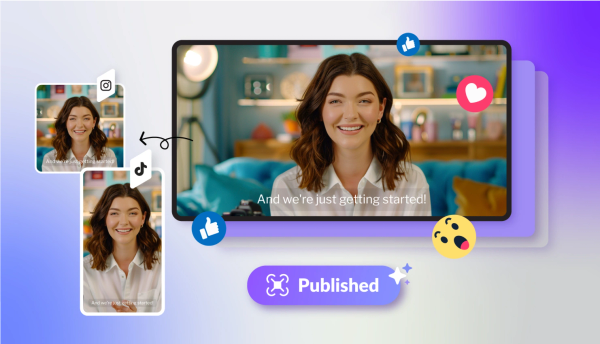
Spikes Studio is an AI-powered platform that automatically detects engaging moments in long-form videos or live streams and converts them into polished, platform-optimized short clips for YouTube Shorts, TikTok, Instagram Reels, and similar formats. Its primary purpose is to eliminate hours of manual editing by using AI to identify viral potential, add captions, transitions, and branding elements, then enable one-click export or scheduling. Core use cases include repurposing podcasts, Twitch streams, YouTube videos, marketing webinars, or any extended footage into scroll-stopping social content to boost audience growth and engagement.
The target audience includes aspiring creators and streamers who want to go viral without a full editing team, content marketers and small businesses seeking efficient video marketing, video professionals managing client workloads, and teams needing collaboration tools. It positions itself as a complete “social video studio in your pocket,” ideal for anyone producing long content but struggling with short-form distribution (official website, accessed March 2026).

Key Features & Capabilities
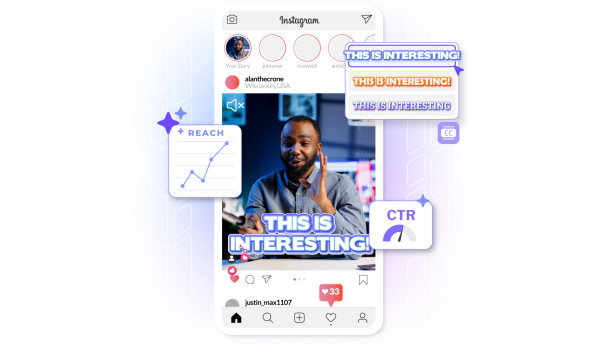
Core functionality revolves around AI clip detection that scans uploads or live broadcasts for high-engagement segments, followed by automatic reframing, caption generation in over 99 languages, and multi-platform exporting. Standout features include the “Micro-Drama Engine” for dramatic clip curation, live-stream “Clip Better” AI that analyzes chat engagement in real time, AI-generated titles/hashtags/emojis tailored to audiences, on-brand templates, instant resizing, social scheduling, performance analytics dashboard, trend analysis, and team collaboration with shared folders and drag-and-drop workflows. It claims to cut editing time by up to 90% through automation and provides direct posting to connected social accounts.
Differentiators from competitors (such as OpusClip or Klap) include integrated scheduling and analytics, virality scoring for clip selection, AI-generated B-roll and effects on paid plans, and a unified content calendar—creating an all-in-one workflow rather than isolated clipping. The advanced web editor supports custom clip lengths, face tracking, transitions, audio/SFX insertion, and animated captions.
Limitations include a 5-minute video length cap in the editor’s captions tab, lower 720p resolution and watermarks on the free tier, limited storage (7 days free, 90 days on basic paid, unlimited on enterprise), and reliance on AI that occasionally requires manual tweaks for perfect results. Advanced automations (e.g., full B-roll, auto-reframing) and social integrations are paywalled. Source quality assurance and broadcast processing are supported via secure cloud handling, but no extensive documentation details pixel-level guarantees (official site and user demos, March 2026).
User Experience
Spikes Studio offers a low learning curve with a clean, intuitive web interface featuring drag-and-drop organization, one-click AI processing, and mobile-friendly access—no prior editing experience required. Users praise the straightforward upload-to-publish flow and visual previews that make clip selection effortless. The interface feels modern and responsive, with customizable brand templates and easy navigation between clip library, editor, and scheduler.
Documentation consists of in-app FAQs, an Intercom help center covering basics like API access, and community-driven tutorials; there is no exhaustive user manual or video academy. Support is available via email ([email protected]) and reportedly includes 24/7 Discord channels per some user reports, though response quality varies. Overall, the platform excels for quick starts but may leave advanced users seeking deeper guides (Product Hunt reviews and official help resources, March 2026).
Performance & Reliability
Processing is fast on paid plans, with AI generating dozens of clip options in minutes even from hour-long sources; users report reliable 1080p exports and consistent platform optimization. Live-stream handling and chat-based clipping perform well for streamers. The cloud-based system ensures cross-device access and automatic updates.
Known issues include occasional upload glitches, clip quality requiring post-edits, and storage expiration on lower tiers. Trustpilot reviews (2.6/5 from 17 users) highlight complaints around billing/subscription management, refund delays, and sporadic support responsiveness, contrasting sharply with Product Hunt’s 4.8/5 praise for efficiency. No widespread outages reported, but reliability depends on stable internet, and some users note AI virality predictions are not infallible. Performance has improved with updates, but real-world results vary by video complexity (Trustpilot, Product Hunt, and community feedback, March 2026).
Pricing & Value
Spikes Studio operates on a freemium model. The free Basic plan provides demo access, auto-captions, and basic editing but includes watermarks, 720p exports, 7-day storage, and regular processing speed. Paid plans start around $12.99–$14.09/month for PRO+ (faster processing, 1080p, animated captions, B-roll, scheduler, analytics, and watermark removal) with annual discounts up to 57%; higher tiers reach approximately $56.34/month for Enterprise features like unlimited storage, custom branding, team workspaces, and API access. Additional minutes can be earned via referrals.
Value is strong for high-volume creators: the time savings and all-in-one social tools often outweigh the modest cost compared to manual editing or basic alternatives like CapCut. It delivers excellent ROI for marketers producing frequent shorts, though users sensitive to billing transparency or needing unlimited free usage may find competitors more flexible. Exact pricing and minute allotments should be verified on the site, as they can fluctuate (official pricing page and third-party comparisons, March 2026).
Practical Tutorial
No official step-by-step video series exists on the site, but the workflow is straightforward and well-documented in community demos (search “Spikes Studio tutorial” on YouTube or TikTok for visual examples). Here is a complete walkthrough for a common task—repurposing a 30-minute podcast episode into five viral TikTok/Reels clips (based on real user processes from 2024–2026 demos):
- Visit https://spikes.studio/ and sign up for a free account (no credit card required).
- From the dashboard, click “Upload File” or paste a YouTube link; for a podcast example, upload an MP4 or link your episode.
- The AI analyzes the audio/visual content and generates 10–20 suggested clips ranked by virality potential (this takes 1–5 minutes).
- Review thumbnails and lengths; select the top 5 (e.g., key storytelling moments or humorous segments).
- Open the advanced editor: auto-captions appear instantly—customize font, color, animation style, and add emojis or B-roll (paid feature). Adjust zoom/reframe, insert transitions, and tweak timing.
- Generate AI titles, descriptions, and hashtags optimized for TikTok; resize to vertical 9:16 format and preview platform previews.
- Connect your TikTok/Instagram account (or download MP4s), schedule posts via the calendar, or publish instantly. Track performance in the dashboard afterward.
This entire process typically takes under 15 minutes per video and scales easily for batch uploads. For live streams, enable “Clip Better” post-broadcast for chat-driven highlights.
Final Verdict
Spikes Studio earns a 4.2/5 overall rating—excellent automation and social integration earn high marks, tempered by mixed support experiences and tiered limitations.
Content creators, streamers, and marketers producing regular long-form material should use it to dramatically increase output and reach without hiring editors. Teams valuing scheduling and analytics will appreciate the end-to-end workflow.
Users needing pixel-perfect manual control, unlimited free high-quality exports, or those wary of billing/support variability should avoid it in favor of more flexible or locally installed tools.
If you create long videos and want to multiply your short-form presence effortlessly, Spikes Studio is a powerful, time-saving investment worth starting with the free tier today.