Spiral Review: Automate Content Creation While Keeping Your Voice

Overview & Purpose

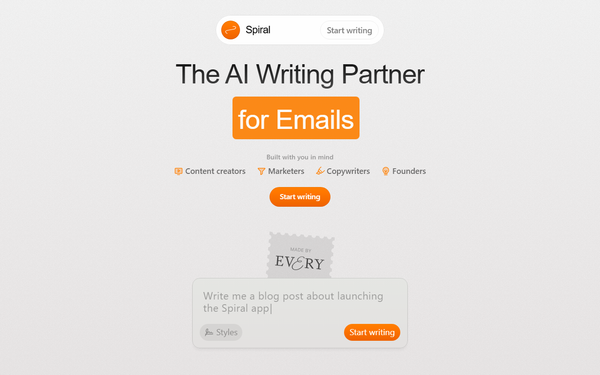
Spiral is an AI-powered automation tool developed by Every Inc. that streamlines repetitive writing, thinking, and creative tasks by up to 80%. Users train custom "Spirals"—reusable automation templates—with examples of their writing to generate content like tweets, blog posts, proposals, summaries, social media copy, landing pages, presentations, and technical documentation, all while preserving the user's unique voice and style. It combines training on personal examples with a collaborative "interview" process where the AI asks clarifying questions, offers multiple draft angles, and grounds outputs in uploaded files or context to avoid hallucinations.
Primary use cases include repurposing notes into polished social posts, scaling branded content across platforms, maintaining tone consistency in team outputs, and accelerating idea-to-draft workflows. The target audience encompasses content creators, marketers, copywriters, founders, and teams (especially agencies or content departments) who produce high volumes of writing and value authenticity over generic AI generation. It is particularly appealing to those tired of manual prompting in tools like ChatGPT or Claude.
Key Features & Capabilities
Core functionality revolves around creating, cloning, and using Spirals: users upload 3–5 writing examples (or favorite styles) to train the model, then input prompts, notes, or files to generate outputs automatically. Standout features include a public library of 200+ pre-built Spirals (handcrafted by Every's team for specific channels like X/Twitter, LinkedIn, or proposals), collaborative interview mode that clarifies intent before drafting, simultaneous multiple-angle drafts (e.g., benefit-driven, creative, productivity-focused), file grounding for factual accuracy, and shared workspaces for team collaboration and Spiral sharing.
Differentiators from competitors (such as Jasper, Copy.ai, or custom GPTs) include its opinionated "editorial taste" built on Every's standards—avoiding AI-isms, favoring concrete details and active voice—and the automation of prompting itself via reusable Spirals, making it feel like a true writing partner rather than a one-off generator. V2 (launched with redesigned interface) added better organization, filters, and integration with high-end models like Claude 3.5 Sonnet for improved quality.
Limitations include a session-based model (each Spiral use counts as a session with unlimited internal iterations), focus primarily on writing/creative tasks rather than broad automation (e.g., no deep non-text integrations), and the need for quality training examples to achieve best results. Missing features at the time of research: extensive third-party integrations (beyond file uploads), unlimited free-tier generations, or advanced analytics on Spiral usage.
User Experience
Spiral offers a low-to-moderate learning curve thanks to its guided interview process and intuitive dashboard for managing custom and public Spirals. New users can start with pre-built library items and clone/customize quickly; the conversational flow feels natural rather than prompt-engineering heavy. The V2 redesign delivers a clean, modern interface with easy navigation, filters, and in-session chatting for refinements.
Documentation and support resources include in-app guidance, Every's blog posts (e.g., the official V2 announcement), a dedicated YouTube walkthrough video for new features, and community access for Every subscribers. Support feels responsive for a tool of this scale, though extensive public API docs or video library are limited compared to enterprise alternatives.
Performance & Reliability
Spiral delivers strong speed and efficiency, with users reporting up to 80% time savings on repetitive tasks through reusable automations and instant multi-draft generation. Outputs are reliable and grounded, especially when feeding context files, and the built-in taste standards reduce generic "AI slop." Performance has improved significantly with V2's model upgrades.
Known issues or common complaints are minimal: some users hit monthly session limits during high-volume periods, and outputs occasionally require light human editing for nuanced humor or edge cases. No major reliability outages or widespread bugs reported on platforms like Product Hunt or Reddit as of research; praise centers on voice consistency and productivity gains.
Pricing & Value
Spiral uses a session-based subscription model with no unlimited free tier (though a trial is available). The Personal plan costs $25/month for 50 sessions (unlimited messages and drafts per session), with options to purchase rollover packs. The Teams plan is $35 per seat/month (minimum 3 seats) for 100 sessions per seat, including shared workspaces. An Every Bundle option provides access to Spiral plus other Every AI apps for around $30/month. Additional sessions can be bought as needed.
Value proposition is excellent for users prioritizing quality voice matching and consistency over raw volume—stronger than generic LLMs (which require constant re-prompting) and competitive with tools like Jasper ($39+/month) while offering superior editorial taste and reusability. It shines for individuals or small teams scaling output without losing authenticity; heavier users may find session caps restrictive compared to unlimited competitors.
Practical Tutorial
A step-by-step tutorial for a common task—creating and using a custom Spiral to generate tweets from meeting notes (based on official V2 features and user workflows; see Every's YouTube announcement for visual demo).
- Sign up or log in at spiral.computer (or writewithspiral.com) and start a free trial if available.
- Navigate to the public Spirals library and search for "X/Twitter post" or "social media" templates. Clone a relevant pre-built Spiral to your workspace.
- Customize the Spiral: Upload 3–5 example tweets or posts written in your exact voice/style. Describe the task (e.g., "Turn bullet-point notes into engaging, benefit-driven tweets under 280 characters with my casual yet professional tone").
- Add any brand guidelines or files (PDFs of past content) for grounding.
- Test the Spiral: Input sample meeting notes or ideas. Start the session—the AI will interview you with targeted questions to clarify intent.
- Review multiple draft angles, select one, and chat iteratively ("Make it punchier" or "Add a call-to-action").
- Export the final tweet(s), then save the customized Spiral to your library for one-click reuse or share it via team workspace for colleagues to adopt.
- For ongoing use, organize in folders and monitor session usage in your dashboard.
This process typically takes 5–10 minutes initially and then automates future tasks instantly. Official resources: Watch "Introducing Spiral V2" on YouTube or check Every.to blog for advanced tips.
Final Verdict
Overall rating: 4.5/5
Spiral excels for content creators, marketers, founders, and teams who want to scale high-volume writing while keeping outputs authentically theirs—its reusable Spirals, collaborative intelligence, and tasteful results deliver real productivity gains with minimal generic AI feel. Avoid it if you need completely unlimited generations on a tight budget, work outside writing/creative domains, or prefer simple one-off chat interfaces over structured automations.
Spiral is the smart choice for anyone serious about automating repetitive content creation without sacrificing quality or voice.