Sprite Fusion Review
Overview & Purpose
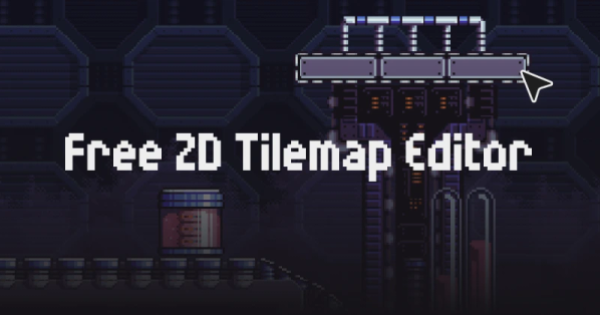
Sprite Fusion is a free, web-based tilemap editor designed for crafting 2D game maps directly in the browser, with seamless one-click exports to popular game engines such as Unity, Godot, Defold, and others. Users can import any tileset, paint levels using tiles or auto-tiling tools, define collisions, and export native assets or formats like JSON, TMX, PNG, and even UVTT files for virtual tabletops (VTT) such as Foundry VTT or Roll20. Its primary use cases include rapid prototyping of pixel-art platformers, RPGs, retro games, and mobile titles, as well as level design for virtual tabletops. The tool emphasizes art direction and simplicity over complexity, making it ideal for quickly turning ideas into playable maps without downloads or installations.
The target audience includes indie developers, students at leading universities, small studios, and hobbyists who value speed and accessibility. It suits both personal and commercial projects, particularly those using Unity or Godot, or creators needing lightweight tools for 2D games and VTT content.
Key Features & Capabilities
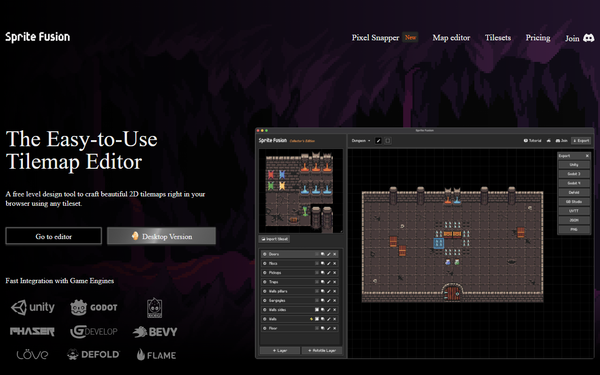
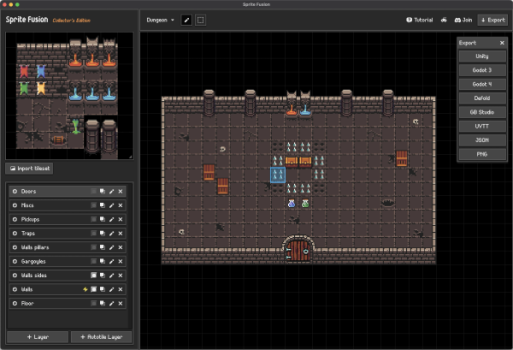
Core functionality revolves around an intuitive editor where users drag-and-drop or paste tilesets, paint with single or multi-tile selections, and build multi-layer maps. Standout features include easy auto-tiling for terrain (compatible with tools like PixelLab), smart fill options, per-layer collision settings, and native exports: Unity Tilemap packages, Godot scenes (for versions 3 and 4), Defold assets, and compact JSON for custom engines like Bevy, Cocos, Phaser, GDevelop, or Love2D. Additional differentiators are direct VTT exports with wall data and recent tile attributes for embedding custom JSON data per tile—perfect for spawning entities or logic without extra code.
These capabilities set Sprite Fusion apart from competitors like Tiled or LDtk by prioritizing zero-setup browser access and engine-specific, no-code imports, eliminating the need for plugins or manual conversion. It also supports unlimited projects on the free web version.
Limitations include a 4.5MB export size cap on the web edition (suitable for small-to-medium maps), internet dependency for the free tier, and fewer advanced features than desktop-heavy tools—such as complex rule-based auto-tiling or extensive object layers. It excels in simplicity but may require workarounds for highly customized or massive projects.
User Experience
Sprite Fusion boasts an exceptionally low learning curve, making it accessible even for beginners. The interface is clean and browser-native, with drag-and-drop tileset loading, responsive canvas tools, and straightforward layer management—no overwhelming menus or steep tutorials required. Users praise its focus on “obscenely easy” workflow, allowing quick iteration from tileset import to export in minutes.
Documentation is lightweight but effective: an in-site FAQ covers basics like tileset import, plus a dedicated Discord server for community support and direct developer feedback. Third-party video walkthroughs, such as the GameFromScratch overview, supplement this well. Overall, the experience feels modern and frictionless across major browsers on Mac, Windows, or laptops, though performance may vary slightly by browser as noted in some aggregated feedback.
Performance & Reliability
The web version runs efficiently on standard modern devices without requiring a gaming PC, handling typical 2D maps smoothly thanks to optimized browser rendering. Exports are fast for the allowed size, and the optional desktop edition further improves speed and removes limits for larger projects. No widespread performance issues or crashes appear in user discussions or reviews as of March 2026; the tool remains actively maintained, with recent additions like tile attributes and fill tools.
Common complaints are minor and tied to its web nature—occasional browser variance or the export size restriction—rather than bugs. Reddit and forum mentions from developers highlight reliability for daily use, with the creator responsive on Discord. Reliability is strong for its intended scope, though very large maps are best handled via the paid desktop app.
Pricing & Value
Sprite Fusion’s web edition is completely free forever for personal and commercial use, with unlimited projects and no login required. The desktop Collector’s Edition is a one-time purchase at $14.99 (discounted from $19.99), unlocking offline access, unlimited map sizes, faster exports, and lifetime updates for Mac and Windows.
The value proposition shines for budget-conscious creators: it delivers professional-grade exports and simplicity at zero or minimal cost, outperforming paid alternatives for quick 2D workflows. Compared to Tiled (free but desktop-only and more complex) or paid tools, the free tier offers exceptional accessibility and engine integration, making it a high-value choice for indies and educators. The desktop upgrade provides strong ROI for users outgrowing web limits.
Practical Tutorial
While official written documentation is concise, the editor’s in-app hints and FAQ make it self-explanatory. For visual guidance, check the excellent GameFromScratch video walkthrough (https://youtu.be/q2asdl9Iwnc). Below is a step-by-step tutorial for a common task—creating and exporting a simple platformer level using a free tileset, based on official features (tested conceptually from site descriptions as of March 2026).
- Access the editor: Visit https://www.spritefusion.com/ and click “Go to editor” (no account needed).
- Import a tileset: Drag any image (e.g., the free “Tiny Swords” tileset from the site’s gallery) into the left panel, or paste from clipboard. The editor automatically detects grid size.
- Create layers and draw: Add a background and foreground layer via the layers panel. Select the paint tool, click single tiles or hold Shift for multi-tile brushes, and sketch your level on the canvas. For terrain, enable auto-tiling on a dedicated layer—it intelligently places edge/corner tiles based on neighbors. Use the smart fill tool for quick ground areas.
- Add collisions and attributes: Mark a layer as “collider” in the layer settings for built-in game collision data. For advanced logic (e.g., spawn points), select placed tiles, open the Tile Attributes panel, and add custom JSON (e.g.,
{"type": "enemy", "hp": 50}). - Test and refine: Zoom/pan the canvas, erase with the eraser tool, or copy-paste sections. Preview auto-tiling changes live.
- Export: Click Export, choose your engine (e.g., Godot Scene for Godot 4), and download the file/package. Drag it straight into your project—no extra code required. For VTT use, select UVTT format with walls enabled.
This process typically takes under 10 minutes for a basic map. For larger projects or offline work, upgrade to the desktop version. Official free tilesets and Discord provide ready examples.
Final Verdict
Sprite Fusion earns a strong 4.5 out of 5 stars for its elegant balance of simplicity, power, and zero-barrier access in the crowded tilemap editor space. Indie developers, students, and VTT creators who prioritize fast, beautiful 2D level design with effortless Unity or Godot integration should use it—its free web version and native exports save hours compared to heavier tools. Avoid it if you need advanced scripting, massive offline maps on a zero budget, or highly specialized features beyond core tiling, as the web limits and streamlined scope may frustrate power users.
Sprite Fusion is the go-to browser tool for anyone wanting to design stunning 2D maps without the hassle—highly recommended for quick, joyful game creation.