Sudowrite Review: The Ultimate AI Co-Author for Fiction Writers
Overview & Purpose

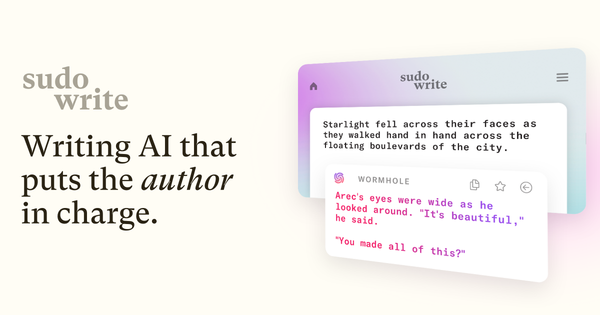
Sudowrite is an AI writing assistant built specifically as a non-judgmental collaborative partner for fiction writers. It helps novelists move from initial idea to finished manuscript by handling brainstorming, outlining, drafting, expanding scenes, rewriting prose, and providing targeted feedback. Primary use cases include overcoming writer’s block, generating vivid descriptions, maintaining story consistency across long works, improving pacing, and iterating on drafts without judgment. It also supports visualization through AI-generated art and custom plugins for advanced workflows like converting novels to screenplays.
The tool targets fiction authors, novelists, and screenwriters—creative writers focused on storytelling rather than marketing copy, technical documentation, or non-fiction. It excels for those working on novels, short stories, or series who need help with creative flow, character development, and immersive prose, but it is not designed for developers, marketers, designers, or general business writing.
Key Features & Capabilities
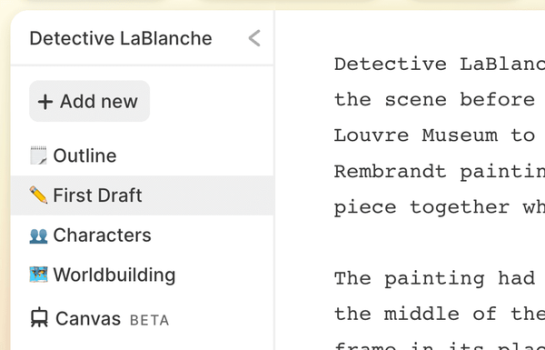
Core functionality revolves around an integrated workspace with a main editor and sidebar tools. Key capabilities include:
- Story Bible: A centralized repository for genre, style, synopsis, characters, worldbuilding, and outlines that keeps the AI grounded in your specific story.
- Write: Analyzes your existing text, characters, tone, and plot to suggest the next several hundred words in your voice, with multiple options.
- Describe: Generates sensory, metaphorical details to enrich settings, characters, and objects.
- Expand: Builds out brief or rushed sections into fuller scenes.
- Rewrite: Offers flexible revisions with directions like “more descriptive,” “more concise,” or “show, don’t tell.”
- Feedback: Delivers quick, actionable notes on pacing, character arcs, story structure, and prose issues (reads a draft in seconds).
- Canvas: Visual brainstorming board for plot points, arcs, and twists.
- Brainstorm and Visualize: Endless idea generation and AI art creation from descriptions.
- Plugins: Over 1,000 community and custom extensions for specialized tasks.
Standout features that differentiate Sudowrite from general AI tools like ChatGPT include its fiction-specific Muse model (trained on narrative prose), deep context retention via the Story Bible, and iterative “yes-and” collaboration that feels like working with a smart co-author rather than a generic generator. The “show, don’t tell” capability in Rewrite and Describe is particularly praised for elevating prose quality.
Limitations include credit-based usage that can be consumed quickly with longer generations or premium models, no built-in plagiarism checker, occasional context drift in very long manuscripts, and output that almost always requires human editing for final polish and originality. It is strictly fiction-oriented and lacks strong support for non-fiction, research-heavy, or highly structured writing. Exports are text-only with no native PDF, EPUB, or formatting tools for direct publishing.
User Experience
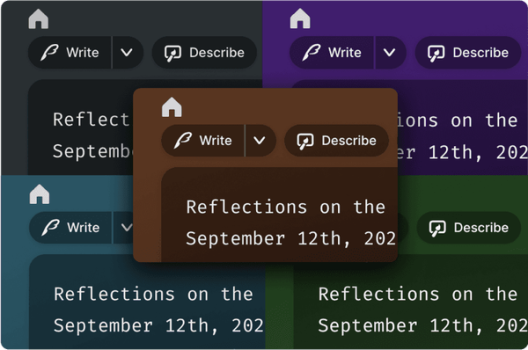
Sudowrite features a clean, modern, uncluttered interface that feels like a focused digital writing workspace. Users can choose from multiple themes and dark modes, and a full-screen focus mode minimizes distractions. The layout is intuitive once familiar, with the editor in the center and tools easily accessible in the sidebar.
The learning curve is moderate: basics are accessible within minutes thanks to an interactive quick-start guide, but mastering advanced features like optimal Story Bible setup, model selection, and prompt refinement takes 2–3 dedicated sessions. Documentation is excellent, with comprehensive docs, video tutorials, free live classes, weekly office hours, and an active Discord community. Email support is responsive, and a mobile app is available for on-the-go access.
Performance & Reliability
Generation is generally fast, with most suggestions appearing in seconds depending on the chosen AI model (Muse, Claude, GPT variants, etc.). The tool handles context well within chapters when the Story Bible is properly populated, and features like Feedback process entire drafts rapidly. Real-world testing shows it can accelerate drafting significantly—users report 4–5x faster progress on early drafts.
Known issues include occasional minor glitches (e.g., brief context loss or the need to refresh after tab-switching), credit consumption that feels unpredictable on lower plans, and rare degeneration of consistency or style over very long projects. Some users note the AI can echo phrasing if fed famous passages or produce slightly generic output without strong guidance. Common complaints center on the credit system expiring unused credits on non-Max plans and the necessity of heavy human editing. Overall reliability is strong for its intended fiction workflow when used iteratively rather than as a fully autonomous writer.
Pricing & Value
Sudowrite offers no ongoing free plan but provides a limited trial for new users. All paid plans grant full access to every feature; differences lie in monthly credit volume and rollover:
- Hobby & Student: 225,000 credits – $19/month (monthly) or $10/month (billed annually).
- Professional: 1,000,000 credits – $29/month (monthly) or $22/month (billed annually).
- Max: 2,000,000 rollover credits – $59/month (monthly) or $44/month (billed annually).
Credits do not expire on the Max plan. Upgrades, downgrades, pauses, and cancellations are straightforward, with a full refund option in the first week.
Value is excellent for dedicated fiction writers who use it strategically to overcome blocks and refine prose—many report it replaces hundreds of hours of manual drafting or professional editing (which often costs $2,000+). It is more expensive than general-purpose AI subscriptions for casual or high-volume generic use but offers superior narrative intelligence and workflow integration for its target audience. The Professional plan provides the best balance for most active novelists.
Practical Tutorial
Sudowrite provides official tutorials and a quick-start guide; the following is a practical, real-world walkthrough for a common task—going from a blank page to a polished first chapter—based on the tool’s documented workflow (as of April 2026). This example uses a young-adult portal fantasy premise.
-
Create a Project and Set Up the Story Bible: Log in, create a new project, and open the Story Bible (right sidebar). Fill in: Genre (“Young Adult Portal Fantasy with Dark Academia vibes”), Style (paste 500–1,000 words of your writing or describe “lyrical and introspective with rich metaphors”), Synopsis (three-act summary), Characters (detailed profiles with arcs), and Outline (scene beats or generate one automatically). This context ensures all suggestions stay on-brand.
-
Brainstorm the Opening: Open the Brainstorm tool (left sidebar). Type a prompt like “Opening lines for a librarian discovering a magical book in an ancient library.” Review generated options and paste the best into the main editor. Example output: “The book didn’t just smell of old paper and forgotten things; it smelled of ozone and starlight.”
-
Draft with Write: Place your cursor at the end of the opening sentence and click Write (top toolbar). Choose Guided or Auto mode and select 3–5 cards. The AI generates the next 200–300 words in your style. Copy liked phrases, edit, delete the rest, then repeat: Write → curate → edit. Iterate until the first scene feels solid.
-
Enrich with Describe: Highlight a vague phrase (e.g., “the strange book”). Click Describe. Review sensory cards: Sight (“leather cover the color of a deep bruise”), Smell (“petrichor after lightning”), Touch (“warm and humming”). Select and weave in the best to “show, not tell.”
-
Expand Key Moments: Highlight a brief action (e.g., “She opened the book”). Click Expand. It turns the moment into a richer paragraph with internal conflict and tension.
-
Refine with Rewrite: Highlight any awkward section and click Rewrite. Request “show don’t tell” or “more intense.” Compare versions and choose the strongest.
-
Get Feedback: Once the chapter draft is complete, click Feedback (top right). Receive instant notes on pacing, character motivation, and structural issues. Revise accordingly.
This process typically takes 30–60 minutes for a strong first draft chapter versus hours manually. Experiment freely—the AI learns from your selections. For video walkthroughs and more, check Sudowrite’s official blog and YouTube channel.
Final Verdict
Overall rating: 4.5/5. Sudowrite earns top marks for fiction writers seeking a true creative partner that understands narrative craft, but it loses half a point for its credit system, editing requirements, and niche focus.
Serious novelists, aspiring authors battling writer’s block, or anyone writing long-form fiction who values style-matched suggestions and story consistency should use this tool—it dramatically speeds up drafting and revision while preserving your voice. Avoid it if you write non-fiction, need unlimited cheap generation, prefer fully autonomous AI output, or are on a tight budget without committing to annual billing.
Sudowrite is the premier AI co-author for fiction storytellers ready to finish their novels faster and stronger.