Tana Review: The Ultimate AI-Powered Second Brain for Pros

Overview & Purpose
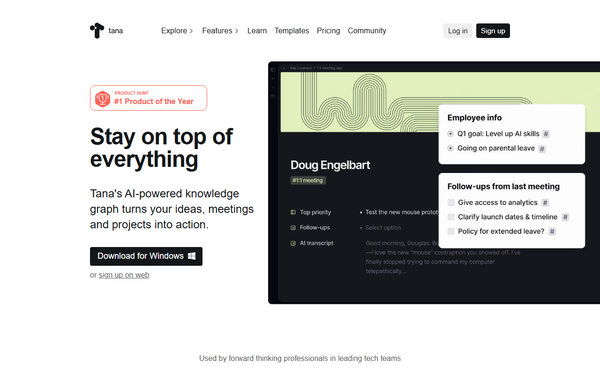
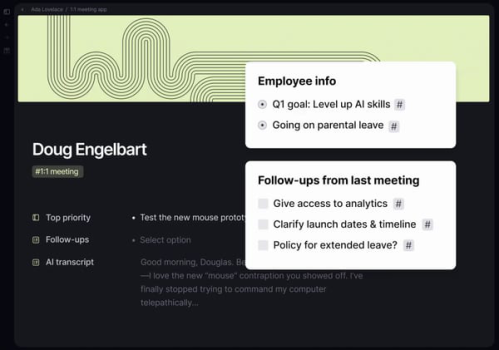
Tana is an AI-powered outliner and networked knowledge graph designed to capture, connect, organize, and act on information in one flexible workspace. It transforms raw ideas, meetings, notes, and projects into structured, actionable items by blending freeform outlining with dynamic data structures—no rigid folders or upfront databases required. Primary use cases include personal knowledge management (PKM), building a second brain (inspired by methods like GTD or Zettelkasten), meeting transcription and follow-up, task/project tracking, OKR management, student note organization, and team workflows for knowledge workers who juggle complex information.
The tool targets busy professionals such as executives, product leaders, software engineers, data analysts, marketers, writers, creators, founders, doctors, and students or academics. It scales to small teams (including those with over 100 members) and appeals to power users seeking more control than traditional tools like Notion or Obsidian provide. As of March 2026, Tana positions itself as an AI-native system where humans and AI collaborate directly on a living graph to boost focus, compound knowledge, and reclaim time.
Key Features & Capabilities
Core functionality revolves around a node-based outliner where every bullet is a live node in a knowledge graph. Users reference nodes with @mentions (creating live transclusions that update everywhere), build structure on the fly with customizable views, and automate via AI.
Standout features that differentiate Tana include:
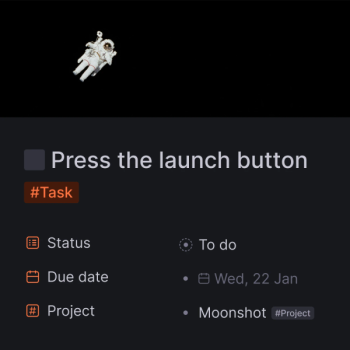
- Supertags: Instant templates that turn plain notes into structured objects (e.g., #Task with fields for Due Date, Priority, Status, or #Person with contact info). These apply schema-free organization and enable powerful querying without location dependence.
- Live searches and custom feeds: Dynamic, real-time widgets inserted anywhere to surface tasks, agenda items, or insights—perfect for personalized dashboards or “inbox zero” workflows.
- Deep AI integration: Live voice transcription (61 languages, speaker separation), meeting summarization, AI chat directly on your graph, custom command nodes/agents for automation, image generation (banners, diagrams), and 2025 additions like Model Context Protocol (MCP) for connecting external AI tools (e.g., Claude) to your entire workspace.
- Daily Notes and task management: A customizable daily dashboard with checkboxes, progress bars, and automatic resurfacing of open items.
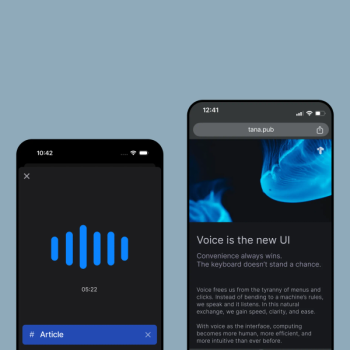
- Mobile/desktop enhancements: Native apps for quick capture (voice memos, widgets), full offline desktop support, and bot-free meeting notetaking that works with any video platform.
These features create a “computational medium” far beyond static pages, allowing structure to emerge naturally and AI to operate on your connected data.
Limitations include no native end-to-end encryption (cloud-hosted), weaker support for long-form writing or ad-hoc tables compared to Markdown-first apps, occasional media/PDF handling quirks, and limited export options (Markdown/JSON only). Mobile editing remains lighter than desktop (focused on capture/updates rather than heavy restructuring), and there are no robust real-time team collaboration tools like Notion’s multi-user editing.
User Experience
Tana has a noticeable learning curve—most users report 1–2 weeks (or longer for full mastery) to become productive due to concepts like Supertags, live searches, and command nodes. Once past the initial hump, the interface feels clean, fast, and empowering: a pure outliner with sidebar navigation, resizable panels, tabs (desktop), and keyboard-driven workflows. The design prioritizes focus and speed over flashy visuals.
Documentation and support are excellent for a specialized tool: comprehensive help articles, video tutorials, template gallery, live community events (“Tana Learn Live,” Beginners Drop-In), a 21,000+ member Slack, and an active Product Hunt community. Official resources include step-by-step guides and a growing blog covering new features. Community-driven content (YouTube, Medium) fills gaps for beginners. Support feels responsive via Slack and email.
Performance & Reliability
Tana performs reliably on desktop (native app recommended), with 2025 updates delivering full offline mode, automatic sync, native tabs/panels, faster indexing, and upgraded transcription (multi-provider AI models, web search). Live searches and graph operations feel snappy even with large workspaces. Mobile apps (iOS/Android) handle quick capture and basic edits well, with home-screen widgets and voice features.
Known issues include occasional interface fatigue from the static outliner style, past import/export friction (improved but not seamless), and mobile limitations for complex editing. Privacy-conscious users note the cloud-only nature (no local-first option). Overall complaints have decreased post-2025 updates, with most reviewers praising speed and uptime for daily professional use. Reliability is high for meeting-heavy workflows thanks to bot-free transcription and backup audio.
Pricing & Value
Tana offers three tiers (as of March 2026):
- Free: $0 – 500 AI credits/month, 3 workspaces, 0.5 GB storage; sufficient for casual use and testing AI.
- Plus: $8/month (or lower with annual billing); 2,000 AI credits/month, unlimited workspaces, Google Calendar sync, command nodes, password-protected sharing.
- Pro: Higher tier with 5,000 AI credits/month and advanced integrations (e.g., Readwise); student/academic/NGO discounts bring Plus to ~$4–5/month and Pro to $9/month annually.
AI credits cover transcription, summarization, chat, and image generation (non-rollover; top-ups available on paid plans). No dedicated enterprise plan is advertised, though teams use paid tiers successfully.
Value is excellent for power users who leverage AI meetings and complex systems—Tana replaces multiple tools (notetaker + task manager + database + AI assistant) and delivers measurable time savings. It costs more than free Obsidian or basic Notion but undercuts enterprise alternatives while offering unmatched flexibility. Casual users may find the learning investment and credit limits less worthwhile.
Practical Tutorial
A standout real-world task is using the Meeting Notetaker to transcribe, summarize, and extract action items from a call—then have them flow automatically into your task system. This leverages Supertags, AI, and live searches. Official documentation is available at https://tana.inc/docs/tana-meeting-notetaker.
Step-by-step walkthrough (requires Tana desktop app):
-
Create or open a note and apply a Supertag (e.g., type
#meeting). Configure the Supertag: go to its definition (Cmd/Ctrl + click the tag), enable “Audio-enabled tag” under AI and commands, toggle “Include system audio,” and optionally “Output as transcript” for timestamps/speaker separation. This auto-adds the transcription command. -
(Optional but recommended) Add transcription context: In the command parameters, include fields like “Attendees” or vocabulary for better accuracy. Enable audio backups via User icon > Tana Labs > Transcript backup audio recording.
-
Start a meeting: Click the microphone icon on the #meeting note (or use desktop notification/Google Calendar sync). A floating recorder appears—pause anytime for privacy. Live transcription appears in real time under “Source material.”
-
End the meeting: Click “End meeting.” AI automatically generates a summary with suggested action items. Press Space on an empty line below the summary to open AI chat and query: “Extract tasks, decisions, and insights—tag them as #Task with Due: tomorrow.”
-
Integrate into workflows: Action items tagged #Task automatically appear in your daily notes dashboard via a pre-inserted live search (create one with Cmd/Ctrl + K > “Insert live search” for “#Task AND Status: open”). Changes sync everywhere instantly.
Example: After a 30-minute team sync, the summary might list “Decision: Launch Q2 campaign” and “Task: Follow up with investor—@John, Due: Mar 15.” These nodes become filterable in any view. Templates for specific meetings (hiring, investor) are available in Tana’s template gallery.
This workflow typically takes under 2 minutes post-meeting and turns passive notes into proactive systems. For video overviews, see Tana’s official Learn hub at https://tana.inc/learn.
Final Verdict
Tana earns an 8.5/10 overall. It excels as a transformative tool for those who invest time in mastering its system, delivering unmatched flexibility and AI-powered actionability that simpler apps cannot match.
Who should use this tool: Knowledge workers, meeting-heavy professionals, executives, creators, and teams building sophisticated PKM or project systems—anyone tired of fragmented tools and ready for a true “second brain” that grows smarter with AI.
Who should avoid this tool: Beginners seeking dead-simple note-taking, mobile-first users needing full-featured editing on phones, privacy-focused individuals requiring local storage/E2EE, or writers focused on long-form Markdown documents—Obsidian or Notion may suit them better.
One-sentence recommendation: If you’re willing to climb the learning curve, Tana is the most powerful AI-native workspace available today for turning scattered information into focused action—highly recommended for ambitious knowledge workers.