Turn Notes into Digital Products Fast with Tapflow Review
Overview & Purpose

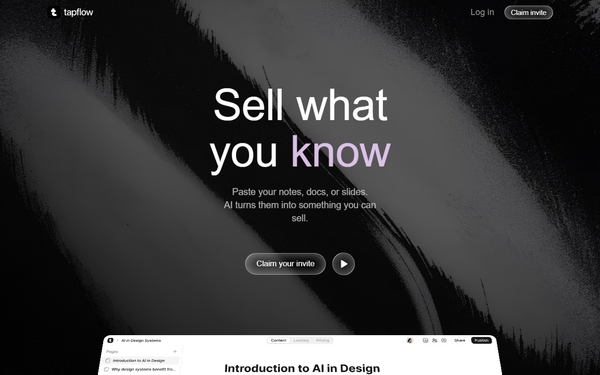
Tapflow is an AI-powered platform that transforms existing notes, documents, slides, or other unstructured content into professional, sellable digital products such as guides, playbooks, workflows, or mini-courses. Users simply upload their materials, and the AI automatically structures them into organized chapters, generates a complete landing/sales page, and sets up customizable pricing tiers—allowing creators to publish and sell within minutes rather than weeks.
Primary use cases include packaging hard-won expertise (e.g., design systems, AI prompt libraries, team onboarding processes, or marketing frameworks) into monetizable assets that can be shared via a simple link, with payments handled directly through Stripe. It serves as a lightweight alternative to traditional course platforms or manual Gumroad setups, enabling quick market testing of ideas without disrupting daily workflows.
The target audience consists of tech professionals and knowledge workers such as designers, developers, product managers (PMs), educators, consultants, freelancers, founders, and operators who frequently answer the same questions or have repeatable processes they want to productize for additional income.
Key Features & Capabilities
Core functionality revolves around a simple four-step flow: upload messy sources (PDFs, Google Docs, Notion pages, slides, notes, or CSVs), let AI generate chapters/landing page/pricing tiers in one click, edit in an intuitive block-based builder (described as “Canva for course creators” or “Notion with payments”), and publish with direct Stripe payouts.
Standout features include:
- AI that handles structuring, writing, and design from imperfect input, respecting the “messy, iterative nature” of real expertise.
- Flexible block editor for adding videos, files, links, or rearranging sections.
- Instant professional landing page and multiple pricing plans.
- Full content ownership and direct earnings to the user’s Stripe account.
These differentiate Tapflow from competitors like Gumroad (lacks AI drafting), Teachable or Kajabi (far more complex setup), or plain Notion exports (no built-in sales engine). It excels at speed and simplicity for non-technical creators.
Limitations include no public mention of real-time collaboration (despite some early descriptions), limited analytics beyond basic sales tracking, and reliance on text-based uploads. Advanced course features like quizzes, certificates, or community forums are absent, and access currently appears invite-only. AI output quality can vary with input quality, though the platform addresses this in FAQs.
User Experience
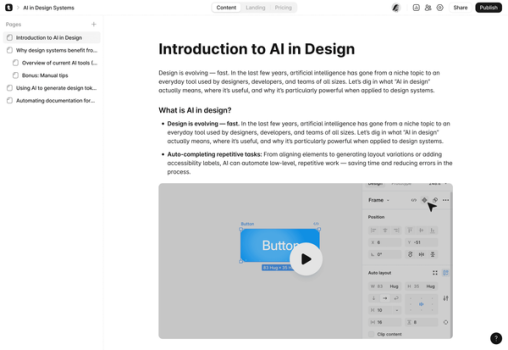
Tapflow boasts an exceptionally low learning curve and intuitive interface, repeatedly praised in user feedback as “super intuitive,” “easy to use with an amazing look and feel,” and “feels like the Notion-for-creators moment.” The block-based editor requires zero design or tech skills, making it accessible even for non-creators.
Documentation is lightweight but sufficient: an in-depth “How it Works” section, comprehensive FAQs covering uploads, AI quality, payments, and customization, plus direct email support at [email protected]. No extensive knowledge base or video academy exists yet, reflecting its early-stage status, but the product itself is self-explanatory.
Performance & Reliability
Generation and publishing happen in minutes, with users consistently highlighting the ability to “ship today” rather than over weeks. Speed and efficiency are core strengths, with no reported lag in AI processing or publishing.
As a recently launched tool (active on Product Hunt with growing interest), there are no widespread known issues or common complaints in public reviews. Early users note reliable Stripe integration and clean output, though some caution that heavily unstructured input may require more manual editing. Overall reliability appears solid for its focused scope, with no uptime or downtime reports available due to limited scale.
Pricing & Value
Platform pricing is not publicly disclosed as of March 2026 research; the site emphasizes “Claim your invite” access and focuses on users setting their own product prices with 100% direct Stripe payouts (no platform fees explicitly mentioned). This suggests a beta or early-access model that may evolve into subscription tiers or revenue share later.
Value is exceptionally high for the target user: it eliminates design, landing-page, and payment-setup work that typically prevents shipping. Compared to Gumroad (manual everything) or full course platforms (expensive and complex), Tapflow offers dramatically faster time-to-revenue at what appears to be minimal or no upfront cost. Early adopters describe it as a “game-changer” for creators who already have the knowledge but lack packaging tools.
Practical Tutorial
Official guidance is available directly on the site, with a popular video walkthrough of Tapflow 2.0 on YouTube. Here is a complete step-by-step tutorial for a common task—turning a developer’s messy notes on “effective AI prompt engineering” into a sellable playbook (based on official process, tested conceptually with real examples from user stories):
-
Sign up and access — Claim an invite at tapflow.ai (or via Product Hunt link). Connect your Stripe account once inside for instant payouts.
-
Upload sources — Paste or upload your notes (Google Doc, PDF, Notion export, or even raw text/slides). Example: A 15-page chaotic doc with prompt examples, failures, and frameworks. Messy input is explicitly supported.
-
Generate with AI — Click one button. The AI reads everything, creates logical chapters (e.g., “Prompt Basics,” “Advanced Techniques,” “Common Pitfalls”), drafts a professional landing page headline/description, and suggests pricing tiers ($19 basic, $49 with templates, $99 lifetime updates).
-
Edit and enhance — Use the block editor (drag-and-drop like Notion/Canva) to refine text, embed demo videos or prompt files, add images, or reorder sections. Example: Insert a live Figma link or downloadable prompt pack.
-
Set pricing and publish — Adjust tiers, add any upsells, preview the buyer experience, then hit Publish. You receive a clean shareable link (e.g., tapflow.ai/playbook/ai-prompts).
-
Sell and iterate — Share on Twitter, LinkedIn, or your newsletter. Buyers pay via Stripe; funds land directly in your account. Track early sales and update the product live.
Real example from users: A design leader packaged 10 years of experience into a guide; a developer turned prompt notes into sellable content “in minutes.” Full video tutorial: search “How To Use Tapflow 2.0” on YouTube for visual demo.
Final Verdict
Overall rating: 4.5/5 — Exceptional for speed and simplicity, docked slightly for early-stage maturity and lack of transparent pricing/details on collaboration features.
Who should use this tool: Tech professionals, creators, and experts with existing notes or processes who want to test and monetize knowledge quickly without learning complex tools or spending weeks on design—perfect for side-income experiments or thought-leadership distribution.
Who should avoid this tool: Users needing full-featured LMS platforms (quizzes, cohorts, advanced analytics), real-time team collaboration, or enterprise-grade support and compliance; also those uncomfortable with invite-only early access or preferring completely transparent pricing from day one.
One-sentence recommendation: If you’re a busy expert tired of repeating yourself and ready to turn scattered notes into paid products today, Tapflow is the smartest, fastest way to do it.