TaxGPT Review: The Ultimate AI Co-Pilot for Tax Professionals

Overview & Purpose

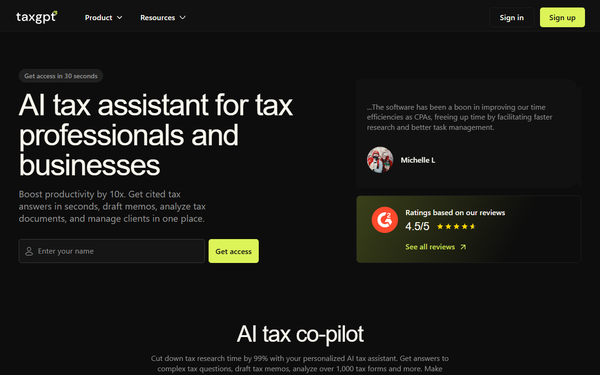
TaxGPT is an AI-powered tax co-pilot and operating system designed specifically for tax professionals, CPAs, accounting firms, and businesses. It delivers instant, cited answers to complex federal, state, and local tax questions (primarily U.S. and Canada, plus related international treaties), drafts client-ready memos, IRS responses, and engagement letters, analyzes tax documents and returns, and maintains a secure client intelligence database for contextual, personalized insights.
Primary use cases include slashing research time by up to 99%, automating document reviews to flag audit risks or missed savings opportunities, streamlining client correspondence, and scaling advisory services without compromising accuracy. While it offers basic support for individuals seeking tax guidance, its core strength lies in professional workflows rather than consumer tax preparation or e-filing.
The target audience is tax professionals (solo practitioners to large firms), accounting teams, and businesses managing tax obligations—from small startups to Fortune 500 companies. It also aids staff training by explaining tax laws with references, making it ideal for anyone handling compliance, planning, or client management rather than developers, marketers, or general consumers.
Key Features & Capabilities
Core functionality revolves around a specialized large language model trained exclusively on authoritative sources including the Internal Revenue Code (IRC), Treasury Regulations, IRS guidance, court cases, and state laws. Users interact via a conversational chat interface or document uploads to receive detailed, always-cited responses in seconds.
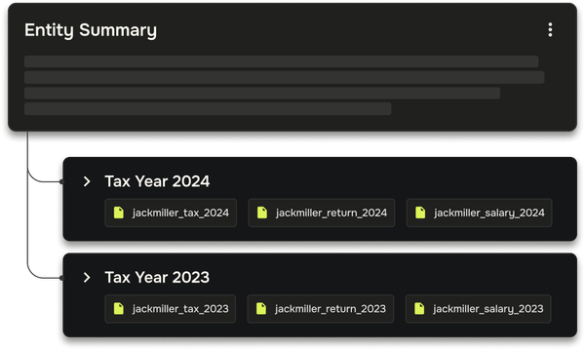
Standout features that differentiate it from competitors include built-in hallucination controls with every answer linked to primary sources, the proprietary “Agent Andrew” AI reviewer that scans returns (e.g., Form 1040, 1065, 1120, 1120-S) and generates color-coded reports (red flags for audit risks or errors, green for tax-saving opportunities), and a client intelligence system that stores and recalls entity structures, filing history, and documents for context-aware answers. Additional tools enable drafting standardized IRS notice responses and visualizing ownership charts.
Compared to general AI tools like ChatGPT or traditional research platforms (CCH, Thomson Reuters), TaxGPT offers superior domain-specific accuracy, security for client data, and integrated workflows rather than isolated Q&A. It is SOC 2 Type II certified with U.S.-hosted encryption and never trains on user data.
Limitations include its role strictly as a research aid—not a substitute for professional judgment or full tax preparation/filing software. Uploads are restricted to PDFs and images (with page limits reported by users), support is strongest for U.S./Canada tax law, and complex calculations or very recent changes may still require manual verification. No native integrations with popular tax prep suites are highlighted, and it does not handle data export in formats beyond generated reports.

User Experience
TaxGPT features an intuitive, chat-based web interface accessible from any browser, with companion iOS and Android mobile apps for on-the-go use. The learning curve is low for tax professionals familiar with research tools; most users report getting productive within minutes after the mandatory live demo onboarding.
Interface quality is clean and professional, with drag-and-drop document uploads, color-coded analysis outputs, and easy thumbs-up/down feedback buttons after every response. Navigation centers on the main chat window, with dedicated sections for client profiles and Agent Andrew reports.
Documentation and support resources are robust: an in-app “University,” biweekly webinars, monthly updates, 1:1 training sessions, a dedicated Customer Success Manager, and 24/7 in-app chat support. Official help articles and YouTube walkthroughs cover prompting best practices and feature usage. Users consistently praise the responsive team and continuous improvements driven by feedback.
Performance & Reliability
Responses typically arrive in seconds, with users reporting average time savings of 5 hours per day or 90% reduction in routine research tasks. The platform’s guardrails and continuous knowledge-base updates (daily) contribute to high reliability, and Agent Andrew automates roughly 90% of return review workflows according to vendor claims.
G2 users rate it 4.5 out of 5 stars across 16 reviews (81% five-star), highlighting fast, well-cited answers and superior search compared to legacy tools. Testimonials frequently mention error-free daily use and quick summaries during client meetings.
Known issues are minor and acknowledged by the company: occasional missed nuances in highly complex or brand-new guidance (always flagged for user review), page limits on large document uploads, and the need for professional corroboration of outputs. A built-in feedback system routes issues to a CPA-reviewed quality team for rapid knowledge-base updates. No widespread complaints about downtime, major inaccuracies, or security breaches appear in recent reviews or forums.
Pricing & Value
TaxGPT does not publish fixed public rates; pricing is custom and based on number of users, firm size, and specific needs (e.g., volume of document reviews or client intelligence features). A free 14-day trial with full access and cancel-anytime policy is available after a brief live demo. The company positions itself as “the most affordable specialized AI tax product” and provides an ROI calculator showing potential annual savings exceeding $20,000 and hundreds of hours for mid-sized firms.
Value proposition is strong for tax professionals: the time and error reduction often delivers rapid ROI compared to hourly rates of traditional research tools, generic AI risks, or manual work. Enterprise options scale seamlessly with dedicated support. Smaller solo users may find the custom quote process and minimum commitment less transparent than flat-fee consumer tools, but the specialized accuracy and security justify the investment for serious users.
Practical Tutorial
TaxGPT provides official onboarding and YouTube videos for getting started. Below is a step-by-step walkthrough for a common professional task: using Agent Andrew to review a completed tax return and identify risks or savings opportunities. This example assumes a small business owner’s Form 1120-S return.
-
Sign up for the free 14-day trial at taxgpt.com and complete the required 30-minute live demo to activate your account (or log in if existing).
-
From the dashboard, navigate to the Agent Andrew section (or start a new chat and type “Launch Agent Andrew for return review”).
-
Upload the completed tax return PDF (e.g., 1120-S) plus supporting documents (K-1s, financial statements, prior-year returns) via drag-and-drop. The system redacts PII automatically for security.
-
Customize the review checklist if desired (add firm-specific items) or use defaults, then click “Analyze.” Agent Andrew processes the files in minutes.
-
Review the generated report: red flags highlight errors increasing audit risk (e.g., missing depreciation schedule), green flags flag savings (e.g., overlooked QBI deduction eligibility), and cleared items show resolved issues. Each flag includes cited explanations and recommended actions.
-
Make corrections in your tax software, re-upload the updated return, and run a follow-up analysis until the report shows all items cleared.
-
Download the final color-coded PDF report for your files or client delivery.
Real example: For a self-employed client claiming a home office, Agent Andrew might flag a green opportunity for additional Section 179 expensing based on asset details and link directly to the relevant IRC section and IRS Pub 535. For deeper guidance, watch the official dashboard walkthrough video (search “TaxGPT Dashboard Modules & Audio Mode” on YouTube) or visit support.taxgpt.com for “How to use TaxGPT Research.”
Final Verdict
TaxGPT earns a solid 4.5 out of 5 for its specialized accuracy, productivity gains, and professional-grade security in the crowded AI tax space.
Tax professionals, accounting firms, and businesses handling complex compliance and advisory work should use it to dramatically reduce research time, minimize errors, and scale client services while maintaining defensibility through citations.
Solo practitioners or individuals seeking simple self-filing assistance should avoid it, as it is not a consumer tax preparation tool, requires professional oversight, and involves a demo-based onboarding plus custom pricing that may exceed basic needs.
TaxGPT is the go-to AI co-pilot for any tax professional serious about working smarter, faster, and with greater confidence.