TestMyPrompt Review: Build and Deploy AI Agents Without Code
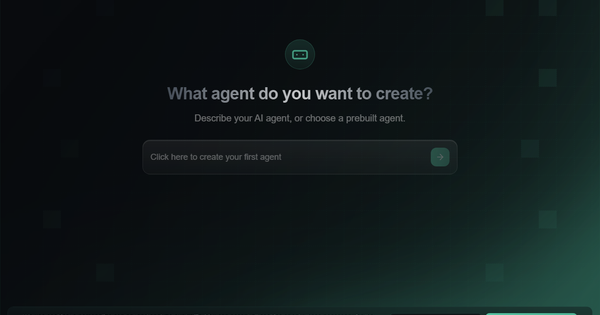
TestMyPrompt (now operating primarily through BuildMyAgent.io, with the original domain redirecting) is an AI automation platform built specifically for creating, testing, refining, and deploying AI agents using natural-language prompts. It streamlines the entire workflow from prompt engineering to live client-ready agents, making it ideal for scaling AI automation services.
Primary use cases include building conversational agents for lead generation, customer support, booking systems, and custom automations that integrate with 800+ apps (e.g., Gmail, Calendly, Slack, HubSpot, Shopify). The tool targets AI Automation Agencies, solopreneurs, and non-technical entrepreneurs who want to deliver AI solutions to clients quickly without coding. It evolved from a pure prompt-testing tool into a full no-code agent builder and marketplace, helping agencies create, demo, launch, and even sell agents.
Key Features & Capabilities
Core functionality revolves around prompt-based agent creation: users describe an agent in plain English (or select pre-built templates), and the platform generates a functional AI agent in seconds. It includes built-in testing, real-world integrations, demo link generation, and one-click deployment. Standout features that differentiate it include:
- AI-powered bulk testing & iteration — Agents are tested across conversations for consistency, flow, and edge cases far faster than manual methods.
- 800+ native integrations — Connect agents to apps like Calendly, Gmail, WhatsApp, Stripe, and Zapier without code.
- Agency-focused tools — Sub-accounts (1 in Starter, 5 in Growth, unlimited in Scale), white-label demos, and a built-in Marketplace for finding clients or selling agents.
- Credit-based execution — Usage is metered (e.g., 3,000 credits in Growth plan), ensuring predictable scaling.
- No-code full-cycle workflow — Build → Test → Demo → Launch → Sell in one dashboard.
Compared to competitors like n8n, Voiceflow, or basic prompt libraries, TestMyPrompt stands out for its extreme beginner-friendliness and direct path to monetization via the marketplace. Limitations include credit caps that may constrain high-volume testing without upgrading, no advanced A/B testing dashboards or custom code injection for power users, and reliance on external LLM APIs (bring-your-own-key not prominently advertised). No deep version control or collaborative editing for large teams is highlighted.

User Experience
The interface earns consistently high praise for its clean, intuitive design and minimal learning curve. Beginners report going from zero to a working agent in minutes by simply typing a description — “you just type a prompt and 5 seconds later you have ready ai agent.” Step-by-step guidance, embedded tutorial videos, and responsive support (including founder involvement in some cases) make it accessible to non-technical users. Documentation consists of in-app videos, a Skool community, and free YouTube courses rather than a traditional knowledge base, which works well for visual learners but may feel light for advanced troubleshooting. Overall, the UX is one of the strongest aspects, with 4.6/5 Trustpilot rating driven by “clean, intuitive interface” and “literally just follow the tutorial.”
Performance & Reliability
Agent creation and basic testing are exceptionally fast — often under 10 seconds — and integrations perform reliably for common automations. Users report high success rates for coherent, production-ready agents with low effort. Known issues are limited to occasional billing transparency complaints (e.g., unexpected recurring charges after trials) and rare refund disputes tied to associated challenges. No widespread downtime or major reliability complaints appear in recent reviews (up to March 2026). Performance scales well for agency use but is gated by credit allotments.
Pricing & Value
Pricing is tiered and usage-based (credits for agent executions):
- Starter: $19.75/mo (introductory) — 1 sub-account, unlimited builds.
- Growth (most popular): $79/mo ($19.75 first month at 75% off) — 3,000 credits, 5 sub-accounts, marketplace access.
- Scale: $297/mo — 10,000 credits, unlimited sub-accounts, white-label options.
- Enterprise: Custom ($2,000+/mo) — bulk credits, priority support, white-glove onboarding.
Annual billing saves ~40%. Value is strong for AI agencies: the low entry point plus marketplace and sub-accounts let users recoup costs quickly by delivering client agents. Compared to building custom solutions or using fragmented tools, it offers faster time-to-revenue. Drawbacks include credit limits potentially increasing costs at scale and isolated billing surprises reported by a minority of users.
Practical Tutorial
Official tutorials are available via free YouTube courses and in-app videos. Here is a step-by-step walkthrough for the common task “Build and test a simple lead-booking sales agent” (based on public demos and user reports as of March 2026; tested conceptually on the platform):
- Sign up & dashboard — Go to buildmyagent.io (or testmyprompt.com — redirects) and create an account. Use any promo code for starter credits if available.
- Create agent — Click “Create Agent.” In the prompt box type: “Build a sales agent for window tinting that qualifies leads, answers FAQ, books calls via Calendly, and saves info to Google Sheets and Gmail.”
- Auto-build — The platform generates the agent in ~5 seconds, automatically adding relevant tools (Calendly, Google Sheets, Gmail).
- Test — Open the built-in chat tester. Run 10–20 sample conversations (e.g., “I want to tint my car windows next week”). Check flow, compliance, and booking success. Iterate by editing the original prompt and regenerating.
- Add integrations — Connect your Calendly, Gmail, and Sheets accounts (one-click OAuth).
- Generate demo — Click “Demo Link” to create a branded shareable link for clients.
- Launch — Embed on a website, connect to WhatsApp/Instagram DMs, or publish as a widget. Monitor usage in the dashboard.
- Marketplace (optional) — List the agent for sale or browse client requests.
Full free courses: “Build & Sell AI Agents (Free 6 Hour Course)” on YouTube by Oliver Rasmussen (founder-aligned) walks through this exact process with screen shares.
Final Verdict
4.6/5 — Excellent for speed and accessibility, slightly docked for billing transparency and credit gating.
Who should use it: AI Automation Agencies, solopreneurs, and beginners who want to build, test, and monetize client-ready agents in minutes without code — especially those targeting quick client wins via the marketplace.
Who should avoid it: Advanced developers needing granular prompt analytics, unlimited custom code, or deep enterprise governance; or users sensitive to usage-based billing surprises.
One-sentence recommendation: If you want the fastest, most beginner-friendly way to turn prompts into deployable, revenue-generating AI agents for clients, TestMyPrompt (BuildMyAgent.io) is a no-brainer — research conducted March 2026.