TestZeus Review: The Ultimate AI-Powered Salesforce Testing Tool
Overview & Purpose

TestZeus is an AI-powered test automation platform whose open-source core—Hercules—is the world’s first open-source testing agent. It transforms plain-English descriptions or Gherkin scenarios into fully autonomous end-to-end tests for Salesforce applications and connected systems. By leveraging multi-agent AI architecture (Planner, Navigation, Memory, and Helper agents) with Playwright under the hood, it handles UI interactions, API calls, security scans, accessibility checks, and visual validations in a single run.
Primary use cases include regression testing Salesforce orgs after releases, validating custom Lightning Web Components, testing Agentforce (multi-turn chat and multiplayer interactions), and ensuring accessibility/security compliance—areas where traditional tools struggle with Salesforce’s Shadow DOM, iframes, and frequent UI changes. It evolved from a legacy Selenium/Java framework (now archived) that used Salesforce’s UI API for dynamic autolocators; Hercules modernizes this with agentic AI while retaining Salesforce specialization.
Target audience: QA engineers, testers, developers, product owners, and business analysts working on Salesforce implementations. Non-technical users can author tests without coding, making it ideal for teams that want to accelerate coverage without deep scripting expertise.
Key Features & Capabilities
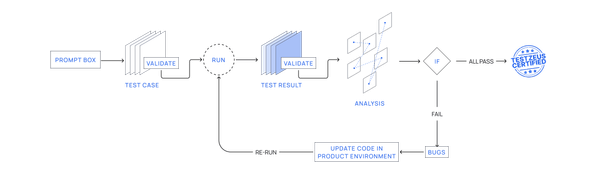
Core functionality revolves around feeding Gherkin feature files to autonomous AI agents that plan, navigate, execute, and validate tests. It supports UI (web/mobile emulation), API, security (15+ Nuclei scans), accessibility (WCAG 2.0–2.2), and visual testing, all with built-in proof artifacts: execution videos, screenshots, network logs, and HTML/JUnit reports.
Standout features that differentiate it from competitors like Selenium, Cypress, Playwright, or general AI tools (e.g., Testim, Mabl):
- Self-healing: Agents adapt to DOM changes, Salesforce releases, and data variations automatically—no locator maintenance required.
- Agentforce-native testing: The only agentic solution that simulates human-like multi-turn, multiplayer chats.
- Salesforce grounding: Understands domain terms (“App Launcher,” LWC components) and handles complex structures out of the box.
- Open-core extensibility: Free AGPL-3.0 source, Python sandbox for custom scripts, MCP integration (6,000+ tools), Docker/CI/CD readiness, and support for multiple LLMs (GPT-4o recommended, plus Groq, Anthropic, Ollama, etc.).
- Unified coverage: One Gherkin scenario can mix UI and API steps seamlessly.
Limitations or missing features: Full reliance on an LLM API key introduces variable token costs (~$0.20 per complex Salesforce scenario) and occasional reasoning variability; native mobile app testing is limited to web emulation; no built-in GUI test recorder (CLI-first); security scans are powerful but require configuration. Compared with enterprise tools, it lacks some polished reporting dashboards in the open-source version.

User Experience
Setup is exceptionally straightforward—under five minutes via pip install testzeus-hercules plus Playwright dependencies, or a single Docker pull. Tests are written in familiar Gherkin (or plain English), and execution is fully autonomous with rich visual proof, dramatically lowering the barrier for non-coders.
The learning curve is gentle for anyone comfortable with BDD scenarios; best-practice guidance (AAA structure, descriptive steps, single-responsibility tests) is well documented in the official blog. There is no flashy web UI—interaction happens via CLI with beautiful HTML reports—but the output is intuitive and debuggable.
Documentation is solid: comprehensive GitHub README and /docs folder (run guides, environment variables, Python sandbox), YouTube video tutorials covering setup, debugging, and Salesforce Spring ’25 compatibility, plus an active community Slack. Support is community-driven for open-source users; paid platform tiers add priority agent/email support. Users consistently praise the elimination of flaky locators and maintenance overhead.

Performance & Reliability
Tests run at “lightning speed” once agents plan the steps, and self-healing dramatically reduces flakiness compared with traditional frameworks—especially valuable during Salesforce’s thrice-yearly releases. Demos show Hercules handling Spring ’25 updates without breakage.
Known issues are typical of early-stage agentic tools: occasional LLM parsing hiccups (easily retried), higher token usage on very complex flows, and variability depending on chosen model. GitHub issues are minimal and actively addressed; community feedback (Reddit, G2 snippets) highlights superior reliability versus Selenium/Cypress for Salesforce. No widespread complaints about crashes or data loss were found as of March 2026.
Pricing & Value
The core Hercules engine is completely free and open-source (AGPL-3.0)—no licensing fees, self-hostable via Docker or pip. The only recurring cost is your chosen LLM provider’s API usage (pennies per test).
TestZeus also offers a hosted platform with tiered plans:
- Basic access from ~$25/month
- Starter ($700/month for 1,200 scenario runs)
- Growth ($1,400/month for 2,400 runs, up to 30 parallel)
- Enterprise custom options
Extra runs are ~$0.60 each; authoring is free. A savings calculator on the site projects 70 % cost reduction versus manual/maintained automation.
Value proposition is outstanding for Salesforce teams: 10× faster test creation, near-zero maintenance, and comprehensive coverage that traditional or generic AI tools cannot match without heavy customization. Compared with paid Salesforce-specific solutions or building custom frameworks, the combination of free core + optional managed tiers delivers exceptional ROI.
Practical Tutorial
A common task—creating a new Salesforce Account—illustrates the workflow. Official video tutorials and the blog provide further walkthroughs; here is a complete, reproducible example based on the GitHub sample and best practices (as of March 2026).
-
Install & Configure (one-time, <5 min)
pip install testzeus-hercules
playwright install --with-deps
Set your LLM key (example for OpenAI):
export LLM_MODEL=gpt-4o export LLM_MODEL_API_KEY=sk-... -
Create a feature file (
tests/salesforce_account.feature):Feature: Account Creation in Salesforce Scenario: Successfully create a new account Given I am on the Salesforce login page When I enter my username "[email protected]" and password "securePassword" And I click on the "Log In" button And I navigate to the "Accounts" tab And I click on the "New" button And I fill in the "Account Name" field with "Test Account" And I select the "Account Type" as "Customer" And I fill in the "Website" field with "www.testaccount.com" And I fill in the "Phone" field with "123-456-7890" And I click on the "Save" button Then I should see a confirmation message "Account Test Account created successfully" And I should see "Test Account" listed in the account records -
Run the test:
testzeus-hercules --input-file tests/salesforce_account.feature --output-path results/ --llm-model gpt-4o(Or use Docker:
docker run -e LLM_MODEL_API_KEY=... testzeus/hercules:latest ...) -
Review results: Open
results/index.htmlfor video replay, screenshots, network logs, and JUnit XML for CI integration. The agents provide step-by-step reasoning if anything needs tweaking.
For deeper guidance, follow the official blog on writing effective tests (use descriptive names, keep scenarios atomic, leverage Background for login). Full repo samples and YouTube videos (“Hercules handles Salesforce Spring25 release,” “Natural language tests for mobile”) are excellent supplements.
Final Verdict
Overall rating: 8.7/10.
TestZeus (Hercules) is ideal for Salesforce teams—QA, development, or business—seeking 100 % automation coverage with zero maintenance and minimal coding. It excels where traditional tools fail and democratizes testing for non-technical stakeholders.
Avoid it if your project requires fully deterministic code-level control, has minimal Salesforce usage, or you prefer GUI-based record-and-playback without LLM variability.
One-sentence recommendation: If you test Salesforce and are tired of flaky locators and endless maintenance, adopt TestZeus Hercules today—its open-source power and self-healing intelligence will transform your QA process.