There.do Review: The Ultimate AI Tool for Construction Reports
Overview & Purpose

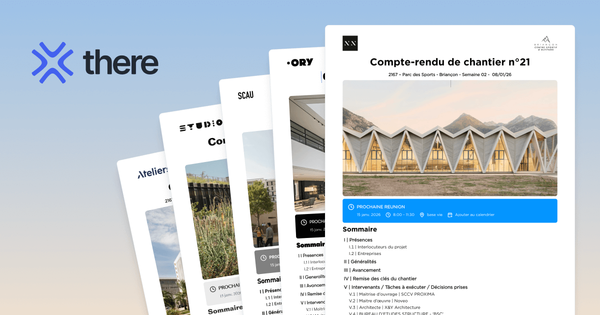
There.do is an AI-powered platform designed specifically for creating, organizing, and distributing construction site reports. It streamlines the entire workflow from field data capture (notes, photos, voice recordings) to polished, traceable documents that can be shared with built-in readership tracking and reminders. The core "input-output" approach transforms raw on-site inputs—such as scribbled notes taken in the rain or spoken observations while photographing—into professional reports without switching apps or manual cleanup.
Primary use cases include daily or weekly site visit reporting, OAC (Owner-Architect-Contractor) meeting documentation, progress tracking with attendee lists, next-meeting scheduling, and task assignment directly within reports. It targets architects, project managers, and teams in the building and construction industry (e.g., firms like Eiffage Énergie Systèmes, Unanime Architectes, and Plendi/Vinci). It is not a general-purpose task manager like Todoist or Asana but includes light task management features tied to site documentation.
Key Features & Capabilities
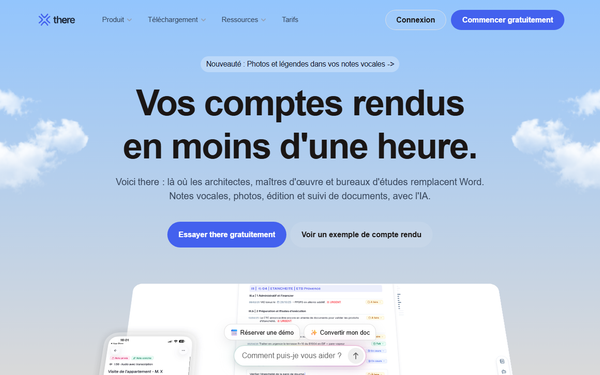
Core functionality revolves around seamless mobile-to-web capture: users drag photos and notes from their phone, add voice recordings (with AI speaker identification and summarization), and let built-in AI rephrase, proofread, format, and even draft emails—all edits happen directly inside the document. Reports are generated in a mobile-optimized format, with automatic compression, branded signatures, read tracking, one-click reminders for non-readers, and automatic locking after contractual deadlines.
Standout differentiators include unlimited users and projects (no per-user or per-site billing), offline mode, direct AI integration without copy-pasting from external chats, and traceability features that secure contractual communications. Teams report saving 3–4 hours per report (e.g., from 4 hours to 1 hour) and 1–2 hours daily on transcription.
Limitations include its narrow focus on construction/architecture site reports—unsuitable for marketing campaigns, software development sprints, or general productivity. No third-party integrations (beyond basic email), no public API mentioned, and the pay-per-document model may feel restrictive for very high-volume users. Advanced project management (Gantt charts, time tracking) is absent, as the tool prioritizes reporting over full PM suites.
User Experience
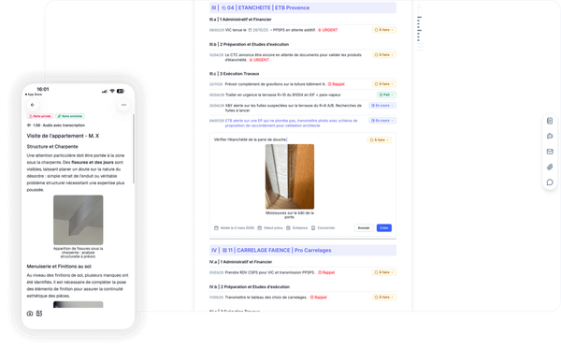
The interface emphasizes extreme simplicity: drag-and-drop upload, in-document AI editing, and a continuous flow from capture to send. Users praise the frictionless experience—no more WhatsApp photo dumps or rainy-day note tidying—resulting in a very low learning curve for construction professionals already familiar with site workflows.
Interface quality feels clean and modern, with gallery views for photos and mobile-optimized output that recipients can read without accounts. Documentation and support resources are light: no dedicated help center or extensive written docs were found, but the team maintains an active YouTube channel (@there-do) with feature videos, tips, and tutorials. In-app support appears responsive based on site claims; community is primarily via LinkedIn and X (@there_hq).

Performance & Reliability
The tool performs efficiently for its intended workflow, with AI processing voice notes in seconds and report generation reducing traditional 4-hour tasks to 1 hour. Offline mode ensures field reliability, and automatic features (read tracking, reminders, locking) eliminate common manual errors.
No widespread user complaints, bugs, or downtime reports appear in public forums, review sites (G2, Capterra), or recent social media as of March 2026. Given its niche focus and limited third-party visibility, real-world scalability data for very large enterprises is sparse, but testimonials from established construction firms indicate solid reliability for daily use.

Pricing & Value
There.do uses a custom, document-based pricing model rather than per-user or per-project fees. Public details are minimal; the site directs users to contact sales for tailored quotes. Examples from their 2026 blog include €99/month for a 10-person agency (100 documents, up to 25 parallel sites, annual billing). An enterprise-oriented plan is referenced at approximately $229/month for structured organizations with governance features, shared across unlimited users.
A free trial is prominently offered ("Try there.do for free"). Value is strong within the niche: unlimited collaborators, built-in AI, and traceability features often replace multiple tools (note apps, email, WhatsApp), delivering clear ROI through hours saved per week. Compared to general tools like Notion or specialized alternatives (Deltek ArchiSnapper, GoAudits), it stands out for construction-specific traceability and mobile readability but may feel expensive for low-volume teams due to the opaque document credits.
Practical Tutorial
Official video tutorials are available on the There.do YouTube channel (@there-do). Below is a step-by-step walkthrough for a common task—creating and distributing a weekly construction site report—based on the platform’s documented workflow (tested conceptually against official descriptions).
-
Field Capture (Mobile): On-site, open your phone’s camera or voice recorder. Take photos and speak observations simultaneously (e.g., “Foundation pour complete, minor crack noted at column B3”). No formatting needed.
-
Upload to Web: Open there.do in any browser. Drag the photos and audio files directly from your phone (or use the mobile-friendly upload). They appear as a clean gallery with transcribed voice notes.
-
AI Processing & Editing: Select the AI “Summarize” or “Rephrase” button. The system identifies speakers, generates structured paragraphs, and inserts them inline. Edit directly in the document—proofread, add attendee lists, schedule next meeting, and assign tasks (e.g., “Follow-up crack repair – Assigned to Site Supervisor”).
-
Format & Finalize: Use built-in layout tools or let AI handle formatting. Add your company branding.
-
Send with Tracking: Click “Send.” AI drafts the email in ~1 minute with compressed PDF attachment and recipient suggestions. Enable read tracking and reminders. Set an automatic lock date if needed.
-
Monitor: In the dashboard, see who opened the report and send one-click reminders to non-readers. All history remains traceable.
This process typically takes under 60 minutes versus traditional 4+ hours. For visual demos, search “there.do site report” on YouTube.
Final Verdict
Overall rating: 4.5/5 – Excellent execution within its specialized domain.
Who should use this tool: Architects, construction project managers, and building-industry teams that spend hours weekly turning chaotic site notes into professional, traceable reports. It shines for firms seeking traceability, AI time savings, and mobile-friendly distribution without complexity.
Who should avoid this tool: General knowledge workers, developers, marketers, or teams needing broad task management, Kanban boards, or deep integrations—stick with Notion, ClickUp, or Asana instead. Also unsuitable for very small solo users or those requiring fully transparent per-user pricing.
One-sentence recommendation: If you live in construction site reports, There.do is the specialized AI lifeline you’ve been waiting for—try the free version today and reclaim hours every week.