Think Diffusion Review: The Ultimate Cloud AI Art Studio

Overview & Purpose
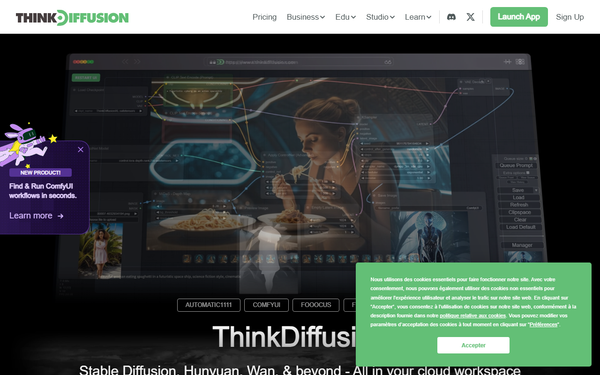
Think Diffusion is a cloud-based AI art lab that delivers fully managed, browser-accessible workspaces for open-source generative AI tools. It eliminates the need for local hardware installation or powerful GPUs by providing instant access to interfaces like Automatic1111, ComfyUI, Fooocus, Forge WebUI, and Kohya for tasks such as image generation, video/animation creation, model training (LoRA, Textual Inversion, Dreambooth), and advanced workflows with ControlNet, OpenPose, and custom nodes. Primary use cases include creating photorealistic art, fashion design prototypes, cinematic videos, character-consistent illustrations, and custom model fine-tuning— all from any device, including smartphones.
It targets AI enthusiasts, digital artists, graphic designers, marketers, students, educators, and creative agencies or businesses seeking professional-grade output without technical setup overhead. As of March 2026, it positions itself as an accessible entry point to the open-source Stable Diffusion ecosystem (including Flux support) for both hobbyists and professionals.
Key Features & Capabilities
Core functionality revolves around dedicated GPU machines (16GB QUICK, 24GB TURBO, 48GB ULTRA) with one-click launches, persistent cloud storage (up to 200GB+), and seamless 1-click model uploads from Civitai, Hugging Face, or local files. Users gain full access to preloaded models (50+ including SD 1.5, SDXL, Flux), extensions (ADetailer, AnimateDiff, ControlNet, Deforum, etc.), and custom nodes, plus model merging and training tools. Workflows support text-to-image/video, inpainting, outpainting, face swapping, and precise composition control.
Standout features differentiating it from competitors include 100% private dedicated machines (no sharing), unlimited simultaneous tabs for parallel workflows, persistent workspace across sessions (with paid plans), browser/phone compatibility, and an auto-stop timer to control costs. It also offers “My Files 24/7” access without running machines on higher plans and direct integration for running ComfyUI workflows in seconds.
Limitations include pay-per-hour usage on top of subscriptions, cumbersome file management (no renaming or advanced organization in the free tier), 48-hour inactivity clearance of files/extensions for non-PRO users, and reliance on stable internet. Advanced users may find model import naming restrictions tedious, and there is no on-premises or fully offline option.
User Experience
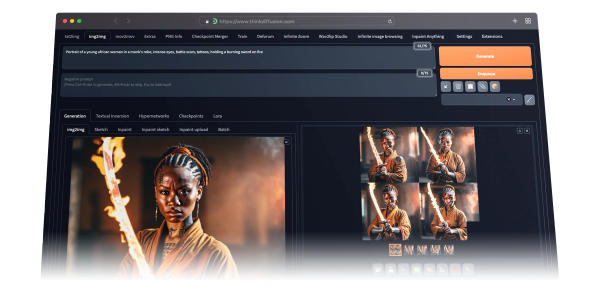
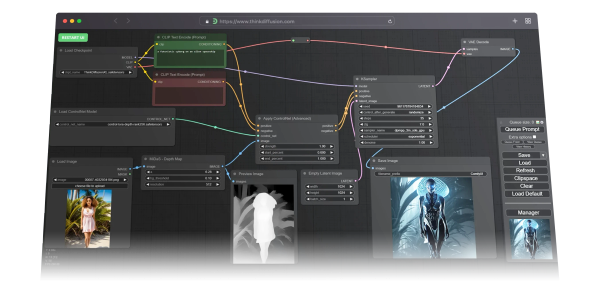
Setup is exceptionally easy with a quick sign-up and machine launch in 3–5 minutes—no coding or local installs required, making it ideal for beginners while scaling to power users. The learning curve is gentle for basic generation but steeper for node-based ComfyUI workflows, though preloaded extensions and one-click features reduce friction significantly.
The browser interface is clean, intuitive, and consistent across devices, with responsive design and built-in tools like image browsers for bulk downloads. Documentation and support are strong: the official Learn hub (learn.thinkdiffusion.com) offers written guides, video tutorials, release notes, and workflow downloads, while 24/7 Discord provides responsive community and team help. Overall, it prioritizes productivity over raw customization.
Performance & Reliability
Performance is a highlight, with fast 3–5 minute startups, reliable dedicated GPUs delivering high throughput (thousands of images per hour on ULTRA machines), and consistent speeds thanks to exclusive resource allocation. Users report smooth handling of demanding tasks like Flux generation or video workflows on higher-tier hardware.
Reliability is generally high with dedicated machines and an auto-stop timer preventing accidental overruns, but common complaints include automatic instance termination and file clearance after 48 hours of inactivity (mitigated by PRO plans) and occasional need to run low-power machines solely for file management. No widespread downtime reports surfaced in 2026 reviews, though cloud performance can vary slightly with connectivity. Internet dependency remains the primary external factor.

Pricing & Value
Think Diffusion uses a hybrid model: optional subscriptions unlock discounts and persistence, with pay-per-hour machine usage.
- HOBBY (free): Standard rates—QUICK (16GB) $0.99/hr, TURBO (24GB) $1.75/hr, ULTRA (48GB) $2.50/hr; 10GB storage (48-hour persistence); 15-minute free trial on sign-up.
- TD-PRO: $19.99/mo (yearly) or $29.99/mo (monthly); 20% discounts (e.g., QUICK $0.79/hr, ULTRA $1.99/hr); 200GB persistent storage; $10 monthly credit (rolls over); 24/7 file access.
- TD-TEAMS: $59.99/mo base (+$6 per extra member); $20 monthly credit; shared collaborative workspaces with add-on storage ($10–$20/mo per tier).
- Enterprise/education options (TD-Edge, TD-EDU) available via contact for custom scaling.
Value is strong for regular users—the PRO subscription often pays for itself via credits and discounts while eliminating re-setup frustration—outperforming raw GPU rentals like RunPod in ease of use, though hobbyists may find hourly costs add up quickly compared to local hardware. It delivers excellent productivity gains for non-technical creators versus free/local alternatives.
Practical Tutorial
Official resources include dozens of video and written tutorials at learn.thinkdiffusion.com and YouTube, covering everything from basic generation to advanced Flux LoRA training. Here is a step-by-step walkthrough for a common task—generating your first image with Automatic1111 (tested and aligned with current platform flows as of March 2026):
- Visit thinkdiffusion.com and sign up for a free account (Google/Discord/email). You’ll receive 15 minutes of free QUICK machine time.
- From the dashboard, click “Launch Machine” and select Automatic1111 (or Forge for faster Flux support). Choose the QUICK 16GB tier for starters.
- Once launched (3–5 minutes), the familiar A1111 interface appears in your browser. Preloaded models (e.g., SDXL or Flux) are ready, or use the 1-click upload panel to add any model from Civitai via URL.
- In the txt2img tab, enter a prompt (e.g., “a serene mountain lake at sunset, photorealistic, detailed reflections”), set steps to 20–30, CFG scale 7, and sampler to Euler a. Select a preloaded model from the dropdown.
- Click “Generate.” Images appear in seconds; use the built-in gallery for variations or inpainting. Enable extensions like ADetailer or ControlNet via the Extensions tab if needed.
- When finished, click the stop button (or set auto-stop timer to 30–60 minutes). Files persist (48 hours on Hobby; indefinitely on PRO). Download via the image browser or “My Files” (PRO).
For video workflows or LoRA training, drag-and-drop official JSON workflows from the Learn site directly into ComfyUI. Full video demo: search “How to Run Stable Diffusion on ANY Device” on their YouTube channel.
Final Verdict
Think Diffusion earns a strong 4.5/5 rating for its seamless cloud experience, broad tool support, and productivity focus—excelling where local setups fail.
It is ideal for digital artists, designers, students, and teams wanting instant, device-agnostic access to pro-level open-source AI art tools without hardware headaches or complex installs. Avoid it if you have a powerful local GPU, prefer completely free/unlimited usage, or need advanced file management and offline control, as costs can accumulate and persistence requires a subscription.
Highly recommended for anyone seeking a private, powerful AI art studio in the cloud—start with the free trial today.