Timebolt Review: Automate Video Editing and Remove Silences Fast
Overview & Purpose
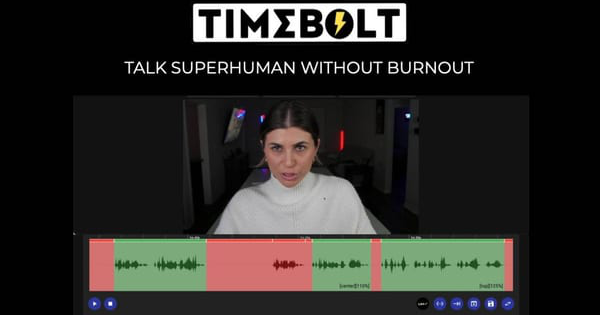
TimeBolt is a desktop video and audio editing application for Mac and Windows that automates the removal of silence, filler words, bad takes, and low-volume segments from recordings, enabling rapid jump cuts and polished output. Often described as a "Video Subtractor," it processes footage locally using waveform precision for cuts accurate to 0.01 seconds, while offering optional AI-powered UMCheck™ for detecting phrases like "um," "uh," or custom fillers. It also includes a built-in 4K screen and webcam recorder with SmartCrop™.
Primary use cases include condensing long-form content such as podcasts, YouTube videos, vlogs, screen recordings, tutorials, and webinars into watchable, high-engagement formats without manual scrubbing. It excels at creating rough cuts that can be refined in professional NLEs or exported directly as final MP4 files. The tool targets content creators (YouTubers, vloggers, podcasters), marketers, educators, gamers, and enterprise teams producing internal or compliance-focused video. It appeals especially to solo creators and small teams overwhelmed by editing time, promising to reduce hours of work to minutes.

Key Features & Capabilities
Core functionality revolves around intelligent silence detection and removal, which processes an hour of video in as little as 13 seconds while preserving natural pacing through customizable padding. Users can preview and adjust cuts at up to 4x speed, marking segments to cut or keep via the Sculpt timeline. Additional tools include Punch In/Out for dynamic zooms (using P key and arrows to focus attention), FastForward for automated speed ramps on silence or filler sections, and Turbo Mode to naturally accelerate speech by up to 12%.
Standout differentiators include its waveform-first engine (claimed 20x more precise than transcript-based AI tools like Descript or Gling), local on-device processing for privacy and speed, and seamless export options. These include direct MP4 rendering, SRT captions, XML/FCPXML for Premiere Pro, Final Cut Pro, DaVinci Resolve, Camtasia projects, and even multi-cam/multi-track support for complex workflows. The built-in 4K recorder with live camera switching and Stitch feature for combining clips add end-to-end workflow value. UMCheck™ AI extends this to filler word and bad take removal with high accuracy benchmarks (e.g., 91-100% in internal tests).
Limitations include pay-per-use pricing for UMCheck™ ($0.03 per minute of video), no full cloud-free advanced AI without the enterprise Vault plan, and free tier restrictions (video-only, watermarked exports, no project saves or NLE exports). It is not a complete NLE replacement and performs best as a preprocessing step rather than for effects-heavy creative editing. Variable frame rate (VFR) files can cause preview or sync issues, requiring conversion beforehand.

User Experience
TimeBolt features a straightforward, timeline-based interface focused on previewing cuts at accelerated speeds and making quick accept/deny decisions. The learning curve is low for core silence removal—most users report productive results within minutes—but advanced features like multi-track exports, Punch In/Out, or NLE integrations require some experimentation and reference to official training videos.
Interface quality is functional and clean for its purpose, with responsive playback and keyboard shortcuts (e.g., O key for cut decisions), though some users describe it as "clunky" or less intuitive than modern NLEs, particularly for multicam or complex timelines. Documentation is solid, with free training videos on help.timebolt.io covering full workflows, plus blog tutorials and a support knowledge base addressing common issues. Community sentiment on platforms like AppSumo (5/5 average) and Reddit highlights its time-saving impact, with responsive email support noted positively.

Performance & Reliability
Performance is a major strength: silence removal and basic cuts are extremely fast and reliable, with local processing avoiding upload delays or privacy risks. Benchmarks published by the company show superior accuracy and minimal rework compared to competitors, often achieving zero-filler output in under three minutes for a one-hour file.
Known issues include occasional minor cut hiccups (e.g., breathing room inconsistencies) or sync problems when exporting to NLEs, especially with VFR source files or multi-track audio. Older Reddit feedback mentions preview lagging or UI glitches, though the company maintains an active help center with fixes. Overall reliability is high for its core task, with thousands of paid users reporting consistent time savings of 50-80% on editing workflows. No major outages or widespread complaints appear in recent sources as of April 2026.

Pricing & Value
TimeBolt offers a free tier for basic video silence removal (watermarked, limited exports) and three Pro plans: $17/month, $97/year (52% savings), or $347 lifetime (one-time, includes all future updates). All paid plans unlock full video/audio support, any file length, project saves, NLE exports, and Banger sharing (with limits on lifetime tier). UMCheck™ AI incurs an additional $0.03 per minute of processed video. Enterprise Teams pricing starts at $97/seat/year with volume discounts, while Vault (on-prem deployment) is custom-quoted for HIPAA/FedRAMP compliance. A 30-day money-back guarantee applies.
Value is strong for frequent creators: the lifetime option pays for itself quickly through hours saved, outperforming subscription-heavy alternatives like Descript for users prioritizing local speed and precision. It is less ideal for light or occasional users due to the upfront cost and per-minute AI fees. Compared to simpler tools like Recut, TimeBolt provides broader features and exports at a premium price point.
Practical Tutorial
Official training videos and blog walkthroughs are available at help.timebolt.io/training-videos and on the TimeBolt YouTube channel. Here is a step-by-step walkthrough for a common task—auto-editing a one-hour podcast or talking-head video to remove silence and fillers—based on official guidance as of April 2026.
-
Import your file: Download and launch the TimeBolt desktop app (free or paid). Drag and drop your MP4 or audio file into the app. (Convert VFR files first if preview issues occur.)
-
Run silence detection: The app automatically detects and marks silences/low-volume sections using waveform analysis. Adjust padding settings for natural breath room if needed.
-
Apply UMCheck™ (optional): For filler words and bad takes, click the UMCheck icon, confirm the $0.03/min cost, and run transcription-based removal. Review and approve AI suggestions.
-
Sculpt the timeline: Play the preview at 1.5x–4x speed. Use the Spacebar to scrub; with the playhead in a cut segment, press O (or click the bar) to keep or remove the cut (red indicates removal). Quickly audit all marks.
-
Enhance with advanced tools: Apply FastForward or Turbo Mode for speed ramps on remaining sections. Use Punch In/Out (P key + arrows) to add zoom focus. Add background audio loops or markers/chapters for structure.
-
Preview and refine: Watch the full edited timeline. Stitch additional clips if needed.
-
Export: Choose MP4 for direct render, SRT for captions, or XML/FCPXML for Premiere/Final Cut/DaVinci. For Premiere users, install the extension for multi-track sync.
This workflow typically turns an hour of raw footage into a polished cut in under 10–15 minutes of active work. For visual demos, watch the official "Master TimeBolt" YouTube guide or the blog post "How to Auto Edit Video Like a Pro YouTuber."
Final Verdict
TimeBolt earns a solid 4.5 out of 5. It excels as a specialized time-saver for creators who produce frequent talking-head or screen content, delivering professional-grade rough cuts faster than manual editing or many AI alternatives while maintaining privacy and precision.
Who should use it: Busy YouTubers, podcasters, educators, and marketers who value speed and local processing and are willing to invest in lifetime access for long-term ROI. Who should avoid it: Beginners on tight budgets, users needing a full-featured editor from scratch, or those uncomfortable with occasional per-minute AI costs and minor VFR compatibility quirks.
One-sentence recommendation: If editing time is your biggest bottleneck, TimeBolt is a worthwhile investment that genuinely delivers on its promise of turning hours of raw footage into watchable video in minutes.