ToastyAI Review: Automate Your Podcast Promotion in Minutes
Overview & Purpose
ToastyAI (now operating under the Outcast.ai branding at toastyai.com) is an AI-powered platform that automates podcast promotion by converting a single episode into over 20 ready-to-use content pieces. It handles everything from high-accuracy transcripts and timestamped show notes to SEO-optimized blog articles, catchy titles, social media posts, short video clips, and audiograms. The primary use cases include repurposing new or old episodes for multi-platform marketing, enabling podcasters to distribute content across blogs, social channels (Twitter/X, LinkedIn, Reddit), email, and video platforms without manual writing or editing. It supports uploads via audio/video files, YouTube URLs, or RSS feeds and even includes an episode-specific chatbot for querying content.
The target audience is primarily podcasters and content creators—especially independent hosts, small teams, and growing networks—who lack dedicated marketing staff or time for promotion. It is not aimed at developers, designers, or general marketers but at anyone producing audio/video episodes who wants to become omnichannel without hiring writers or editors.
Key Features & Capabilities
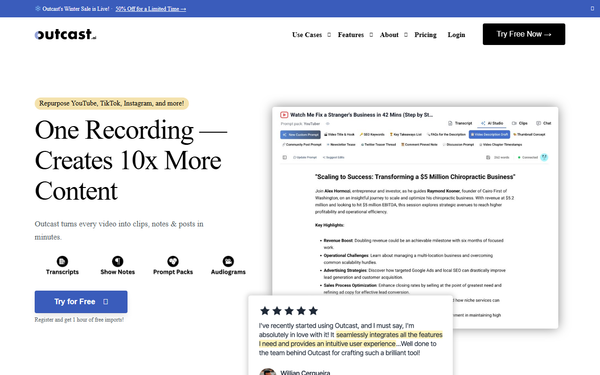
Core functionality revolves around one-click episode processing: upload your file/URL/RSS, provide basic details (show name, language, speakers), and receive studio-grade transcripts (with speaker identification and timestamps across 17 languages), three variations of show notes, SEO-ready blog posts (averaging 750 words per 30-minute episode), unlimited social media captions, chapter markers, and exportable clips/audiograms. Additional tools include an AI Studio for custom blogs/emails/images, Prompt Packs for tailored generation, an episode chatbot for quotes and summaries, and real-time team collaboration.
Standout features that differentiate it from competitors (such as Opus Clip for short-form video only or Descript for editing-focused transcription) include its podcast-aware AI writer trained on your show’s voice, built-in listener feedback integration to refine future outputs, and a full suite combining text, social, and visual assets in minutes. The platform also supports repurposing old episodes and direct clip editing with captions.
Limitations include a 15-minute maximum export length for clips, usage capped by plan-based “minutes” of processed content (lower tiers restrict total hours), potential need for light post-editing on AI-generated text for perfect tone or SEO, and no native direct publishing integrations to platforms like WordPress or social schedulers. Processing for very long videos can take up to 30 minutes, and advanced video production tools are absent.
User Experience
The interface is clean and intuitive with a straightforward upload workflow that requires minimal steps, resulting in a low learning curve—even for non-technical podcasters. Users simply register, navigate to a “New Episode” page, choose upload method, fill in show/speaker details, and let AI handle the rest. Real-time collaboration and the episode chatbot add convenience for teams.
Documentation is solid via the official getting-started guide, which walks through every upload option with screenshots and examples. Support feels responsive (small-team founder access noted), though public help resources beyond the docs are light. Overall, the experience emphasizes speed and simplicity, allowing focus on content creation rather than promotion.
Performance & Reliability
Generation happens quickly—most users report full asset creation in about five minutes after transcription completes. Transcription accuracy is consistently praised as “studio-grade” with reliable speaker detection. No widespread outages or major reliability complaints appear in available user sentiment; the tool handles typical podcast lengths (up to ~10 hours per episode) efficiently.
Known issues are minor and typical of AI tools: occasional tone mismatches requiring tweaks, and processing delays for large files. Reddit and aggregator feedback highlight time savings without major reliability flags.
Pricing & Value
ToastyAI offers a free trial with 1 hour of imports upon registration. Paid plans are tiered and credit-based (tied to processed episode minutes): Starter/Beginner around $25/month (or lower annually), Pro around $49/month, and higher Business/Max tiers up to ~$97/month for greater volume. Annual billing typically includes savings equivalent to two months free, with a 30-day refund guarantee. Unused credits may roll over or expire depending on plan—exact current details are best verified in-app as they evolve.
Value is strong for active podcasters: one episode’s worth of content replaces hours of manual work and multiple tools, making it cheaper than hiring a writer or using several specialized services. Compared to alternatives like Castmagic or Flowsend.ai, ToastyAI delivers broader omnichannel outputs at a competitive entry price.
Practical Tutorial
A step-by-step walkthrough for the common task of generating promotion content from a new episode (based on official documentation):
- Register for free at toastyai.com (or app.outcast.ai/register) to claim your 1-hour trial imports.
- Log in and go to the “New Episode” page.
- Choose your upload method: drag-and-drop audio/video file, paste a YouTube URL, or enter your RSS feed.
- Fill in episode details: name your show, select language (e.g., English), list speakers (e.g., “Host: Jane Doe, Guest: John Smith”), and optionally trim start/end times.
- Submit for processing—the AI transcribes with timestamps and speaker labels.
- Review the transcript, then use the AI Studio, Prompt Packs, or one-click tools to generate: three show-note variations, an SEO blog article, 5–10 social posts, catchy titles/chapters, and editable clips/audiograms.
- Edit any output (e.g., refine blog for your site), export, and post across platforms.
Example: Upload a 30-minute episode titled “AI in Podcasting.” Receive a 750-word SEO blog ready for your website, timestamped show notes, and ready-to-post tweets—all in under 10 minutes total. Full official guide: https://outcast.ai/docs/getting-started/.
Final Verdict
Overall rating: 4.5/5 (strong automation and accuracy offset limited public reviews and credit caps; researched March 16, 2026).
Podcasters and creators who publish regularly and want to scale promotion across channels without extra staff should use this tool—it saves hours per episode and enables true omnichannel reach. Avoid it if you need unlimited high-volume processing without checking tier limits, advanced video editing, or prefer fully transparent upfront pricing.
Highly recommended: Start with the free trial to turn your next episode into a full marketing campaign in minutes.