Toolhouse Review: The Fastest Way to Build Production AI Agents
Overview & Purpose

Toolhouse (https://toolhouse.ai/) is a Backend-as-a-Service (BaaS) platform that equips Large Language Models (LLMs) with actions, knowledge, and tools, enabling developers to build, deploy, and manage production-ready AI agents with minimal effort. It simplifies function calling and tool integration, providing a managed cloud infrastructure complete with pre-built MCP servers for capabilities like RAG, memory management, code execution, web scraping, browser automation, and search. Primary use cases include automating workflows (research agents, data analysis assistants, customer support bots), deploying agents as APIs, scheduling autonomous runs, and enhancing existing LLM applications with real-world actions. It ensures cross-LLM compatibility via standard function-calling protocols and delivers low-latency performance through its globally distributed runtime.
The target audience is primarily AI developers, engineers, startups, and product teams building LLM-powered applications. It also appeals to “vibe coders” and non-technical users through its Agent Studio (plain-English prompting) and simple SDK/CLI flows, making it suitable for individuals, SMBs, and enterprises alike (with testimonials from teams at Cloudflare and others). Research conducted as of March 10, 2026.
Key Features & Capabilities
Core functionality revolves around three pillars: the Toolhouse SDK (Python, TypeScript) and CLI for seamless tool injection and agent deployment, a marketplace of curated MCP servers/tools for instant action capabilities, and full production hosting with observability. Key capabilities include one-command local-to-production deployment (agents defined in code or YAML and published as APIs), built-in prompt optimization, automated evals, asynchronous execution, cron-based scheduling, file uploads, and integrations with Zapier, n8n, Vercel AI SDK, and LlamaIndex.
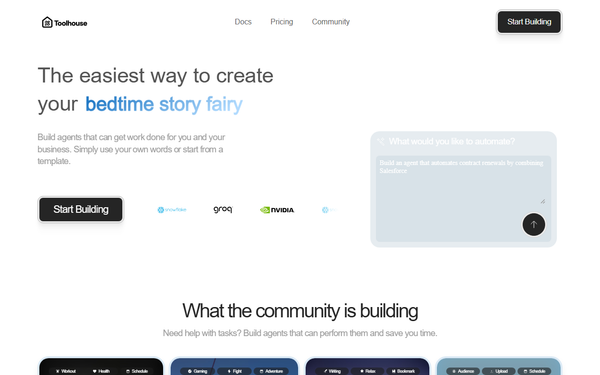
Standout features that differentiate it from competitors (e.g., LangChain, CrewAI, or Composio) include “just 3 lines of code” to add full function-calling infrastructure, perfect local-to-prod parity (“what you see on your laptop is what you get”), managed global runtime for high availability and low latency, detailed agent + execution logs for debugging, and automatic connection to 40+ tools without self-hosting. Agent Studio allows non-coders to build agents from plain English descriptions (available on higher plans).
Limitations include credit-based usage (e.g., limited agent runs on lower tiers), dependency on Toolhouse’s MCP ecosystem for advanced tools (custom MCP servers are possible but require extra work), and the need to bring your own LLM provider key. The platform is still maturing, so its tool marketplace is not as vast as fully open-source alternatives, and Agent Studio is gated behind the Business plan.

User Experience
Toolhouse offers a low learning curve for anyone familiar with LLMs or basic coding. Developers can integrate tools and deploy agents in minutes using the SDK or CLI; non-technical users appreciate the drag-and-drop data uploads, unlimited testing sandboxes, and Agent Studio interface. The web dashboard is clean and intuitive for managing API keys, viewing logs, and monitoring runs, while the CLI provides powerful local development and CI/CD integration.
Documentation is excellent, with clear quick-start guides for Python, TypeScript, and CLI, plus advanced sections on scheduling, logs, and custom MCP servers. Community support includes an active Discord, GitHub repository, and “Ask the Docs” help center. Overall, the experience feels polished and production-focused, with users frequently praising how it eliminates boilerplate and “just works” across environments.

Performance & Reliability
Performance is a strong suit: the globally distributed runtime delivers high availability, consistent low-latency tool execution (optimized scraping, search, and browser actions), and reliable scaling without users managing infrastructure. Testimonials highlight “record time” delivery and seamless API integration, with no widespread reports of downtime or latency issues as of March 2026.
Known issues or common complaints are minimal; searches across reviews, Reddit, and tech forums turned up no major outages or reliability concerns. The primary feedback is overwhelmingly positive around speed to production and observability logs that make debugging straightforward. Occasional credit exhaustion on free/Pro tiers is the only recurring note, but this is transparent and expected for usage-based platforms.

Pricing & Value
Toolhouse offers a transparent, usage-friendly structure with no hidden fees:
- Free tier: Limited agent runs and basic features (public agents, core tools) — ideal for experimentation and sandboxes.
- Pro: $10/month — 1,000 agents/month, 1,000 credits, powerful scraping/web search, unlimited tool usage, file uploads, Zapier/n8n integrations.
- Business: $500/month — significantly higher limits (e.g., 165k credits), priority support, full Agent Studio, advanced scoping.
- Enterprise: Custom pricing with dedicated support, on-prem options, private data hosting, and compliance features.
Compared to alternatives, the value proposition is excellent: at just $10/month you avoid weeks of development time on custom tool infrastructure, hosting, and observability. It is far more affordable and simpler than self-managing LangChain-style setups or competing BaaS platforms with higher base costs. Heavy users may outgrow Pro quickly, but the entry point and time savings make it highly cost-effective for most developers and teams.
Practical Tutorial
Official quick starts and full documentation are available at https://docs.toolhouse.ai/ (Python SDK, TypeScript, and CLI guides). Below is a real-world, step-by-step walkthrough for a common task: building a web-research agent that can search, scrape, and summarize information using Toolhouse + OpenAI (based on official SDK patterns and community examples from Dev.to and Medium tutorials).
-
Sign up and get your API key — Create a free account at https://toolhouse.ai/, go to your dashboard/settings, and copy your Toolhouse API key.
-
Install dependencies — In your Python project run:
pip install toolhouse-ai openai python-dotenv -
Initialize the SDK — Create a new file (e.g.,
research_agent.py):import os from openai import OpenAI from toolhouse import Toolhouse th = Toolhouse(api_key=os.getenv("TOOLHOUSE_API_KEY")) client = OpenAI(api_key=os.getenv("OPENAI_API_KEY")) -
Fetch tools and run the agent — Add this core loop (Toolhouse automatically handles execution and returns results back to the LLM):
messages = [{"role": "user", "content": "Research the best neighborhoods in Tokyo for foodies and summarize with local restaurant recommendations."}] # Get Toolhouse tools (web search, scrape, etc.) tools = th.get_tools() # First LLM call with tools response = client.chat.completions.create( model="gpt-4o", messages=messages, tools=tools ) # Toolhouse executes the tools and returns updated messages messages = th.run_tools(response) # Final LLM call for the answer final_response = client.chat.completions.create( model="gpt-4o", messages=messages ) print(final_response.choices[0].message.content) -
Run locally or deploy — Test with
python research_agent.py. For production, use the CLI (th deploy) or wrap in FastAPI/Vercel for an API endpoint. Add memory or scheduling via the dashboard for persistent agents.
This example typically takes under 10 minutes and gives your agent powerful real-world capabilities. For CLI-only agents or no-code versions, see the official “Quick start for developers (CLI)” or Agent Studio (Business plan). Community examples (e.g., personal life coach or veterinary clinic agent) are available on Medium and GitHub.
Final Verdict
Overall rating: 4.6/5 (excellent simplicity and time savings, slightly docked for credit limits and maturing ecosystem).
Developers, startups, and teams building LLM agents or tool-augmented applications should use Toolhouse — it dramatically reduces boilerplate, provides reliable production infrastructure, observability, and powerful tools at an unbeatable entry price. Avoid it if you need fully open-source/self-hosted control, have extremely high-volume usage without budget for Business tier, or prefer massive open ecosystems over a focused managed BaaS.
One-sentence recommendation: Toolhouse is the fastest way to turn any LLM into a production-ready agent with real-world tools — start with the free tier today and you’ll wonder how you ever built without it.