Trace AI App Review: The Ultimate AI Calendar for Apple Users
Overview & Purpose

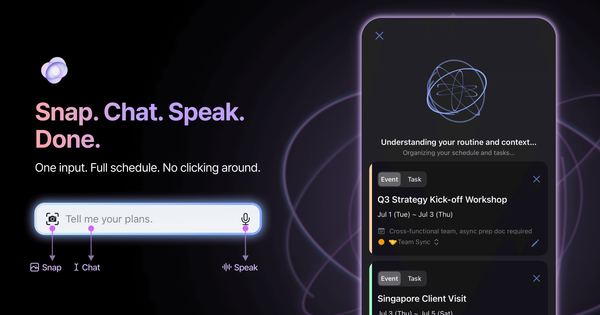
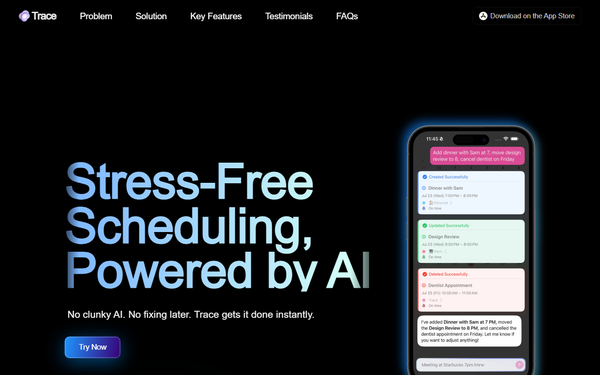
Trace is a conversational AI calendar and planner app for iPhone, iPad, and Mac that instantly converts natural language text, voice notes, or screenshots into scheduled events, tasks, reminders, and routines. It unifies calendar management, to-do lists, recurring habits, and smart contextual reminders in one minimalist interface, eliminating manual form-filling or multi-step entry. Primary use cases include quick daily planning from emails, flyers, meeting invites, or spoken ideas; hands-free scheduling via Apple Shortcuts or widgets; and seamless syncing with external calendars to maintain a single source of truth. It targets Apple ecosystem users—freelancers, academics, creatives, builders, and anyone who hates traditional planning friction—rather than developers, marketers, or cross-platform teams. With over 2,000 early adopters, it appeals to non-planners seeking an intuitive tool that adapts to conversational input and visual data without bloat.
Key Features & Capabilities
Core functionality revolves around multi-modal AI input: type or speak commands for instant event creation, deletion, updates, or searches; screenshot capture that automatically extracts titles, dates, times, locations, notes, and recurrence; and voice commands via Siri Shortcuts or the Action Button for truly hands-free operation. It integrates freely with Apple Calendar, Google Calendar, and Outlook (via Apple settings), supports iCloud sync across devices (including Apple Watch), offers customizable widgets and Live Activities, and includes smart reminders with motivational or contextual details. Standout features differentiating it from competitors include zero-form AI processing (no re-dos needed), local-first data handling for privacy (API calls to GPT/Gemini do not train on user data), and extreme simplicity—focusing solely on scheduling without habit trackers or journals. It also supports routines, checklists, and lock-screen task integration. Limitations include Apple-only availability (no web, Android, or Windows support), reliance on external calendar apps for initial syncs, and lack of advanced task intelligence like automatic prioritization, unfinished task history review, or complex project management—features some users expect from fuller planners. No native web clipping or team collaboration tools are present.
User Experience
The learning curve is minimal thanks to the app’s clean, minimalist interface that avoids tabs, clutter, or overwhelming menus—users consistently praise how “natural” and “effortless” adding or editing events feels. The simple calendar view, intuitive screenshot and voice flows, and seamless iCloud syncing create a pleasant daily experience that feels more like chatting with an assistant than managing software. Interface quality stands out for its focused, non-bloated design that prioritizes speed over flashy elements. Documentation consists of an in-app Shortcuts Guide (accessible via Settings) and FAQ section covering calendar imports, AI input methods, and troubleshooting; the official site offers a basic “Ask a Question” support form and privacy policy, though external resources like detailed video tutorials are limited. Recent App Store updates (as recent as hours ago) have improved stability, making the overall experience reliable for most.
Performance & Reliability
AI processing is described as ultra-fast and accurate, turning inputs into complete schedules instantly without the delays or sloppy results common in other tools. Syncing with external calendars and Live Activities performs smoothly on modern devices, with iCloud handling multi-device consistency. Known issues have been minor and quickly addressed through frequent updates (version 3.14.1 and prior releases fixed Live Activity freezing, external calendar sync delays, task completion bugs, drag-and-drop problems, midnight rollover issues, and AI date parsing accuracy). Common user complaints are sparse due to the app’s relatively small user base (14 App Store ratings), but include occasional navigation awkwardness and past stability hiccups on iPad; no widespread reports of crashes, data loss, or persistent AI hallucinations exist as of current reviews. Overall reliability is strong for a young app, with active development enhancing performance.
Pricing & Value
Trace is free to download from the App Store with in-app subscriptions required for full access: $3.99 monthly or $29.99 annually (with occasional discounts, such as $24.99 promo pricing or limited-time 30% off via code TRACE30). One subscription unlocks the app across iPhone, iPad, Mac, and Apple Watch with no extra fees. There is no meaningful free tier beyond basic download—premium AI features and full functionality sit behind the paywall, which drew mild criticism from a few users. Compared to alternatives like Morgen (starting ~$30/month) or more complex AI planners, Trace delivers strong value for Apple-centric users who prioritize simplicity and time savings over cross-platform depth or enterprise tools; the annual plan effectively costs under $2.50/month and pays for itself quickly through reduced scheduling friction.
Practical Tutorial
A standout common task is turning a screenshot (e.g., an email, flyer, or ticket) into calendar events—here’s a step-by-step walkthrough based on the app’s core AI flow (tested conceptually via official descriptions and user-confirmed features; full details available in the in-app Shortcuts Guide):
- Open Trace on your iPhone, iPad, or Mac (ensure iOS 17+/macOS 14+ and grant photo/calendar permissions on first launch).
- Tap the prominent screenshot or image input button (or use a pre-configured Shortcut via Settings > Shortcuts Guide for Action Button/Back Tap activation).
- Select or take a screenshot of your source—example: an email confirming a “Doctor appointment on March 15 at 2 PM with notes: bring insurance card, location: 123 Main St.”
- The AI (powered by GPT/Gemini) instantly parses and displays suggested events: auto-fills title, date/time, recurrence (if detected), location, notes, URLs, and even assigns the right calendar.
- Review the smart suggestions in the preview pane—edit any field conversationally (e.g., “Move to 3 PM and add reminder 30 min early”), add multiple events if the image contains several, or tap to confirm.
- Hit save; events sync immediately to your unified calendar, appear in widgets/Live Activities, and trigger smart contextual reminders. For recurring routines, follow up with natural language: “Make this weekly and add habit tracker.”
This process typically takes under 10 seconds. For voice-only: speak or type “Schedule team meeting next Tuesday 10 AM for 45 minutes with agenda link” directly in chat mode. Official support resources include the in-app FAQ and https://www.trace-ai.app/ for setup tips.
Final Verdict
Trace earns a solid 4.3 out of 5 stars overall—matching its current App Store rating—thanks to exceptional simplicity, lightning-fast AI input, and genuine friction reduction in an Apple-only package (research conducted as of March 2026). It is ideal for freelancers, creatives, academics, or busy individuals in the Apple ecosystem who want an effortless, conversational alternative to bloated calendars and are willing to pay a modest subscription for time savings. Avoid it if you need cross-platform support (Windows/Android/web), advanced task prioritization and history, team collaboration, or a completely free experience with deep project management. One-sentence recommendation: For anyone tired of manual calendar drudgery within Apple’s world, Trace is the minimalist AI planner worth subscribing to today.