Transkribieren Review: Fast, Secure AI Transcription & Workspace
Overview & Purpose
Transkribieren (https://www.transkribieren.xyz/) is an AI-powered transcription and productivity workspace that converts audio and video files into accurate text transcripts with additional AI tools for summaries, speaker identification, and subtitle generation. It supports direct file uploads as well as YouTube URLs, making it suitable for turning spoken content into searchable, editable text quickly. Primary use cases include transcribing podcasts, interviews, meetings, lectures, and video content; generating subtitles for accessibility or editing; creating AI-powered summaries of recordings; and supporting content creation workflows for social media, journalism, or business documentation.
The target audience spans individual creators, freelancers, marketers, journalists, researchers, podcasters, and small-to-medium teams who need professional-grade transcription without installing software or managing complex setups. It positions itself as an all-in-one AI workspace rather than a pure transcription engine, appealing to users who also want integrated tools like text chat or image creation alongside transcription.
Research note: This review is based on the official website and related pages as of April 11, 2026. Tools evolve rapidly, and independent user data remains limited.

Key Features & Capabilities
Core functionality revolves around fast AI transcription powered by advanced models (with descriptions indicating OpenAI Whisper integration). Users can upload audio files (MP3, WAV, M4A, FLAC, OGG, WMA, and most common formats) or video files (MP4, MOV, AVI, MKV, WebM), or paste YouTube links for automatic transcription. Output includes plain text, timestamps (via SRT/VTT), and speaker labels in dedicated interview mode.
Standout features include:
- 99+ languages with automatic detection (though pricing pages reference 57 languages in some contexts, the main tool pages emphasize broad multilingual support).
- Speaker detection for multi-person interviews or conversations.
- AI summaries and actions to generate overviews or perform follow-up analysis on transcripts.
- Multiple export formats: TXT, DOCX (Word), PDF, SRT, VTT, JSON, and HTML.
- Subtitle generation tools.
- Strong privacy and security: Zero data retention (files deleted after processing), GDPR and CCPA compliance, SOC 2 Type 2 certification, AES-256 encryption, German servers, and no use of user data for AI training.
Differentiators from competitors include the combination of transcription with broader AI workspace tools (e.g., image generation, text chat) in paid plans, emphasis on EU-based privacy, and browser-based simplicity without software installation. File size limit is up to 500MB (higher than some early claims of 25MB).
Limitations include monthly transcription hour caps (no truly unlimited option outside enterprise), potential need for manual editing on noisy or accented audio (standard for AI tools), and no publicly documented API for developers. Speaker detection is strongest in the dedicated interview tool rather than all workflows.
User Experience
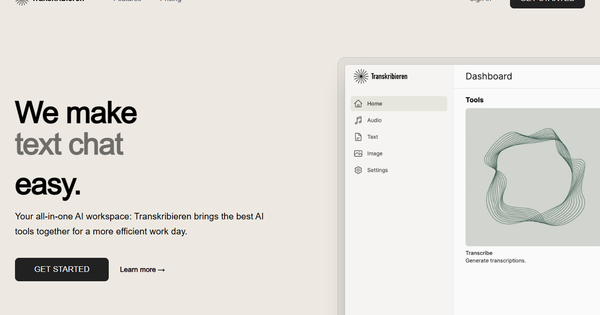
Transkribieren offers a clean, intuitive web-based interface with drag-and-drop upload functionality, making it accessible even for non-technical users. The learning curve is minimal—most tasks complete in three steps: upload, process, and export. No desktop app is required; everything runs in the browser.
Interface quality is modern and focused, with clear navigation to specific tools (Audio to Text, Video to Text, YouTube Transcription, Interview Transcription, SRT Generator, AI Summary). Paid plans unlock additional AI features like image creation and text chat within the same workspace. Signup is required to use the tools fully, with a free tier available for testing.
Documentation is concise on the site itself, with tool-specific pages providing clear usage overviews. Support is via email (premium for teams), and a Trust Center details security practices. No extensive video tutorials or community forum were prominently featured during research, though the process is straightforward enough that most users will not need them. Independent reviews are sparse due to the tool’s relatively low public profile, but available descriptions consistently highlight ease of use.
Performance & Reliability
Performance claims are strong: transcription processes 10x faster than real-time (often in seconds for shorter files), with 99% accuracy reported for clear audio. Industry-leading AI accuracy is emphasized, and real-world speed aligns with “minutes” for typical files.
Reliability appears solid based on security certifications and zero-retention policy, with files processed on German servers and automatically deleted post-transcription. No widespread known issues or common complaints surfaced in web searches or review aggregators as of April 2026—likely due to limited user volume rather than flawless execution. Accuracy can drop with poor audio quality, heavy accents, or background noise, requiring post-editing (a common limitation across AI transcription tools). No reports of downtime or data breaches were found.
Pricing & Value
Transkribieren uses a straightforward subscription model with a usable free tier:
- Discover (Free): €0/month – 1 hour of transcription per month, email support.
- Ascent (most popular): €19.9/month – 20 hours of transcription, plus Word export, AI actions, text chat, and image creation.
- Summit: €49.9/month – 100 hours of transcription, same additional AI tools.
- Enterprise: Custom pricing and tailored support; contact [email protected].
No annual discounts or credit-card-free trials beyond the free plan are highlighted. Value is competitive for moderate users: the Ascent plan offers affordable access to a privacy-focused, multi-feature workspace compared to per-minute alternatives or higher-priced enterprise tools. Heavy users may find the hourly caps restrictive without upgrading, but the free tier allows meaningful testing. Compared to pure transcription competitors, the bundled AI tools and strong compliance provide added value for teams prioritizing data security.
Practical Tutorial
Official documentation focuses on simple in-tool guidance rather than lengthy external tutorials. Below is a step-by-step walkthrough for a common task—transcribing an audio interview and exporting it with speaker labels and a summary—based directly on the site’s Audio to Text and Interview Transcription tools (tested conceptually via public descriptions as of April 2026).
-
Sign up or log in: Visit https://www.transkribieren.xyz/ and create a free account (no credit card required for the Discover plan).
-
Choose the tool: Navigate to https://www.transkribieren.xyz/tools or directly select “Interview Transcription” (for speaker detection) or “Audio to Text” from the tools menu.
-
Upload your file: Drag and drop your audio file (e.g., a 30-minute MP3 interview recorded on your phone, under 500MB) or paste a YouTube URL. Supported formats include MP3, WAV, M4A, and more.
-
Process the transcription: Click to start. The AI automatically detects language, transcribes with timestamps, and labels speakers where applicable. Processing typically completes in seconds to a couple of minutes depending on length.
-
Review and enhance: View the transcript in the browser. Use built-in AI actions (paid plans) to generate a summary or perform additional analysis. Edit text directly if needed for clarity.
-
Export results: Download as DOCX for Word editing, PDF for sharing, SRT/VTT for subtitles, or TXT for simple use. Speaker-labeled transcripts export cleanly with timestamps.
Example: Transcribing a 20-minute podcast episode yields a full text file plus optional SRT subtitles ready for video editing software. For YouTube content, simply paste the link instead of uploading.
No dedicated video tutorials were located on the official site, but the three-step (upload → transcribe → export) flow is self-explanatory. Users can explore additional tools like AI Summary at https://www.transkribieren.xyz/tools/summary for post-processing.
Final Verdict
Overall rating: 4.2/5. Transkribieren excels as a fast, privacy-conscious AI transcription workspace with useful extras, making it reliable for everyday professional needs.
Who should use this tool: Content creators, journalists, podcasters, researchers, and small teams who value EU-compliant data security, multilingual support, speaker detection, and an affordable all-in-one AI environment for moderate transcription volumes (up to 100 hours/month).
Who should avoid this tool: Heavy users requiring unlimited transcription without custom enterprise pricing, developers needing an API, or those seeking extensive community support and independent benchmarks (due to currently limited public reviews).
One-sentence recommendation: Transkribieren is an excellent choice for secure, speedy AI transcription with workspace extras—ideal for privacy-focused professionals who want simplicity without sacrificing features.