Trupeer.ai Review
Overview & Purpose
Trupeer.ai is an AI-powered platform that transforms raw screen recordings—captured via its native Chrome extension or uploaded from other tools—into polished professional product videos, demo videos, training materials, and automated step-by-step documentation. It automates the entire workflow: refining scripts by removing fillers and fixing grammar, generating studio-quality voiceovers, adding visual effects, and simultaneously creating companion guides with screenshots, numbered steps, and summaries. Primary use cases include building sales and marketing demos, customer support tutorials, employee onboarding videos, internal SOPs, knowledge base articles, and multilingual training content. The target audience is primarily product marketers, sales teams, customer support specialists, L&D professionals, technical writers, and software/product teams in SaaS or tech organizations who need to produce high-quality, branded content quickly without video editing or technical writing expertise. Enterprise teams benefit from its scalability and security features. Research conducted as of March 2026.
Key Features & Capabilities
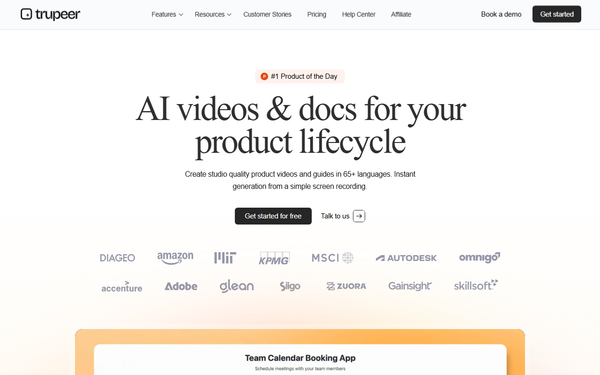
Core functionality centers on a simple record-or-upload process followed by one-click AI generation: the platform intelligently analyzes the recording to produce a synchronized video with cleaned narration, smart zoom effects on key actions, annotations, highlights, subtitles, and optional realistic AI avatars with lip-sync. It simultaneously outputs a fully formatted step-by-step guide. Standout features that differentiate Trupeer from competitors include integrated AI avatars (hundreds of nationalities and custom options), brand kits for custom wallpapers, logos, colors, and templates, translation and dubbing into 65+ languages, a centralized Knowledge Base with AI video search for querying content, engagement analytics (views, watch time, comments), and enterprise-ready security (ISO 27001, SOC 2, SAML SSO). Unlike Loom (basic recording and sharing) or doc-focused tools like Guidde and Scribe, Trupeer delivers higher production value with avatars and effects while combining video and documentation in one workflow. Limitations include a credit system based strictly on the length of generated videos (drafts and translations consume credits, with no rollover), capped recording lengths on lower plans, occasional need for manual script tweaks due to AI nuances, and less granular manual timeline editing than professional tools like Descript or Camtasia. Guides are unlimited on paid plans, but advanced analytics and custom seats are Enterprise-only.
User Experience
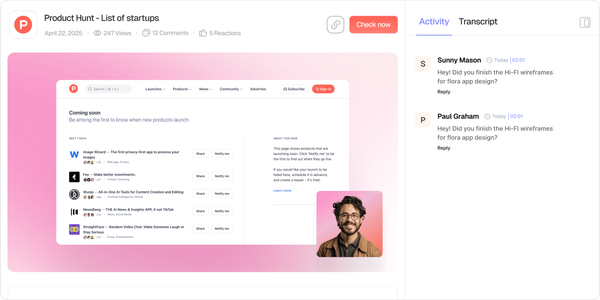
Trupeer.ai features an exceptionally low learning curve—users with no editing experience can produce professional results in minutes thanks to its intuitive, clean web-based interface and seamless Chrome extension (compatible with Chrome, Edge, Safari, and others). The dashboard is modern and straightforward, guiding users from recording to editing to export without complex menus. Documentation and support resources are comprehensive, including an official help center with FAQs, a dedicated tutorials page showcasing real examples created with the tool, blog posts on best practices, in-app chat support, and responsive email assistance ([email protected]). Reviews consistently highlight the frictionless onboarding and speed, though some users mention an initial adjustment period for understanding credit consumption. Overall, the experience feels accessible and empowering for non-technical teams.

Performance & Reliability
Performance is a major strength: Trupeer.ai reliably converts rough recordings into high-quality outputs in just minutes, delivering accurate action detection, natural-sounding voiceovers, precise lip-sync, and professional visuals across varying screen sizes and workflows. Efficiency gains are dramatic—tasks that once took hours or days (or required external video teams) now complete in 10–15 minutes. Reliability is strong for standard product demos and tutorials, with consistent results praised across user demonstrations and feedback. Known issues are minor and infrequent: occasional AI imperfections in complex accents or fast-paced actions that require quick edits, credit limits surprising high-volume testers, and early-stage bugs that the support team has addressed promptly. No widespread outages or major reliability complaints appear in 2025–2026 reviews; the platform scales well for enterprise use with strong security compliance.
Pricing & Value
Trupeer.ai uses a simple, scalable credit-based structure (credits tied to output video length; guides unlimited on paid plans; exports free):
- Free: Limited AI video minutes, watermarks on exports, basic features—suitable only for testing.
- Pro ($40/month, billed monthly; ~20% off annually): 20 AI video minutes, unlimited guides, watermark-free, extended recording lengths—ideal for individuals.
- Scale ($199/month, billed monthly; ~20% off annually): 100 AI video minutes, team workspaces, advanced features—geared toward professionals and small teams.
- Enterprise: Custom pricing (unlimited or high-volume minutes, custom recording lengths, SSO, admin dashboard, priority support, personalized onboarding)—contact sales for details.
Additional credits can be purchased, and subscriptions are cancelable anytime. The value proposition is outstanding for frequent creators: it replaces expensive video teams or agencies (often $300+/month) and delivers faster, higher-quality results than basic alternatives like Loom or manual editing suites. Paid plans offer clear ROI through time savings and professional output, though heavy users should monitor credits closely; the free tier feels restrictive for serious work.
Practical Tutorial
A common task—creating a professional product demo video and accompanying guide (e.g., demonstrating a feature like “How to add emojis in Figma”)—follows this straightforward workflow, based on official processes and verified in multiple hands-on reviews and YouTube demonstrations:
- Sign up and setup: Visit https://www.trupeer.ai/, create a free account (Google login works instantly), and install the Chrome extension from the dashboard.
- Record your screen: Click “Start New Recording” via the extension or app. Select tab/window/desktop, enable microphone, and narrate naturally while performing the actions (e.g., open Figma, select text, add emoji). Keep it 2–5 minutes; imperfections are auto-fixed later. Or upload an existing recording.
- Generate with AI: Stop recording—it uploads automatically. Click “Generate Video & Guide.” The AI instantly creates a polished script (fillers removed, grammar enhanced), studio voiceover, smart zooms on clicks, annotations, highlights, and a parallel step-by-step guide with accurate screenshots and summaries.
- Edit and customize: In the intuitive editor, refine the script if needed (changes auto-sync to video). Choose or customize an AI avatar, select voice/accent/language, apply your brand kit (logo, colors, template). Use AI prompts to adjust tone or structure the guide.
- Translate or enhance (optional): Generate dubbed versions in other languages with lip-sync; add to your Knowledge Base for team search.
- Preview, export, and share: Watch the full preview, then download the MP4 video and guide (PDF/embeddable format), generate a shareable link with analytics, or embed anywhere. Track viewer engagement directly.
The entire process typically takes 10–15 minutes from rough recording to final assets. For visual examples and more use cases, visit the official tutorials page at https://www.trupeer.ai/tutorials, which features dozens of real guides created with Trupeer (e.g., “How to Find the Zoom Meeting ID,” “Using the Slice Tool in Figma”). Additional walkthroughs are available on YouTube.
Final Verdict
Overall rating: 4.5 out of 5. Trupeer.ai should be used by product marketers, support teams, L&D professionals, and technical writers in SaaS or tech companies who want to create polished, branded videos and documentation at scale without hiring editors or investing hours in manual work—its speed, dual output, and ease deliver exceptional productivity gains. Avoid it if you need highly cinematic custom videos, deep manual timeline control, or operate on an extremely tight budget where even limited credits feel restrictive (stick to free Loom in that case). Trupeer.ai is a must-have accelerator for any team tired of clunky screen recordings and ready for professional content in minutes.