Turbodoc Review: Automate Invoice Data Extraction with AI

Overview & Purpose
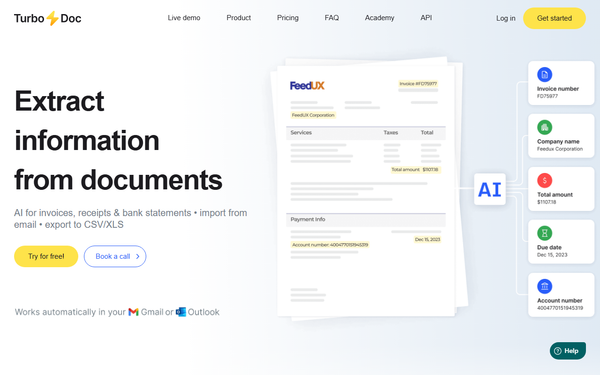
TurboDoc is an AI-powered optical character recognition (OCR) and intelligent document processing platform that automates the extraction of structured data from unstructured financial documents such as invoices, receipts, and bank statements. It pulls documents directly from connected email accounts (Gmail or Outlook), organizes the extracted information in a centralized dashboard, allows side-by-side verification and editing, and enables seamless export to CSV or XLS formats for accounting systems. Primary use cases include accounts payable automation, invoice tracking, expense management, audit preparation, and reducing manual data entry for budgeting and financial reporting.
The tool targets small-to-medium businesses (SMBs), freelancers, accounting teams, and enterprises handling moderate volumes of financial paperwork. It is particularly appealing to finance professionals, bookkeepers, and operations managers seeking affordable automation without complex setup or coding. Launched in late 2024 by a young entrepreneur, TurboDoc positions itself as a simple, secure alternative for businesses looking to cut costs on late payments, duplicates, and manual errors.
Key Features & Capabilities
Core functionality revolves around AI-driven data extraction with high accuracy (claimed 96–99% in testing and user feedback), automatic email ingestion, a secure dashboard for storage and management, and one-click exports. Standout features include real-time side-by-side view/edit mode (original document alongside parsed fields for instant corrections), Gmail/Outlook automation that processes invoices the moment they arrive, advanced image processing for lower-quality scans, and AES-256 enterprise-grade encryption with U.S.-based servers. Multi-language support covers English, Spanish, German, French, Italian, Dutch, Portuguese, and Catalan. Additional capabilities include bulk export for accounting software and secure original-document retention for compliance.
Differentiators from competitors (such as DocuClipper or more expensive enterprise OCR tools) are its usage-based pricing tied directly to invoice volume rather than pages processed, effortless email auto-import without manual uploads, and transparent side-by-side verification that reduces post-processing time. Upcoming integrations with accounting platforms are on the roadmap (waitlist available).
Limitations include currently limited native integrations beyond email (accounting software support is “coming soon”), volume caps that may force upgrades for growing teams, and no built-in advanced analytics or AI insights beyond extraction. Accuracy drops with very poor image quality, and unsupported languages require contacting support. The product remains relatively new, with fewer third-party integrations and ecosystem depth than mature competitors.

User Experience
TurboDoc offers a clean, intuitive dashboard interface with minimal learning curve—most users can be productive within minutes of connecting their email. Reviewers highlight the “lifesaver” Google integration and user-friendly layout that displays originals next to editable fields. No-code setup and simple navigation make it accessible even for non-technical users.
Documentation is light on public resources; the site provides workflow overviews and an academy section with general automation guides rather than in-depth video tutorials or searchable knowledge base. Support is responsive, with premium prioritized assistance included in the Pro plan. Overall, the experience feels modern and efficient, though users may wish for more self-service help articles.

Performance & Reliability
Extraction is rapid—typically 1.2 seconds per page—and reliable for standard invoice formats. Users report 99% perfect extractions in most cases, with the ability to quickly correct the occasional small error via the side-by-side editor. Email automation runs seamlessly in the background, and the dashboard handles organization, searching, and reporting without lag.
No widespread outages or major reliability complaints appear in available reviews. Common minor issues are the recommended double-check for edge-case documents and occasional plan-volume surprises. Security has not drawn criticism, and data handling meets enterprise standards. As a newer tool, long-term scalability for very high volumes is best addressed via self-hosting.

Pricing & Value
TurboDoc uses straightforward, invoice-volume-based pricing with no hidden fees:
- Free / Starter: $0 – up to 10 invoices per month (ideal for testing).
- Simple: $6 per month – up to 50 invoices (includes Gmail automation).
- Pro: $30 per month – up to 300 invoices (multiple Gmail accounts + premium support).
- Self-Hosting / Enterprise: Custom pricing – unlimited volume, private hosting, full API access.
No annual discounts are advertised, but the model scales flexibly as usage grows. A free tier and trial period lower the barrier to entry.
Value is strong for cost-conscious SMBs and freelancers: significantly cheaper than page-based competitors while delivering comparable or better accuracy and automation. The email-centric workflow saves hours weekly, easily justifying the low monthly cost for teams processing 20–200 documents. Larger enterprises may find self-hosting more economical long-term but should evaluate integration readiness.
Practical Tutorial
Official detailed video tutorials are not publicly available, but the platform’s workflow is straightforward and well-documented on the site. Below is a complete step-by-step guide for the most common task—setting up automated invoice processing and handling your first batch (based on official documentation and how-to resources as of March 2026).
-
Sign up and verify: Go to https://turbodoc.io/, create a free account using email (Starter plan activates instantly). Confirm your email and log in.
-
Connect your email: In the dashboard, navigate to Settings > Integrations. Click “Connect Gmail” or “Connect Outlook,” grant the necessary permissions (read access to inbox only). TurboDoc will automatically begin scanning for invoices and receipts.
-
Receive and auto-process: Forward or simply receive an invoice in your connected mailbox. TurboDoc captures it in the background, extracts key fields (vendor, date, amount, invoice number, etc.), and populates the dashboard within seconds.
-
Review and edit in dashboard: Open the dashboard table. Click any document row to enter view/edit mode. The original image/PDF appears on one side; extracted data fields are editable on the other. Verify, correct any discrepancies, and save changes instantly.
-
Export or integrate: Select documents or use filters, then click “Export” → CSV or XLS. For accounting software, copy-paste or wait for upcoming native integrations. Data remains securely stored for audits.
For visual reference and advanced tips (e.g., validation rules or exception workflows), see the official guide at https://turbodoc.io/how-to-automate-accounting-data-entry/. Test with 2–3 sample invoices on the free plan before scaling.
Final Verdict
TurboDoc earns a solid 4.3 out of 5. It excels as an affordable, accurate, and delightfully simple AI invoice automation tool that delivers immediate time savings for users reliant on email workflows.
SMBs, freelancers, and accounting teams processing up to a few hundred invoices monthly should strongly consider it for its low cost, effortless Gmail/Outlook integration, and reliable 99% extraction accuracy. Larger enterprises needing deep ERP connections or unlimited volume today should avoid it until integrations mature or opt for the custom self-hosting tier only after testing.
For any business tired of manual data entry and ready for smart automation on a realistic budget, TurboDoc is an excellent starting point—sign up for the free tier and let it handle your next invoice.