Type AI Review: The Ultimate AI-Powered Editor for Long-Form Writing
Overview & Purpose

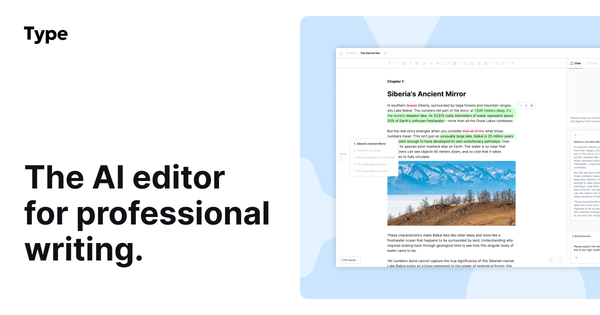
Type.ai, often referred to simply as Type, is an AI-first document editor designed specifically for long-form professional writing. It combines a full-featured word processor with deeply embedded AI capabilities to help users generate, revise, edit, and organize content more efficiently. Unlike general-purpose chatbots like ChatGPT or Claude, Type positions itself as a complete writing environment where AI assists inline without requiring constant copying and pasting between tools.
Primary use cases include crafting books, novels, screenplays, essays, technical reports, long-form marketing copy, and any document requiring careful structure, tone consistency, and iterative editing. Users can turn scattered notes, outlines, or imported files into polished drafts, then refine them with AI suggestions while maintaining full creative control. It targets professional writers, authors, novelists, screenwriters, content strategists, technical writers, and anyone producing extended written content—particularly those who find generic AI chat interfaces disruptive to their workflow. With over 200,000 writers using the platform, it appeals to both hobbyists and professionals seeking a dedicated creative partner for storytelling or documentation.

Key Features & Capabilities
Core functionality revolves around a modern, block-based editor that supports rich formatting (headers, tables, code blocks, LaTeX math, images, and quotes) alongside real-time AI integration. Users can generate full drafts from prompts or attached knowledge files, rewrite selected text inline, and run document-wide reviews that suggest improvements for clarity, grammar, style, or structure—similar to track changes but powered by AI. Standout features include:
- Inline AI commands and Type Chat: Highlight text or use the command palette (/) to request rewrites, continuations, or brainstorming. Changes appear as previews with red/green diff highlights for easy acceptance or rejection.
- Document Review: Processes the entire document on demand to catch errors, enhance readability, or transform tone.
- Context awareness: The AI adapts to your existing style, formatting, and document content rather than defaulting to generic output.
- Offline mode: Full editing capability with local saving and cloud sync upon reconnection.
- Multimodal exports: DOCX, PDF, Markdown, HTML, view-only sharing links, or AI-narrated audio files.
- Additional tools: Version history, keyboard shortcuts galore, content idea suggestions in the sidebar, and import support for Word docs/PDFs.
These differentiate Type from competitors like Grammarly (a plugin rather than full editor) or Jasper (more marketing-focused templates) by emphasizing editorial control, long-form focus, and seamless integration within one distraction-free interface.
Limitations include monthly AI usage quotas (which reset but can be consumed quickly during heavy revision sessions), a practical document size cap around 130,000 words (longer manuscripts should be split), and occasional AI hallucinations or stylistic inconsistencies common to large language models. It does not replace dedicated grammar tools for real-time spellchecking in every scenario and lacks advanced team collaboration features found in Google Docs.

User Experience
Type.ai boasts an exceptionally clean, modern, and performant interface that feels like a next-generation Microsoft Word or Google Docs with AI superpowers. The learning curve is gentle for anyone familiar with standard word processors—most users report becoming productive within minutes thanks to intuitive blocks, floating toolbars, and extensive keyboard shortcuts. The sidebar (housing Type Chat, ideas, and reviews) is collapsible and non-intrusive, while inline editing keeps the focus on the document itself.
Documentation is solid through the official blog (with detailed overviews and feature explainers) and short YouTube tutorials, though in-app help could be more prominent. Support is email-based with priority response for paid users; community feedback on platforms like G2 and Product Hunt consistently highlights the intuitive design and productivity gains.

Performance & Reliability
The editor is notably fast and responsive, even with large documents, thanks to its optimized block-based architecture. AI responses are quick in "Speed" mode and higher quality in "Power" mode, with context windows up to 200k tokens for Claude models. Offline functionality ensures reliability during travel or poor connectivity.
Common complaints from users center on hitting AI usage limits during intensive editing marathons and the need for occasional manual fact-checking due to potential hallucinations. However, there are few reports of crashes, data loss, or major bugs; version history and local saving provide strong safeguards. Overall reliability is high for its intended long-form use cases, with privacy protections ensuring user data is never used to train models.

Pricing & Value
Type.ai offers a generous free tier that lets users create and permanently access documents (with limited AI features). Paid plans, billed monthly or annually (33% savings on annual), include:
- Basic: $8/month ($96/year) – Suitable for shorter projects.
- Pro: $16/month ($192/year) – 3x AI usage; most popular for novels and screenplays.
- Max: $64/month ($768/year) – 12x AI usage for high-volume writers.
All paid tiers unlock the latest premium models from Anthropic, OpenAI, and Google, plus priority email support. There is a 30-day money-back guarantee on paid plans.
Value is strong for serious long-form writers: the time saved on drafting and editing often justifies the cost compared to juggling multiple tools (e.g., ChatGPT + Word + Grammarly). It undercuts some enterprise alternatives while offering deeper integration than free chatbots. Heavy users may need to upgrade tiers or monitor usage carefully, but the free tier provides an excellent no-risk entry point.
Practical Tutorial
Type.ai provides official guidance via its blog and YouTube channel (search "Getting started with Type.ai"). Below is a step-by-step walkthrough for a common task—generating and refining a book chapter from an outline—based on official features (as of April 2026).
-
Sign up and create a new document: Visit type.ai, sign up for free, and start a blank document. (Documents are saved permanently on the free plan.)
-
Import or outline your structure: Paste an outline or import a Word/PDF file via the "Import doc" button. Use block shortcuts (e.g., # for headings) to organize sections.
-
Generate a draft: In an empty or outlined document, click "Generate Draft." Provide a prompt (e.g., "Write Chapter 3 of a sci-fi novel about AI ethics, 2,000 words, matching my attached outline style"). Optionally attach reference files or previous chapters as "knowledge" for consistency. Click generate—the AI produces content directly in the editor.
-
Refine with Type Chat and inline edits: Open the sidebar chat. Highlight a paragraph and ask, "Improve clarity and tension while keeping my voice." Preview suggested changes (green/red diffs), then accept (A key) or reject (R key) individually or in bulk.
-
Run a full Document Review: Click the Reviews icon in the sidebar, select a review type (e.g., "Fix grammar and enhance readability"), and let it scan the entire chapter. Review suggestions in the document or sidebar and apply selectively.
-
Polish and export: Use the command palette (Cmd/Ctrl + K or /) for "Continue writing" on unfinished sections. Format with the toolbar, then export via the ... menu to DOCX, PDF, or AI-narrated audio. Share a view-only link for feedback.
For more visuals, watch the official "Getting started with Type.ai" YouTube tutorial or read the detailed overview at blog.type.ai/post/type-ai-overview.
Final Verdict
Overall rating: 4.7/5 – An outstanding tool that excels at what it was built for.
Writers, authors, and content creators working on long-form projects should use this tool because it delivers genuine editorial control, context-aware AI assistance, and a polished editor in one seamless package—dramatically speeding up drafting and revision without sacrificing quality or voice.
Casual users needing only basic spellchecking or very short-form content should avoid it, as the AI quotas and long-form focus add unnecessary complexity (free tools like Grammarly or ChatGPT suffice there).
One-sentence recommendation: If you're serious about crafting high-quality long-form writing with intelligent AI support that respects your creative process, Type.ai is one of the best investments you can make.