Typefully Review: The Best AI Tool for X and LinkedIn Threads

Overview & Purpose

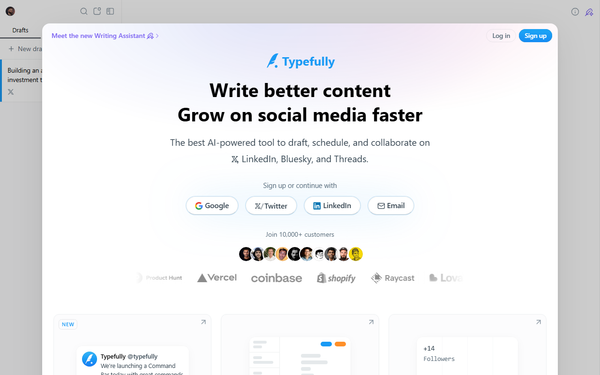
Typefully is a specialized social media management and content creation platform designed to help users write, schedule, and publish high-quality posts and threads across multiple platforms. Its primary purpose is to streamline the entire workflow for creating engaging social content, from initial drafting in a distraction-free editor to performance tracking and audience growth. Key use cases include crafting Twitter/X threads, cross-posting to LinkedIn and emerging platforms like Bluesky and Threads, automating engagement, and using data-driven insights to refine strategies.
The tool targets freelancers, content writers, social media creators, marketers, solopreneurs, and small teams or agencies who prioritize text-based content and audience building on platforms where quality writing drives results. It is not aimed at visual-heavy creators or developers needing advanced coding integrations but excels for those focused on consistent, high-impact posting to grow their online presence.
Key Features & Capabilities
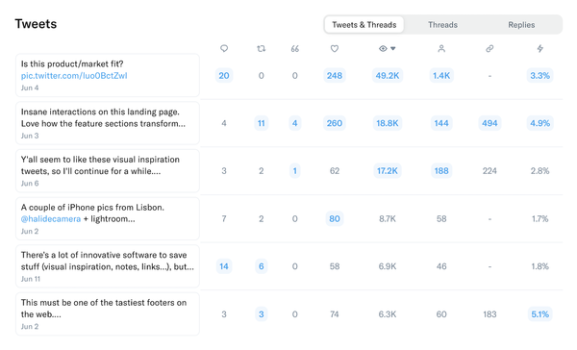
Core functionality revolves around a minimalist editor for drafting single posts or multi-tweet threads, with seamless scheduling, one-click publishing, real-time pixel-perfect previews, and support for media uploads (drag-and-drop images/videos). Users can organize drafts with tags and a calendar view, connect multiple accounts, and enable automatic backups. AI-powered tools include Quick Edit (for grammar fixes, improvements, condensing, or punchier text), idea generation, and voice-matching suggestions based on past content. Additional capabilities cover detailed analytics (impressions, engagement rates, growth tracking—especially strong for X), collaboration via shared drafts and comments, automations like retweets/replies and best-time scheduling, and cross-posting to supported platforms.
Standout features that differentiate Typefully from broader tools like Buffer or Hootsuite include its thread-first composer (with natural language scheduling and auto-splitting), AI specifically trained for social media writing, and focused X/LinkedIn analytics that help optimize posting times and content performance. It also offers social sets for managing multiple profiles and turning posts into blogs or giveaways with auto-DMs. Limitations include support for only five platforms (X/Twitter, LinkedIn, Bluesky, Threads, and Mastodon)—no Instagram, TikTok, Facebook, or YouTube integration—and a lack of advanced visual content creation tools or a full social inbox. Free-tier restrictions on posts and AI usage, plus the need for higher plans for full analytics and unlimited collaboration, may feel limiting for heavy users.
User Experience
Typefully boasts an exceptionally clean, minimalist interface that emphasizes focus and speed, making it one of the easiest tools in its category to adopt. The learning curve is minimal—most users report getting productive within minutes thanks to intuitive keyboard shortcuts (e.g., Cmd/Ctrl + J for Quick Edit), drag-and-drop functionality, and a clutter-free editor that hides distractions like feeds or notifications. Reviews consistently highlight the gorgeous design and distraction-free environment as major wins for writers and ghostwriters.
The interface quality is modern and responsive, with dark mode, precise previews, and visual status indicators (Drafts, Scheduled, Posted). Documentation is solid through a comprehensive Help Center covering writing/editing, publishing/scheduling, analytics, collaboration, and troubleshooting, with searchable articles and an API reference for advanced users. Support resources include in-app chat, a knowledge base, and community feedback channels, though some users note occasional delays in responses for non-urgent issues. Overall, the UX earns high marks (around 4.7/5 in independent evaluations) for simplicity without sacrificing power.
Performance & Reliability
The web-based app performs efficiently with fast loading times, real-time editing, and reliable scheduling/publishing even for complex threads. Analytics dashboards update promptly, and automations (like best-time posting or auto-replies) execute without noticeable lag. Users praise its stability for daily workflows, with no major downtime reported in recent feedback.
Known issues are relatively minor and infrequent: occasional connection glitches (quickly resolved by clearing cache or resetting the app in-browser), posts appearing as "unavailable" temporarily on X, or rare quoting/reply formatting quirks. Common user complaints center on free-tier limitations rather than core reliability, with some Reddit mentions of login hiccups during peak updates. Overall, performance is strong and dependable for its intended scale, with ongoing improvements noted in changelogs.
Pricing & Value
Typefully offers a free plan for casual users (limited posts per month, basic features, and one account) and tiered paid options. As of March 2026, paid plans start with the Starter tier at $8/month (billed annually; 1 account, core writing/scheduling tools), followed by Creator at $19/month (5 accounts, full AI, unlimited analytics, and advanced editing), and Team at $39/month (unlimited accounts, full collaboration, and enterprise-level automations). Annual billing provides discounts, and higher tiers unlock unlimited publishing, intelligent AI credits, detailed insights, and integrations.
The value proposition is excellent for focused creators: more affordable and writing-centric than all-in-one competitors like Hootsuite, with superior thread tools and analytics at a fraction of the cost for X/LinkedIn-heavy users. It outperforms general schedulers in content quality and growth tracking but may require stacking with other tools for broader platform needs. No free trial is prominently advertised, but the free tier serves as a low-risk entry point.
Practical Tutorial
Typefully provides official guides in its Help Center, and numerous video walkthroughs exist (e.g., on YouTube). Below is a step-by-step tutorial for a common task: creating and scheduling a sample thread on X and cross-posting to LinkedIn.
-
Sign up and start a draft: Go to typefully.com, create a free account, and click "New draft." Select X (or a social set for multiple platforms).
-
Write your thread: In the distraction-free editor, type your first tweet (hook). Press Enter to automatically create the next tweet in the thread. Add numbers (1/5, 2/5, etc.) manually or let the auto-splitter handle long text. Example: Start with "Why consistent posting compounds your audience growth 🧵 (1/5)" followed by value-packed points.
-
Enhance with AI: Highlight any paragraph or tweet, click "Quick Edit" (or press Cmd/Ctrl + J), and choose options like "Improve," "Make punchier," or "Add emojis." For deeper help, use the AI prompt sidebar: "Rewrite this in a conversational tone" or "Generate ideas for thread part 3." Drag in images or use the emoji picker (:alias).
-
Preview and organize: Review the pixel-perfect preview (including how it appears on LinkedIn). Add tags for organization and pin if needed.
-
Schedule or publish: Click "Schedule." Type natural language like "next Tuesday at 9 AM" or select "Best time" based on your analytics. Choose platforms (X + LinkedIn), review, and confirm. For immediate posting, use "Publish now."
-
Track results: After posting, monitor performance in the Analytics tab (impressions, engagement). Share the draft link for team feedback before going live.
This process takes under 10 minutes for a polished 5-tweet thread and works identically for Bluesky or Threads. For video demos, search "How to Use Typefully" on YouTube or check support.typefully.com for platform-specific articles.
Final Verdict
Overall rating: 4.6/5
Typefully is ideal for freelancers, writers, and creators who live on X, LinkedIn, and similar text platforms and want a streamlined, AI-enhanced workflow to produce better content faster and grow their audience with data. It shines for anyone prioritizing quality threads over visual or broad multi-platform management.
Avoid it if you need Instagram/TikTok support, heavy video editing, or an all-in-one social inbox for large enterprises—general tools like Buffer may suit better.
One-sentence recommendation: Typefully is a must-try for serious thread writers and creators seeking efficiency and growth on text-first social media.