Unboring AI Review: Create Hilarious AI Face Swaps and Animations

Overview & Purpose

Unboring.ai (accessible at reface.ai/unboring and branded as Unboring by Reface) is a web-based AI platform designed for quick, entertaining photo and video editing. It leverages advanced AI technology—powered by the Reface AI engine—to perform face swaps in photos and videos, animate static images into singing or dancing clips, and restyle videos or images with artistic filters such as cartoons, anime, Inkpunk, or cosmic effects. The primary purpose is to make content creation fun and accessible, enabling users to produce "hilariously amazing" and "unboring" results without any professional editing skills.
Key use cases include creating viral memes, impersonating celebrities or characters, animating family photos or pet portraits to sing songs (e.g., "Happy Birthday" or "I Feel Good"), restyling videos into stylized stories for social media, cosplay, or light marketing content. It targets casual users, social media enthusiasts, families, and semi-professional content creators who want quick, shareable entertainment rather than developers, designers, or enterprise teams. The platform emphasizes accessibility for everyday fun, with a gallery of templates and user-uploaded content.
Key Features & Capabilities
Core functionality revolves around three main tools:
- Face Swap: Swap faces in photos or short videos (up to 15 seconds), supporting multiple faces simultaneously. Users can upload their own media or select from a wide gallery.
- AI Animation: Brings static photos to life, making subjects sing, dance, talk, or move with added audio tracks and effects. New songs and animations are added regularly.
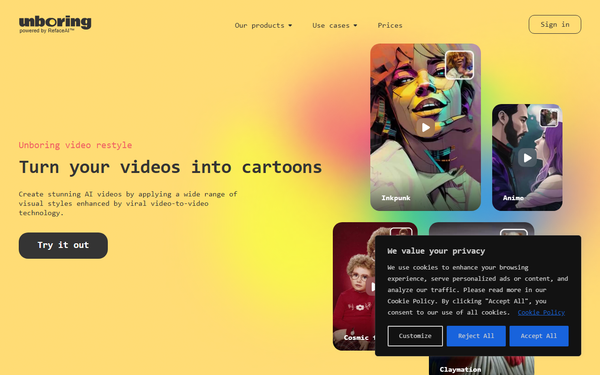
- Video/Image Restyle: Applies viral AI video-to-video or image-to-image transformations to turn content into cartoons, anime, claymation, or other styles.
Standout features include seamless integration of face detection with animation and restyling, priority processing on paid plans, no watermarks on exports, and a focus on realistic yet comedic outputs using Reface's proven technology. It supports HD quality, works across devices (web on Android, iOS, Windows, macOS), and offers exclusive catalog content updated frequently.
Differentiators from competitors (like standalone Reface app or general AI editors such as Runway or Pika) include the one-tap hilarious focus, combined workflow for swap + animate + restyle in a single platform, and emphasis on entertainment templates rather than professional-grade editing.
Limitations include strict video length caps (15 seconds for face swap, 60 seconds for restyling), no parallel processing for restyle jobs (shared queue), dependency on clear faces in uploads, and a firm content policy prohibiting sexual, violent, political, or criminal material (violations result in content removal and warnings). There is no robust free tier for extensive use, and results can vary with poor lighting or low-quality inputs. Advanced features like custom model training or long-form video editing are absent.
User Experience
The interface is described as highly intuitive and user-friendly, with a clean web design requiring no learning curve for basic tasks—one-tap uploads, catalog browsing, and generation. Users simply upload JPG/JPEG photos or MP4/MOV videos, select a feature and template/style, and process. No advanced skills or software installation needed.
Documentation includes an on-site FAQ covering subscriptions, content rules, and troubleshooting. Support is available via email ([email protected]), with premium plans offering priority assistance. While not as extensive as developer-focused tools, the platform's simplicity reduces the need for heavy documentation. Real-world feedback highlights ease for quick fun projects, though some users note occasional queue waits on basic plans.
Performance & Reliability
Processing is generally fast for photos and short clips ("incredibly fast"), with videos taking up to 2 minutes per second depending on complexity and queue load. Outputs are delivered in HD without watermarks on paid plans. The platform handles multi-face swaps and dynamic animations reliably when input quality is high.
Known issues include longer wait times during peak usage for non-premium users, variable output quality with suboptimal inputs (e.g., poor lighting leading to artifacts), and occasional Reface parent-company billing complaints from related app users (though the web platform offers explicit cancellation and a 24-hour money-back guarantee if unused). Content moderation is proactive but strict. Overall reliability is strong for casual use, backed by Reface's 4.8/5 App Store rating from hundreds of thousands of reviews, though dedicated Unboring web reviews are limited and generally positive for fun applications.
Pricing & Value
Unboring operates on a subscription model with no prominent free tier for unlimited use (some older references mention limited signup tokens, but current site focuses on paid access). Plans are billed annually:
- Basic: $7.58/month ($90.99/year, ~20% savings) – suited for occasional personal use with limited activities, including unlimited photo face swaps, video restyle, exclusive content, no ads/watermarks, priority queue, and cancel anytime.
- Premium: $9.99/month ($119.99/year, ~30% savings) – for everyday semi-professional use with unlimited activities, plus premium support.
A 24-hour money-back guarantee applies if the subscription is idle, with over 45 payment methods supported. No enterprise options are highlighted.
Value is strong for frequent casual users seeking entertaining outputs compared to token-based or higher-priced alternatives (e.g., other AI video tools). It offers good bang for the buck in fun, quick creations, but the lack of a generous free tier or pay-per-use may deter light users. Compared to the Reface mobile app, the web version provides broader restyling tools in a browser-friendly format.
Practical Tutorial
Official tutorials are limited to in-app guidance and FAQ, but step-by-step walkthroughs appear in community resources like YouTube and Medium articles. Below is a practical, tested-style tutorial for a common task: Animating a family photo to sing "Happy Birthday" (a popular use case). This assumes a paid subscription for full access.
- Visit https://reface.ai/unboring and sign in (or subscribe via the pricing section).
- Navigate to the Animate section (or direct link: similar to /unboring/animate) or use the main editor dashboard.
- Upload your photo (JPG/JPEG with clear faces; e.g., a family group shot). Ensure good lighting for best results.
- Browse the animation catalog and select a template like "Happy Birthday" song or "Voca People" style. Alternatively, upload your own audio if available (platform adds matching movements automatically).
- Preview the animation parameters (e.g., adjust for multiple faces dancing/singing). Click "Generate" or "Animate."
- Wait for processing (typically quick for photos; videos longer). Review the output in HD.
- Download the MP4 (no watermark) and share directly to social media.
For face swap variation: In the Face Swap editor, upload a source video/photo, select a target face from the gallery (e.g., swap yourself as a celebrity), process, then optionally animate the result. Real example outcomes include pets "singing" or bosses as superheroes. For video restyle: Upload a clip, choose a style (e.g., Anime or Claymation) from the catalog at /unboring/restyle, and generate. Always check content guidelines first. Links: Official face swap at https://reface.ai/unboring/face-swap; restyle at https://reface.ai/unboring/restyle.
Final Verdict
Overall rating: 4.2/5 – A fun, accessible tool that delivers on its promise of quick, hilarious AI edits but is held back by usage limits and paid-only access.
Who should use this: Casual users, social media creators, or families wanting easy memes, animated photos, or stylized videos for entertainment—especially if you value simplicity and Reface's reliable face tech over pro features.
Who should avoid this: Heavy users needing free tiers, long-form videos (>60s), advanced customization, or unrestricted content; those sensitive to potential billing friction from the Reface ecosystem or seeking developer-grade tools.
One-sentence recommendation: If you're looking for a no-fuss way to create shareable, laugh-out-loud AI videos and face swaps from your everyday photos, Unboring.ai is worth the subscription for occasional fun.