Uniscribe Review: Fast AI Transcription with Smart Mind Maps
Overview & Purpose

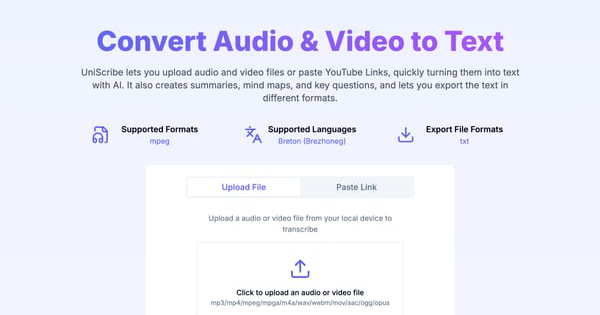
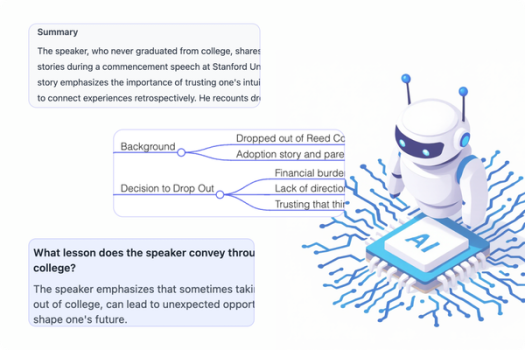
UniScribe is an AI-powered online platform that converts audio and video files—or YouTube links—into accurate text transcriptions using advanced speech-to-text technology. Beyond basic transcription, it automatically generates concise summaries, visual mind maps, and extracts key questions and answers to help users quickly analyze and organize spoken content. Primary use cases include processing lectures, interviews, podcasts, meetings, and video content for note-taking, content repurposing, or research. It appeals especially to journalists needing reliable interview transcripts, students and researchers visualizing complex material, content creators turning videos into blog posts or subtitles, and educators or professionals handling high volumes of spoken media.
Key Features & Capabilities
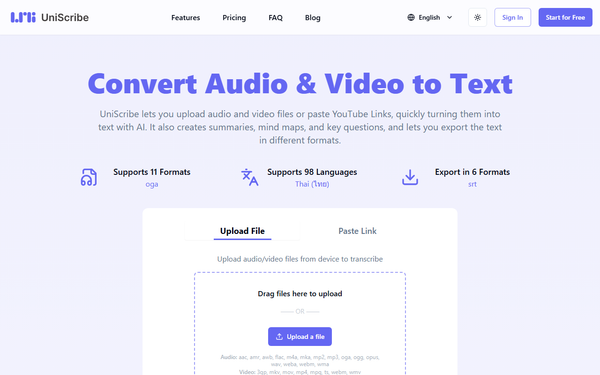
Core functionality centers on fast, accurate transcription with speaker identification, timestamps, and support for 98 languages plus a wide range of audio (MP3, WAV, etc.) and video (MP4, MOV, etc.) formats up to 10 hours or 5 GB per file. Standout features that set it apart include AI-generated text summaries, interactive mind maps (exportable as PNG), automated key Q&A extraction, bulk processing (up to 50 files), YouTube link support, and API access for developers. Exports are flexible across TXT, PDF, DOCX, SRT, CSV, and VTT formats, with no media file retention for strong privacy. These AI post-processing tools differentiate UniScribe from simpler transcribers by turning raw text into actionable insights instantly.
Limitations include cloud-only operation (no offline or local processing), monthly minute quotas that may require overage fees, basic in-editor tools (no built-in find-and-replace or advanced speaker name editing in some tests), and mind maps limited to non-editable PNG exports. Speaker diarization works well for detection but offers limited customization compared to desktop alternatives.
User Experience
The interface is clean, modern, and highly intuitive with a simple drag-and-drop upload area or YouTube link paste field on the dashboard. Users report a minimal learning curve—even complete beginners can start transcribing in seconds—and appreciate the synced audio player that lets you click timestamps to jump in the recording. The overview tab neatly displays summary, mind map, and Q&A sections for quick navigation. Documentation is straightforward via an FAQ section, blog guides, and API docs at uniscribe.co/docs, while support includes responsive Discord community help and priority email for paid users. Overall feedback highlights the “super intuitive” design and ease of controlling transcript alongside audio.
Performance & Reliability
Processing is exceptionally fast—typically under one minute for a one-hour file—and remains consistent regardless of user hardware thanks to cloud execution. Accuracy is high with a premium Whisper-based model, handling clear English and many regional languages well; users frequently note only minor corrections needed even with accents or challenging audio. Reliability is strong for daily use, with no widespread downtime reported and privacy-focused no-retention policy. Common user comments praise speed and results for lectures or podcasts. Minor complaints center on occasional jargon misrecognitions requiring tweaks and the lack of advanced editing features like search-and-replace; some early comparisons noted speaker labeling could be more flexible.
Pricing & Value
Users can start for free with limited credits (approximately 120 minutes per month, basic model, shorter file caps), making it accessible for light testing. Paid plans are straightforward and affordable: Basic at $6/month ($10 billed yearly for 1,200 minutes), Standard (most popular) at $12/month ($20 yearly for 3,000 minutes), and Pro at $18/month ($30 yearly for 6,000 minutes). All include premium accuracy, full AI features, and overage rates from $0.003–$0.005 per minute. A limited-time lifetime deal was previously available via AppSumo starting at $39 for recurring monthly credits. Compared to competitors like Otter.ai or Rev, UniScribe offers excellent value through its lower entry price, unique mind-map/Q&A tools, and generous export options—ideal for individuals and small teams rather than enterprise-scale needs.
Practical Tutorial
UniScribe provides clear on-site guidance, and its blog includes practical examples (e.g., MP4-to-text or audio-to-SRT). Here is a complete step-by-step walkthrough for a common task—transcribing a YouTube lecture and generating a mind map plus summary for study notes. This uses a real-world flow verified from official instructions and user demos as of March 2026.
-
Sign up or log in: Visit https://www.uniscribe.co/ and click “Start for Free” or Sign In (Google or email works). Free tier lets you test immediately.
-
Upload or paste link: On the dashboard, drag-and-drop a local MP4/Mp3 file or simply paste a YouTube URL (example: a 30-minute university lecture on “AI Ethics”). Select the language (auto-detect or choose from 98 options) and enable speaker recognition if it’s a multi-person discussion.
-
Transcribe: Click the “Transcribe” button. Processing usually completes in under 30 seconds for short files or less than a minute for longer ones. You’ll see a progress indicator.
-
Review the transcript: Open the result. Use the synced video/audio player and click any timestamp to jump to that moment. Edit text inline if needed (minor fixes are quick).
-
Explore AI insights: Switch to the “Overview” tab. Instantly view the AI-generated summary, a clickable mind map visualizing key concepts (e.g., branches for “Bias in AI,” “Ethical Frameworks,” “Future Regulations”), and a list of extracted key questions and answers.
-
Export or share: Click “Export” and choose your format—PDF for notes with the mind map included, SRT for subtitles, or TXT/DOCX for reports. Generate a shareable link for collaborators. For the lecture example, you now have a searchable PDF summary and mind map ready for exam prep in under five minutes total.
For more examples, check the official blog at https://www.uniscribe.co/blog.
Final Verdict
UniScribe earns a strong 4.6 out of 5. It excels for journalists, students, researchers, and content creators who want fast, accurate transcriptions plus smart AI analysis tools like mind maps and Q&A in one affordable package—saving hours of manual work while delivering visual insights competitors often lack. Avoid it if you need offline/local processing, heavy speaker relabeling and advanced text editing, or unlimited enterprise features without quotas. Highly recommended for anyone dealing with spoken content who values speed, simplicity, and smart post-processing.