UnSoloMind Review: The Ultimate AI Knowledge Assistant for Teams
Overview & Purpose
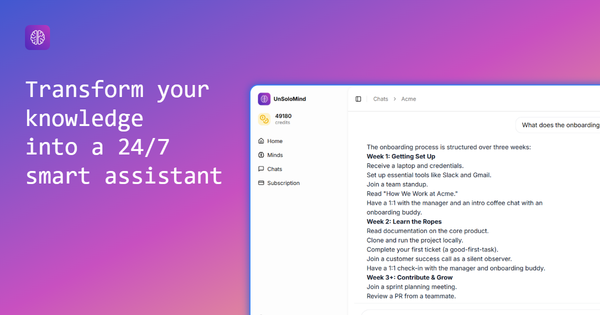
UnSoloMind is an AI-powered chat-based knowledge assistant that transforms uploaded documents, notes, and files into a searchable, always-available "Mind" — a smart knowledge space teams can query conversationally. Users upload PDFs, .txt, or .docx files once, and the GPT-based AI learns from them to deliver instant, context-aware answers 24/7, eliminating the need to repeat information or dig through scattered wikis, Slack threads, or emails. Primary use cases include resolving repetitive internal questions, speeding up onboarding for new team members, capturing async updates without meetings, and preventing after-hours support burnout by handling queries automatically. It is particularly suited for remote or distributed teams seeking to centralize knowledge and reclaim 5–8 hours per week otherwise lost to duplicate questions.
The target audience includes small teams, startup founders, team leads, and knowledge workers (such as support specialists, product managers, or even individual users like students summarizing books or notes). It is not positioned for large enterprises with complex compliance needs but shines for anyone tired of being the "go-to" person for answers. Research conducted as of March 6, 2026.
Key Features & Capabilities
Core functionality revolves around creating a "Mind" by uploading files, which the AI then converts to plain text for natural-language querying via a familiar chat interface. Users manage content through a simple built-in editor, invite guests with one click (guests incur no cost; usage deducts credits from the owner's account), and receive GPT-powered responses in seconds. Standout features include asynchronous knowledge sharing without pings or meetings, 80% reported team adoption within the first week, and a lightweight design that avoids the unread-document problem common in tools like Notion or Confluence.
Differentiators from competitors (such as heavier platforms like Glean or Guru) include its ultra-simple 1-minute setup, credit-based pricing where only the creator pays, and explicit focus on personal or small-team async workflows rather than enterprise-scale search. The tool also supports multiple Minds for organizing different topics and allows quick addition of new notes or FAQs.
Limitations include support for only .txt, .pdf, and .docx uploads (no automatic syncing with Slack, Google Drive, or Notion), no publicly detailed security features or advanced analytics, credit consumption that can add up for heavy use, and a lack of deep integrations or customization options. Missing features compared to more mature alternatives include version history for documents, proactive notifications, or robust role-based permissions beyond basic sharing.

User Experience
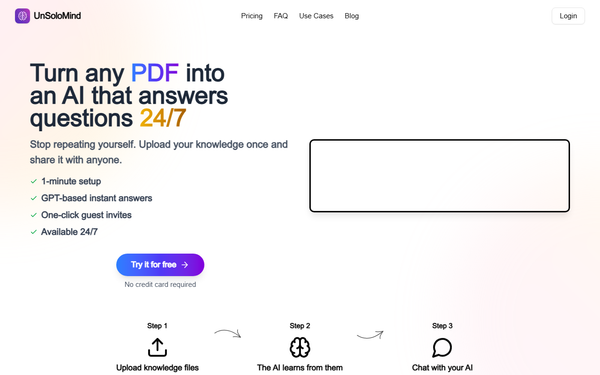
Setup is exceptionally straightforward with a claimed 1-minute process: sign up, upload a file, and start chatting — ideal for non-technical users. The interface is clean and chat-focused, mimicking familiar tools like ChatGPT, resulting in a minimal learning curve. The built-in editor for adding or editing knowledge items is simple and intuitive.
Documentation consists of in-app FAQs covering core concepts (Minds, credits, file formats) plus blog posts on best practices for knowledge management. Support is available via email ([email protected]), with no dedicated help center or community forum noted. Overall, the experience prioritizes speed and simplicity over advanced configuration.
Performance & Reliability
Responses are delivered in just a few seconds using GPT-4o Mini (standard queries) or a reasoning model, with claims of 10× faster information access and automatic resolution of 100% of duplicate questions. Efficiency is high for document-based Q&A, and the tool reliably handles async scenarios without human intervention.
As a relatively new platform (founded 2025), public user reviews and complaints are limited; available feedback is positive regarding reliability for small-scale use, with no widespread reports of downtime, hallucinations beyond typical RAG limitations, or performance issues on established review sites. Potential edge cases include reduced accuracy with poorly structured source documents or high-volume credit exhaustion.
Pricing & Value
UnSoloMind operates on a credit-based subscription model with no advertised free tier beyond a no-credit-card trial upload. Plans (prices exclude VAT; cancel anytime) are:
- Basic: $9/month — 2,000 credits, up to 5 Minds, up to 5 users. Suitable for small teams testing async workflows.
- Pro: $19/month — 10,000 credits, up to 100 Minds, up to 100 users. Ideal for growing teams.
- Enterprise: $99/month — 50,000 credits, unlimited Minds and users, plus priority support.
Credits are consumed at 5 per standard response or 20 for reasoning-mode queries; guests chat for free using the owner's allocation (roughly 400 standard responses on Basic). Value is strong for small teams or solopreneurs compared to alternatives like Notion AI add-ons or enterprise knowledge tools, offering affordable entry, high time savings, and guest-friendly access without requiring subscriptions for the entire team.
Practical Tutorial
No official video tutorials or step-by-step guides are linked on the site, but the process is well-documented in FAQs and blog posts. Below is a complete walkthrough for a common task: building a team knowledge base from a company handbook PDF (based directly on the official upload-and-chat flow).
- Go to https://unsolomind.com/ and click "Try it for free" or "Upload your first PDF free" to sign up / log in (no credit card required).
- Once in the dashboard, click to create a new "Mind" (your smart knowledge space) and name it, e.g., "Company Handbook 2026".
- Upload your file(s): Select a PDF such as an employee policy document. The system automatically converts it to searchable plain text. Add additional .txt or .docx notes via the editor if needed (e.g., "Vacation policy update: 20 days per year").
- Invite your team: Use one-click guest invites to share the Mind link or email addresses. Only your account consumes credits when others chat.
- Test and refine: Open the chat interface within the Mind and ask real questions, e.g., "What is the vacation policy for new hires?" or "How many sick days do we offer?" The AI will cite or synthesize from the uploaded content. Use thumbs-up/down feedback on responses to improve accuracy over time.
- Maintain: Return to the editor to add new items (e.g., quarterly policy updates) or create separate Minds for topics like "Product Roadmap" or "Client FAQs".
This setup typically takes under 2 minutes and immediately enables 24/7 self-service. For ongoing tips, refer to the site's blog posts on documentation best practices.
Final Verdict
Overall rating: 4.3/5 — A refreshingly simple and affordable tool that delivers on its promise of effortless async knowledge sharing for the right users.
Small teams, startups, founders, and remote knowledge workers who struggle with repetitive questions and scattered docs should use this tool for its quick setup, low cost, and genuine time savings. Avoid it if you need enterprise-grade security, automatic integrations with existing tools (Slack, Notion, etc.), unlimited usage without credit caps, or advanced analytics.
UnSoloMind is an excellent choice for anyone who just wants their knowledge to answer questions so they don't have to.