Vaiz Review: The Ultimate All-in-One AI Project Management Tool
Overview & Purpose

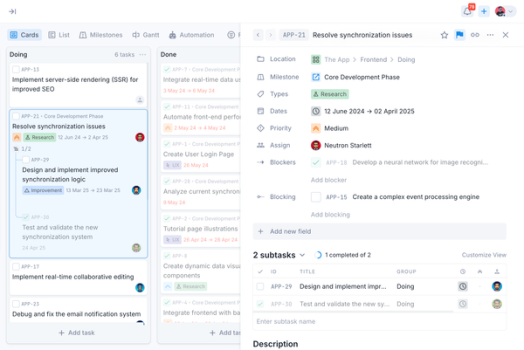
Vaiz is an all-in-one project management and collaboration platform that unifies task tracking, rich document creation, real-time team communication, workflow automation, and AI assistance within a single workspace. It enables teams to manage projects through customizable boards (Kanban, Gantt views), milestones, dashboards, and subtasks while seamlessly embedding or linking collaborative documents that support advanced formatting, code blocks, embeds (Figma, GitHub, YouTube), diagrams, and LaTeX equations. Primary use cases include streamlining development sprints, marketing campaigns, sales pipelines, recruitment processes, OKR tracking, and cross-functional workflows such as Scrum, Waterfall, or Sociocracy 3.0—eliminating the need to switch between disparate tools like Jira, Notion, Asana, or Confluence.
The platform targets a broad audience: developers, marketers, designers, sales teams, HR/recruiters, non-profits, and small-to-enterprise organizations across industries including tech (AI, blockchain, VR/AR), consulting, and production. It is particularly appealing to teams frustrated by fragmented tool stacks who want centralized visibility, activity logs, role-based access controls, and productivity gains (claimed to save up to 9% of work time by reducing context switching).
Key Features & Capabilities
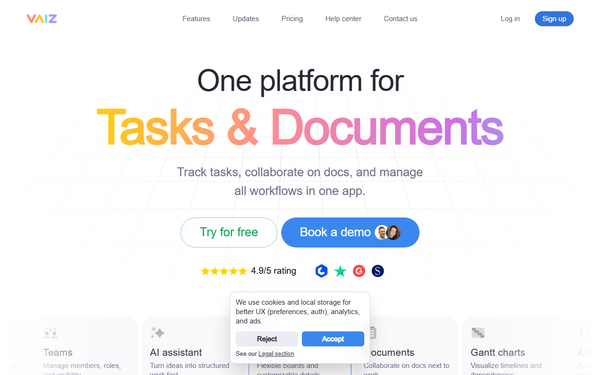
Core functionality revolves around flexible task boards with WIP limits, smart filters, custom fields, subtasks, and multiple views; Gantt charts for timeline and dependency visualization; real-time collaborative documents with 60+ editing blocks (todos, data grids, embeds, dev tools like Swagger/GraphQL highlighting); AI assistant for generating tasks, descriptions, summaries, and structured plans; unlimited workflow automations (in paid plans); dashboards for metrics; milestones/epics; and full activity/history logs with mentions and comments.
Standout features that differentiate Vaiz include its tight integration of tasks and documents (docs live alongside boards without file hunting), easy JSON/XML imports from Asana, Jira, Trello, or ClickUp, GitHub integration, extensive embed and code support, and templates for specialized frameworks (RAID logs, RACI matrices). Unlimited storage/users and automatizations in higher tiers, plus a lightweight, uncluttered interface, position it as a cost-effective Notion + Jira replacement.
Limitations include a maturing ecosystem with fewer deep third-party API integrations than established competitors, occasional mobile app sync or stability quirks, and the potential for feature overload—teams needing only basic task lists may find the platform overly comprehensive. AI outputs can occasionally produce inconsistent or “weird” results, requiring manual review. No native advanced analytics beyond basic dashboards is noted in current documentation.
User Experience
Vaiz offers a modern, intuitive interface praised for being “uncluttered” and simpler than Jira or Confluence, with lightning-fast real-time collaboration and responsive design that feels like a “breath of fresh air.” The learning curve is moderate: beginners can get started quickly with templates and tutorials, but fully leveraging automation, custom fields, and AI typically takes 2–4 weeks for teams transitioning from simpler tools. Small teams sometimes describe it as initially overwhelming due to the breadth of options.
Documentation and support resources are strong, with an official help center at vaiz.com/help featuring clear step-by-step tutorials, plus 24/7 email/chat support (priority phone for Premium). User reviews highlight responsive customer service and helpful onboarding. Mobile experience is functional but less polished than the web version, with occasional reported sync delays.
Performance & Reliability
The platform is marketed as “lightning fast, secure, and reliable,” with real-time syncing across tasks and documents delivering smooth performance even during collaborative editing. Activity logs and unlimited history (Pro+) ensure nothing is lost. No widespread outages or major slowdowns were reported in recent user feedback as of March 2026.
Common complaints are minor: occasional AI inconsistencies, rare mobile sync issues, and initial setup complexity for very large workspaces. Overall reliability is high, with users noting stable performance for development teams and seamless GitHub embeds. Trustpilot reviews (4.6/5 from 24+ users) confirm positive experiences with speed and uptime.
Pricing & Value
Vaiz offers transparent, competitive pricing with a generous free tier and 30-day trial (no credit card required):
- Free: Up to 10 users, 2 GB storage, 100 automations/month, basic tools—ideal for small teams testing the waters.
- Pro: $5 per user/month (billed yearly) or $7 monthly—unlimited users, 500 GB storage, unlimited automations and history.
- Premium: $9 per user/month (billed yearly) or $13 monthly—unlimited storage, full AI assistant, priority 24×365 support.
- Enterprise: Custom self-hosted option with dedicated setup and compliance features.
Additional perks include 50% startup/small-business discounts, prorated billing, and the ability to upgrade/downgrade spaces independently. Value is excellent for teams consolidating tools—often 25–64% cheaper than Asana, ClickUp, or Jira equivalents while delivering comparable or richer functionality. The all-in-one approach provides strong ROI through reduced subscription sprawl and productivity gains, especially for growing teams.
Practical Tutorial
Official tutorials are available at https://vaiz.com/help/tutorials. Below is a step-by-step walkthrough for a common task—setting up a Kanban board for a development project and creating your first task with AI-generated description (based on official guides as of March 2026). This example assumes you have signed up (free) and created a workspace/space.
-
Create or open a Project: From the left sidebar, locate the Projects section and click the project name (e.g., “Apollo Program” or create a new one via the + icon).
-
Create a New Board: In the project view, click the + button next to the Boards section. Select a template (e.g., “Project management” for structured columns or “Default” for empty). Click Continue.
-
Configure the Board: Enter a board name (e.g., “Main Development Board”). Customize groups/columns (e.g., Backlog, To Do, In Progress, Done). Define task types with colors, labels, and icons. Click Create board.
-
Invite Teammates (optional): In the Setup team dialog, add emails or select existing members/groups and click Invite.
-
Open the Board and Add a Task: Click “Open board.” In the desired column (e.g., To Do), click the “Add task” button, type a title (e.g., “Develop user login feature”), and press Enter or click Add task.
-
Assign and Enhance the Task: Click the task card to open details. Use the three-dots menu or avatar to assign to yourself. Scroll to the Description field, click the ? AI prompt icon, type a prompt such as “Describe the task for developing a small to-do app with authentication,” press Enter, review the generated text, and click Insert.
-
Add Parameters: Set a due date via the Dates option (choose Start → End range if needed), select Priority (High/Medium/Low), and add any milestones or comments. Review the Activity log at the bottom for audit trail.
Your board and AI-assisted task are now live and ready for collaboration. Full official guides: How to Create a Board and How to Create Tasks.
Final Verdict
Overall rating: 4.5/5 — a strong, feature-packed all-in-one solution with excellent value and modern polish.
Teams that should use this tool are small-to-medium cross-functional groups (developers, marketers, sales, HR) seeking to consolidate task management, documentation, and collaboration into one affordable workspace with helpful AI and flexible workflows—especially those migrating from multiple tools and valuing speed, imports, and real-time features.
Teams that should avoid this tool are absolute minimalists needing only basic task lists (Trello suffices), organizations requiring ultra-mature mobile apps or deep specialized integrations, or those wary of a still-maturing platform’s occasional AI quirks and initial learning curve.
Vaiz delivers an intuitive, cost-effective unified workspace that genuinely reduces tool fatigue—highly recommended for teams ready to streamline their entire project lifecycle.