VanceAI Image Upscaler Review: Boost Photo Quality with AI

Overview & Purpose
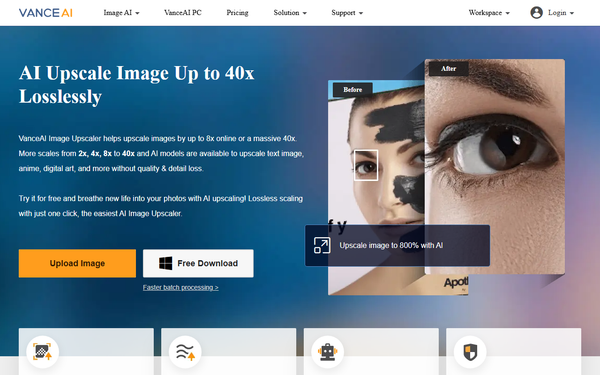
VanceAI Image Upscaler is an AI-powered online and desktop tool that uses deep learning and Generative Adversarial Networks (GANs) to enlarge images up to 800% (8x online, up to 40x via desktop software) while intelligently restoring lost details, reducing pixelation, and preserving sharp textures, colors, and clarity. It automatically analyzes and processes low-resolution photos, fixing issues like blur, JPEG artifacts, and grain to produce HD or 4K-ready results in seconds.
Primary use cases include enhancing e-commerce product photos and banners for platforms like Amazon or Etsy, creating professional car dealership listings, preparing images for large-format printing (posters, banners), sharpening digital art, illustrations, anime, pixel art, and AI-generated content, as well as improving blurry text, scanned documents, invoices, or old family photos for better readability and visual appeal.
The target audience spans e-commerce sellers and marketers needing quick product image optimization, graphic designers and artists working with digital media or print projects, photographers dealing with soft or low-res shots, content creators handling social media or web graphics, and everyday users or small businesses requiring professional-grade enlargements without advanced editing skills. It appeals to both beginners and professionals seeking efficiency over manual tools like Photoshop.
Key Features & Capabilities
Core functionality revolves around one-click AI upscaling with automatic model detection and options for manual selection among specialized models (e.g., Standard for general photos, Anime, Art & CG, Text/Low-resolution, and Compressed). Users can choose scales like 2x, 4x, 6x, or 8x online (higher with desktop), with batch processing available via the VanceAI PC desktop app. It supports JPG, PNG, and JPEG formats, with before/after previews using interactive sliders for comparison.
Standout features include its diverse AI models tailored for specific content types (e.g., preserving anime details or sharpening text without distortion), lossless quality retention even at high scales, rapid processing (typically seconds per image), strong privacy protections (images deleted within 24 hours), and the hybrid web/desktop approach for flexibility—online for quick single tasks and desktop for offline batch work up to 40x. Unlike traditional interpolation, it intelligently reconstructs details rather than stretching pixels.
Limitations include no truly unlimited free tier (processing requires credits after initial trials), file upload caps (up to 5MB/2.8MP for non-subscribers, 10MB/34MP for paid), online dependency for the web version, and occasional need for format conversion post-processing. The desktop app adds value but requires separate licensing, and extreme upscaling on complex images can sometimes introduce minor artifacts. It lacks advanced manual controls compared to desktop software like Topaz Gigapixel.
User Experience
The tool boasts an exceptionally low learning curve thanks to its intuitive drag-and-drop web interface—no technical expertise required. Users simply upload an image, and the AI handles analysis, model selection, and upscaling automatically, with optional scale adjustments and previews. The clean, minimalist design includes side-by-side or slider comparisons, making it accessible for non-designers.
Interface quality is modern and responsive, with clear calls-to-action and history panels for recent uploads. Documentation is straightforward via on-site FAQs covering common scenarios like printing or depixelation, supplemented by YouTube tutorials and a blog. Support includes 24/7 customer service for paid users, though some reviews note occasional delays during peak times or challenges with refund requests. Overall, it's praised for simplicity and speed, with minimal onboarding needed beyond signing up.
Performance & Reliability
Processing is highly efficient, with most images upscaled in just a few seconds online, scaling well for single files or batches on desktop. Quality is generally reliable, with users and reviews highlighting natural detail preservation, reduced noise, and crisp results superior to basic resizing—especially for e-commerce, art, and text. It performs best on moderately low-res inputs and excels at maintaining original characteristics without over-smoothing or artificial alterations.
Known issues include variable results on highly complex or historic photos (occasional face distortion or added artifacts reported in some Trustpilot reviews), desktop app crashes with very large batches (e.g., thousands of images), and slower performance during high server load. Internet is required for the web version, and file size limits can force automatic resizing. Reliability is strong for most casual-to-professional use, with over 1 million users citing consistent quality, though it's not flawless for every edge case.
Pricing & Value
VanceAI operates on a credit-based system where most upscaling tasks consume 1-3 credits per image (depending on complexity and tool). Pay-as-you-go packs start at 100 credits for $4.95 (~$0.05/credit), with larger bundles offering better rates (e.g., 1,000 credits for $17.95 at ~$0.018/credit). Monthly subscriptions provide recurring credits (e.g., 100 credits/month from ~$9.90), with rollover benefits for active plans. No watermark on paid outputs; a limited free trial allows testing without full downloads in some cases.
Desktop software (VanceAI PC) has separate licensing (e.g., ~$39.90/month or lifetime options with discounts), enabling offline batch processing. A 7-day money-back guarantee applies if under 10% of credits are used. Value is strong for occasional or targeted use—cost-effective compared to one-time purchases of heavy desktop alternatives like Topaz—offering flexible entry for small businesses or freelancers. Heavy users may find credits add up, making desktop subscriptions more economical long-term, though it's competitively priced against rivals like LetsEnhance for speed and model variety.
Practical Tutorial
A basic step-by-step tutorial for upscaling a low-resolution product photo (common e-commerce task) is available directly from the official interface and documentation—no advanced skills needed. Here's a practical walkthrough based on the tool's standard workflow (as of April 2026; visit https://vanceai.com/image-enlarger/ for the latest):
-
Sign up/Log in and Access the Tool: Create a free account at vanceai.com if needed (required for full access without watermarks). Navigate to the Image Upscaler page and click "Upload Image" or drag-and-drop your file (JPG/PNG supported; keep under 5MB/2.8MP for free trials).
-
Upload and Preview Original: Select your low-res image (e.g., a blurry 720p product shot). The interface displays the original on the left.
-
Select Preferences (Optional but Recommended): AI auto-detects the best model, but you can choose from options like "Standard" for photos or "Text" for documents. Pick a scale (e.g., 4x for print-ready) via the workspace controls. No manual sliders for sharpness are needed—the AI handles enhancement.
-
Start Processing: Click "Start to Process" or equivalent. Expect results in seconds; a progress indicator shows AI analysis and upscaling.
-
Review Before/After: Use the interactive slider or side-by-side view to compare details (e.g., sharper product textures, clearer labels). Adjust scale if needed and reprocess.
-
Download the Result: Once satisfied, download the upscaled image (higher resolution, e.g., 4K equivalent). For batches, switch to the desktop app download for offline multi-file handling.
Official video tutorials on YouTube (search "VanceAI Image Upscaler how to use") provide visual demos, including real before/after examples for anime or car photos. For print-specific guidance, the site's FAQ recommends testing scales and using desktop for large volumes.
Final Verdict
Overall rating: 4.5/5 – Excellent for speed, ease, and specialized quality, with minor deductions for credit-based costs and occasional edge-case inconsistencies.
Who should use this tool: E-commerce professionals, designers, artists, and marketers who need fast, reliable upscaling for product visuals, digital art, or print prep—especially those valuing specialized AI models and a simple workflow over advanced customization. It's ideal for occasional to moderate use where privacy and quick results matter.
Who should avoid this tool: Heavy batch processors on tight budgets (desktop licensing adds cost), users requiring fully offline/free unlimited processing, or those with highly specialized restoration needs (e.g., old documents where results can vary). If you prefer one-time software purchases or encounter frequent billing issues, explore alternatives.
One-sentence recommendation: VanceAI Image Upscaler delivers professional-grade, hassle-free AI enlargement that's perfect for boosting image quality across commercial and creative projects—try the free test and scale with credits for reliable results.