Veed Review: The Best AI Video Editor for Fast Content Creation

Overview & Purpose
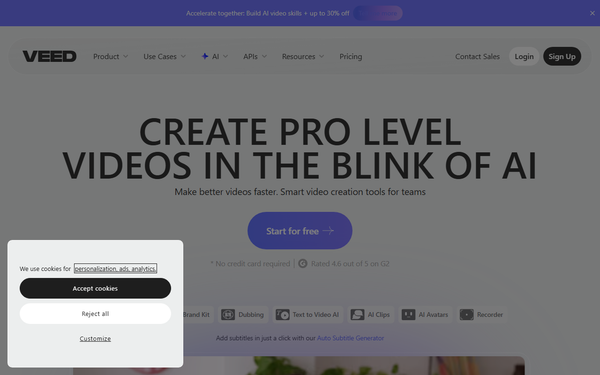
VEED is an AI-powered online video creation and editing platform that enables users to transform ideas into professional videos rapidly through a browser-based interface. It combines intuitive editing tools with advanced AI capabilities, allowing everything from basic trimming and captioning to generating full videos from text prompts, removing backgrounds, and creating AI avatars. Primary use cases include creating social media content, marketing videos, product demos, training materials, webinars, internal communications, and customer testimonials. It excels at quick-turnaround projects like repurposing long-form content into short clips or adding subtitles for accessibility.
The target audience spans growth marketers, content creators, demand generation teams, small business owners, HR professionals, educators, and videographers who need professional results without deep technical expertise or desktop software. It is particularly suited for non-designers and teams prioritizing speed and collaboration over Hollywood-level precision.
Key Features & Capabilities
Core functionality revolves around a cloud-based editor supporting upload, recording (screen and camera), trimming, text overlays, music addition, and export in multiple formats and resolutions. Standout AI-driven features include one-click auto-subtitles and transcription (with 95%+ accuracy in many languages), background removal, noise reduction, eye contact correction, voice dubbing, text-to-speech, AI avatars, and generative AI tools powered by models like Kling, Sora, and Veo for text-to-video creation. Additional tools encompass magic cut for clipping long videos, brand kits, social media resizing, and stock media libraries.
Differentiators include seamless browser-based workflow (no downloads required), deep AI integration that automates tedious tasks, and strong subtitle/translation capabilities that support multiple languages and speaker detection. Collaboration features like shared workspaces and reviewers appear in higher plans.
Limitations include credit-based consumption for advanced AI generations (e.g., video clips or avatars), which can add up for heavy users, and a lack of advanced timeline precision or effects found in pro desktop software like Adobe Premiere. Offline editing is impossible due to its cloud nature, and some users note that highly customized or complex animations may require exporting to other tools.
User Experience
VEED boasts an intuitive, drag-and-drop interface with a low learning curve, making it accessible even for complete beginners. Users frequently praise the clean dashboard and quick start—no lengthy tutorials needed for basic edits. The platform feels responsive for short projects, with helpful prompts and AI suggestions guiding the process.
Interface quality is modern and uncluttered, though occasional lag can appear when handling large files or during rendering. Documentation includes a robust help center, blog, video guides on YouTube, and webinars. Support varies by plan: chat for paid users, with 24/5 options at Enterprise level. Overall, it prioritizes simplicity and speed over exhaustive customization options.
Performance & Reliability
For most short-form and mid-length videos, VEED performs efficiently with fast uploads, AI processing, and exports. Browser-based design enables work from any device with an internet connection. However, common user complaints involve buffering, lag, and glitches with longer or high-resolution files, sometimes leading to lost progress or failed exports. Reliability issues appear more pronounced in free or lower-tier plans.
As of April 2026 research, these performance hiccups remain a recurring theme in reviews, though many users report satisfactory results for typical marketing and social content. Stability improves with stable connections and smaller projects.
Pricing & Value
VEED offers a tiered structure (per editor, billed monthly or annually with up to 51% savings on yearly plans):
- Free: $0 – Basic editing, watermarked 720p exports, 10-minute limit, limited AI credits, 2GB storage.
- Creator: ~$12/month (annual) – No watermark, 1080p, full stock library, unlimited auto-subtitles, basic AI tools.
- Pro: ~$24/month (annual) – Recommended; 4K exports, advanced AI (unlimited Gen-AI Studio in some contexts), multiple brand kits, higher credits.
- Studio: ~$39/month (annual) – Unlimited storage, project analytics, custom templates, all AI models.
- Enterprise: Custom – Full collaboration, SSO, dedicated support, unlimited reviewers.
Value is strong for quick, AI-assisted content creation compared to desktop alternatives like Adobe Premiere or even CapCut, especially for teams avoiding installation. The free tier allows testing, but professional use requires paid plans for watermark-free, high-quality output and full AI access. Some reviewers find higher tiers expensive relative to feature depth, but most agree the time savings justify the cost for frequent creators.
Practical Tutorial
A common task is adding professional auto-subtitles to a video for better engagement and accessibility. Here is a step-by-step walkthrough based on VEED’s official process (as of April 2026):
- Log in to your VEED account (free signup available) and click Create Project.
- Upload your video file by dragging it or selecting Upload a File from your desktop.
- Once the video loads in the editor, click Subtitles in the left-side menu.
- Select Auto Subtitle, choose the spoken language, and click to generate. VEED transcribes automatically (typically in seconds, with ~95% accuracy). Enable Detect Speakers for multi-person videos.
- Review and edit subtitles in the timeline: Split long sentences by hitting Enter in the text editor, merge lines by hovering and clicking, or correct low-confidence words (highlighted by the tool).
- Customize appearance via the Styles menu at the top: Choose fonts (e.g., Roboto or upload custom), adjust size (22-28 pt recommended), color for contrast, effects (e.g., background box or karaoke animation), alignment, and spacing.
- For multi-language support, go to Translate, add languages, and auto-translate or upload SRT files.
- Preview the video, then export (watermark-free on paid plans) or download subtitles separately in SRT format (Pro+).
For visual guidance, refer to VEED’s official tutorial: https://www.veed.io/learn/how-to-add-subtitles-or-captions-to-a-video. This entire process usually takes under 5 minutes for a 5-minute video.
Final Verdict
Overall rating: 4.3/5. VEED delivers exceptional value for speed and simplicity in AI-enhanced video creation.
Who should use this tool: Marketers, small teams, content creators, educators, and beginners who produce frequent short-to-medium videos for social media, marketing, or internal use and want powerful AI automation without a steep learning curve or high costs.
Who should avoid this tool: Professional video editors needing pixel-perfect control, offline capabilities, or handling very long/high-complexity projects; those sensitive to occasional performance lags or who require unlimited advanced features without credit limits.
One-sentence recommendation: VEED is an outstanding choice for anyone seeking fast, professional-looking videos with minimal effort—especially if AI subtitles and quick generation are priorities—making it a smart pick for non-experts focused on results over advanced filmmaking tools.