Venice AI Review: The Best Private and Uncensored AI Alternative

Overview & Purpose

Venice AI is a privacy-first AI platform that delivers text generation, image creation, code assistance, document analysis, web search, and character creation through a browser-based interface (with iOS and Android apps). It emphasizes "unrestricted intelligence" by keeping all conversations and data stored exclusively in the user's local browser storage—no server-side retention, logging, or third-party sharing—while providing access to open-source and leading models in an uncensored environment. Primary use cases include brainstorming, research, creative writing, coding, photo understanding, PDF analysis, and generating or editing images/videos without content filters that plague mainstream tools.
The target audience spans developers building with its permissionless API, content creators and artists seeking unrestricted image or character generation, researchers needing private document analysis, and general users (including those exploring edgy or NSFW topics legally) who prioritize data privacy and creative freedom over the heavy moderation found in tools like ChatGPT or Claude. It appeals especially to privacy-conscious individuals, marketers avoiding corporate censorship, and anyone frustrated by AI refusals on sensitive prompts.
Key Features & Capabilities
Core functionality revolves around multimodal AI: text chat with adjustable temperature/top-p and system prompts (Pro), image generation with detailed controls (negative prompts, aspect ratios, seeds, adherence/CFG scale, steps), code assistance via specialized models like GPT-5.2 Codex, document/PDF uploads (local processing), built-in web search, and AI character creation with rich backstories.
Standout features that differentiate it include 100% local chat storage for true privacy, "Venice Uncensored 1.1" model for minimal refusals, access to cutting-edge open models (e.g., Claude Opus 4.5, Flux 2 Pro, Grok 4.1, Kling video variants) without account-linked tracking, Pro-exclusive tools like watermark removal, high-res upscaling, and 70+ image styles, plus a social feed for privately shareable links. The API enables autonomous agents with OpenAI-compatible endpoints.
Limitations include strict daily caps on the free tier, reliance on model-inherent safeguards (still blocks outright illegal content), no third-party privacy audit for verification, occasional generation artifacts (e.g., blank images or verbose "thought process" outputs), and no enterprise SLAs or dedicated compliance features. Video generation exists but remains secondary and credit-based.

User Experience
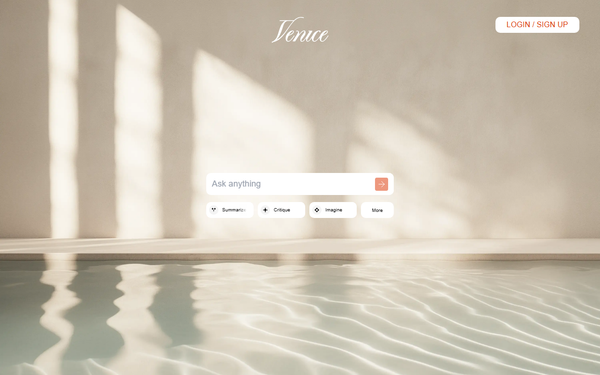
Venice AI boasts a clean, intuitive browser interface with tabs for Summarize, Critique, Imagine, and chat history—minimal learning curve for anyone familiar with ChatGPT. Users select models from dropdowns, tweak settings via a gear icon, and generate instantly; chats persist locally until manually cleared. Mobile apps mirror the web experience for on-the-go use.
Interface quality is modern and distraction-free, with options like Safe Venice toggle (disableable on Pro) and private sharing links. Documentation for end-users is light (mostly blog posts and in-app tooltips), with full guides limited to the developer API at docs.venice.ai; community support via Reddit and slow official responses are common pain points. Overall ease of use earns high marks for casual users, though advanced parameter tuning (e.g., CFG scale) benefits from external references.

Performance & Reliability
Response speeds are generally fast thanks to a distributed GPU pool and optimized open models, with image generation completing in seconds for standard prompts and text replies feeling snappy. Uptime has improved post-2025 infrastructure upgrades, but occasional outages or slowdowns during maintenance appear in user reports.
Common complaints include inconsistent output quality (e.g., verbose reasoning eating response space, blank image results during edits), Android-specific bugs (scrolling/selection issues), and login hiccups tied to service providers. Uncensored mode performs reliably for creative freedom but can produce unpredictable or lower-fidelity results on complex prompts compared to heavily tuned commercial models. No widespread data breaches reported, aligning with local-storage claims, though lack of independent audits leaves some users cautious.

Pricing & Value
Venice offers a generous free tier ($0) with 10 text prompts and 15 image prompts daily using base models—ideal for testing. The Pro plan costs $18/month (or $149/year, roughly $12.42/month) and unlocks unlimited text (in-app), up to 1,000 images/day, advanced models, character creation, document uploads, watermark removal, high-res upscaling, and filter disabling. API usage follows separate credit/token pricing with staking options.
Value proposition shines for privacy seekers: cheaper than ChatGPT Plus while delivering uncensored access and local data control. Free tier suits light users; Pro delivers strong ROI for creators or developers needing volume without data risks. Compared to alternatives, it undercuts paid competitors on privacy and freedom, though heavy users may need Pro immediately due to tight free limits.
Practical Tutorial
Venice provides official guidance via its blog. Below is a complete step-by-step walkthrough for a common task—generating a captivating, custom image (e.g., "Cyberpunk street market at night")—based on the platform's current interface as of March 2026. This works on web or mobile apps; upgrade to Pro for advanced controls and unlimited generations.
-
Sign up and navigate: Go to venice.ai (free account required for limits tracking). Click "Imagine" or head to the image generation section from the chat interface.
-
Select model and enter basic prompt: Choose an image model (e.g., Flux 2 Pro or Nano Banana Pro for realism). Type a simple prompt like "Sunset over a lake" and hit Enter for a quick result.
-
Refine with detailed prompt: For better output, expand it: "Cyberpunk street market, wide-angle low shot. Neon-lit rainy night, foggy atmosphere. Rule of thirds composition with holographic ad on right foreground." Front-load key details.
-
Adjust settings (gear icon): Set aspect ratio (e.g., 16:9 cinema), style (e.g., Comic Book or Realistic), adherence (higher for strict prompt following), steps (30 default), and negative prompt (e.g., "blurry, low quality, deformed faces"). Enable Hi-Res for detail (longer wait) or Hide Watermark (Pro). Toggle Safe Venice off for full uncensored freedom (Pro).
-
Generate and iterate: Hit regenerate. Download favorites. Use Venice's text chat first to refine prompts automatically (e.g., "Optimize this image prompt: [your idea]").
-
Advanced: Composite elements: Generate separate pieces (e.g., character + background), download, then composite externally in Canva or Photoshop. Pro users can upscale directly.
For official details and examples, see Venice's tutorial: https://venice.ai/blog/how-to-generate-captivating-images-with-venice. Experiment with seeds for reproducibility.
Final Verdict
Overall rating: 4.2/5 – Exceptional on privacy and creative freedom, solid but not flawless on reliability and support.
Venice AI is ideal for privacy-focused creators, developers, and users tired of censored mainstream AI who value local data control and uncensored outputs for legal creative work. Avoid it if you need enterprise-grade support, audited compliance, or rock-solid 24/7 performance for mission-critical tasks.
One-sentence recommendation: If privacy and unrestricted creativity matter more than polished enterprise polish, Venice AI is the smartest ChatGPT alternative available today.