Verex Review: Automate Web QA Testing with AI Agents

Overview & Purpose

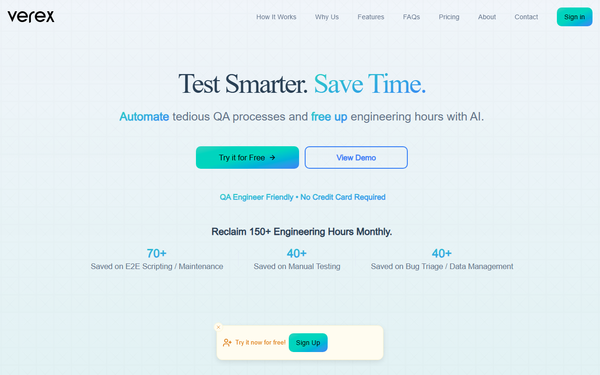
Verex is an AI agent-powered QA automation platform designed to streamline end-to-end testing for web applications without requiring manual scripting or coding. Users describe tests in natural language, and the AI handles execution, reporting, and even bug triage. Primary use cases include automating repetitive E2E flows (such as login sequences, UI consistency checks, and security validations), integrating tests into CI/CD pipelines for faster releases, triggering ad-hoc tests via chat tools like Slack or Teams, and automatically logging defects into project management systems. It targets engineering teams seeking to cut manual testing overhead, particularly QA engineers, developers, DevOps professionals, product managers, CTOs, tech startups, SaaS companies, agencies, and freelance consultants. The tool is explicitly positioned for publicly accessible web apps (requiring browser and internet access) and emphasizes seamless workflow integration to reclaim engineering time.
Key Features & Capabilities
Core functionality revolves around AI-driven test creation and execution: define tests in plain English, trigger them flexibly (UI, chatbot, Slack/Teams, or CI/CD), receive visual reports with screenshots, and enable auto-bug creation in Jira or Trello. Standout differentiators include dynamic AI agents that interpret natural language and adapt to UI changes without relying on fragile selectors (unlike traditional tools like Selenium), AI-generated optimization suggestions, automatic test data generation, and one-click integrations with GitHub, GitLab, Bitbucket, Jenkins, Slack, Microsoft Teams, Jira, Trello, and GitHub Issues. The platform supports scalable test suites for web apps and claims to deliver 3x faster bug resolution.
Limitations include its restriction to publicly accessible web applications (no support mentioned for internal, desktop, or mobile-native apps unless exposed via browser), reliance on an evolving AI model that may occasionally misinterpret complex scenarios, and a token-based execution system that could introduce usage caps for high-volume teams. Documentation is basic with no advanced features like custom scripting fallbacks or offline testing noted. As a beta product, it lacks the maturity of established competitors like Testim, Mabl, or Cypress with AI add-ons.
User Experience
Onboarding is marketed as completing in under two minutes: sign up, describe tests in natural language, add credentials if needed, and start. The interface is described as QA-engineer-friendly with clean dashboards for test management, visual reports, and chatbot-style triggers, suggesting a low learning curve for non-coders. No complex setup or selector maintenance is required. Documentation exists at verex.ai/docs with organized sections (Getting Started, Test Management, Test Execution, and detailed Integrations guides for GitHub Actions, GitLab CI/CD, etc.), but it remains high-level without exhaustive public step-by-step tutorials or video libraries. Support is hands-on during beta via a dedicated team and contact form; community resources are minimal given the tool’s newness. Overall, the experience prioritizes speed and simplicity over deep customization.

Performance & Reliability
Verex promises instant test execution and reports, with claims of reducing manual testing from 40+ hours to ~1 hour per month and eliminating script maintenance entirely. AI adaptation to UI changes reportedly minimizes flakiness. As of research in March 2026, the platform is in active beta with working product usage reported by early testers, but no independent performance benchmarks or uptime statistics are publicly available. No widespread user complaints or known issues (downtime, false positives, or accuracy problems) appear in reviews or forums—largely because the tool is very new, with only launch announcements on Reddit and AI directories. Reliability hinges on the AI’s natural-language understanding and public web accessibility; complex or dynamic apps may consume more tokens or require refinement.

Pricing & Value
Verex offers a Free plan with one-time evaluation token credits upon signup (no monthly reset; limited to the first organization per account) for trial purposes. Paid plans use a token-based system (4 tokens for simple tests, ~7 for average, 10+ for complex workflows) that resets monthly, enabling predictable budgeting regardless of test length. Specific dollar amounts for Basic/Pro tiers are not publicly listed on the pricing page and require signup or contact; Enterprise is fully custom with priority support, advanced security, dedicated managers, and custom SLAs. No credit card is needed to start. Value is strong for teams spending 150+ hours monthly on QA, with claimed 70% cost reduction and 3x faster bug resolution—potentially superior to code-heavy tools for non-technical users. However, opaque pricing and token limits may reduce appeal for high-volume enterprise use compared to transparent competitors. Early-stage teams and startups will find the free tier and rapid ROI compelling.
Practical Tutorial
Official documentation is available but high-level (see https://verex.ai/docs for full guides). Below is a practical, self-contained walkthrough for a common task—creating and running an end-to-end login flow test—synthesized directly from Verex’s “How It Works” workflow and documentation structure. This can be completed in minutes.
-
Sign Up and Onboard — Go to https://verex.ai/ and click “Try it for Free” (or /auth/signup). Create an account (no credit card required). Once logged in, navigate to the test suite dashboard and click “Add New Test.” Describe the test in natural language, e.g.: “Log in to my SaaS app at https://example.com using email [email protected] and password SecurePass123, then verify the dashboard loads and the welcome message appears.”
-
Configure Credentials and Environment — In the test editor, add any required environment variables or credentials securely (Verex handles browser sessions). Optionally specify test data (the AI can auto-generate variations).
-
Save and Validate — Save the test. The AI will parse the description into executable steps (visible in a preview pane if available).
-
Trigger the Test — Choose your method: (a) Manual via the UI “Run Now” button; (b) Chatbot in the dashboard; (c) Slack/Teams command (connect integration first under /docs/integrations); or (d) CI/CD—add the GitHub Actions workflow from https://verex.ai/docs/integrations/github-actions.
-
Review Results — Within moments, view the report with screenshots for each step, pass/fail status, and AI insights. Failed steps highlight issues visually. If a bug is detected, click to auto-create a Jira/Trello ticket with logs and screenshots.
-
Iterate or Schedule — Edit the natural-language description for changes (no code edits needed). Add to a suite for batch runs or set recurring triggers.
For deeper integrations or token management, refer to https://verex.ai/docs/test-execution/evaluation-tokens and the Integrations section. Test and refine based on your app’s public URL.
Final Verdict
Verex earns a 4.2/5 rating. It excels as an accessible, AI-first QA automation solution for teams tired of brittle scripts and manual overhead, making it ideal for startups, SaaS companies, and DevOps groups focused on web apps who want natural-language testing and seamless Slack/CI/CD/Jira integration. Engineering teams saving 100+ hours monthly will see immediate ROI. Avoid it if you need mobile/desktop testing, internal-only apps, transparent per-user pricing, or battle-tested reliability from established vendors—its beta status and web-only scope limit broader applicability. Recommendation: Give Verex a free try today if your QA workflow is web-centric and code-heavy; it could genuinely transform your release velocity. (Research conducted March 6, 2026, based on official site, documentation, and limited public sources.)