Vetis Review: The Ultimate AI Second Brain for Easy Organization
Overview & Purpose
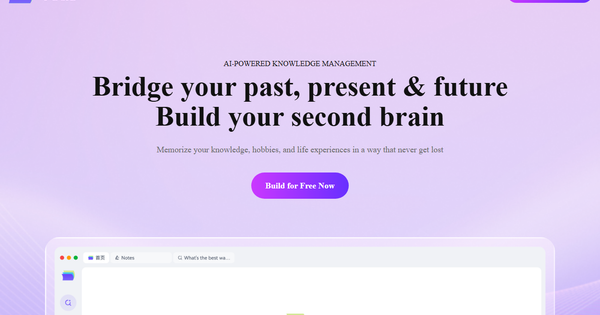
Vetis is an AI-powered knowledge management platform that functions as a "second brain," enabling users to store, organize, and retrieve personal notes, documents, web pages, PDFs, and other reading materials through a private AI bot. Rather than manual folders or tags, it automatically organizes content, extracts key points, summarizes lengthy articles, and delivers instant answers via natural language Q&A—drawing from both your private knowledge base and smart web searches when needed. Primary use cases include rapid information recall during research or work, efficient reading of online articles without wasting time on irrelevant sections, automatic note-taking from AI interactions, and building a cohesive "system of knowledge" over time to connect disparate ideas. It targets knowledge workers, students, researchers, writers, developers, marketers, and other professionals who struggle with scattered notes, chaotic information overload, or repetitive manual organization—essentially anyone building a personal knowledge base for hobbies, life experiences, or professional productivity.
Key Features & Capabilities
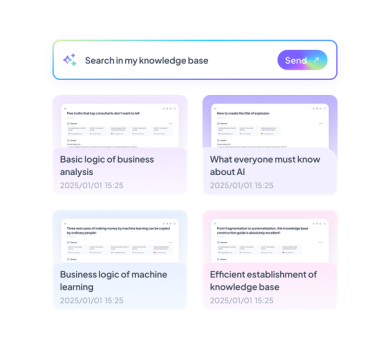
Core functionality revolves around a private AI bot that handles import of memos, documents, and web content; smart extraction of key points in seconds; instant Q&A recall; article/PDF summarization; and automatic note generation. Standout differentiators include complete elimination of folders and tags through AI-driven organization, seamless integration of personal notes with external web knowledge for comprehensive responses, and the ability to "piece together" stored information into a structured system of knowledge—features that go beyond basic search in tools like Notion or Obsidian by emphasizing effortless, bot-assisted retrieval and permanence ("write once, store forever"). Security is emphasized with military-grade encryption and strict access controls.
Limitations include search quotas on lower plans (potentially frustrating for heavy users), lack of detailed public information on specific import integrations or collaboration tools, and no mention of advanced features like real-time team editing or extensive third-party app connections. As an emerging tool, it also lacks the mature ecosystem of competitors in areas such as mobile apps or plugin extensibility.
User Experience
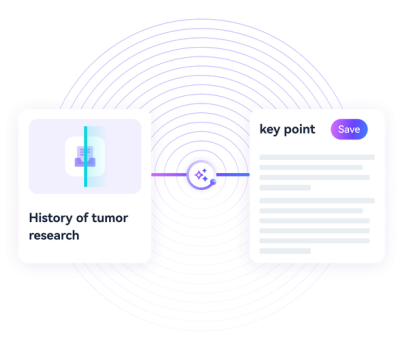
Vetis boasts a clean, modern web interface centered on a prominent chat/search bar with toggles for "Knowledge Base" (personal notes) and "Web" modes, flanked by a simple sidebar for document lists, home, and settings—resulting in minimal clutter and intuitive navigation. The learning curve is low, as users interact primarily through natural language Q&A rather than complex structuring, making it accessible for beginners while promising quick mastery for power users. Documentation and support resources are basic, limited to on-site FAQs on security, cancellation, and costs, with no extensive public guides, video library, or community forum evident as of the research date. Overall, the experience prioritizes simplicity and speed, though sparse external resources may leave advanced users seeking more self-guided exploration.
Performance & Reliability
Official claims highlight fast performance, with key-point extraction and summarization occurring in seconds and responsive Q&A drawing from both stored content and web sources. The platform positions itself as reliable for long-term storage ("memory never lost") backed by enterprise-level encryption. No widespread known issues or common user complaints appear in public forums, review directories, or social searches as of March 2026—likely due to its relatively low visibility and emerging status. Reliability seems solid for core tasks, though real-world scalability for very large knowledge bases or high-volume daily use remains unverified by independent large-scale testing.
Pricing & Value
Vetis offers a freemium model with three tiers (monthly or yearly billing, the latter providing a 20% discount):
- Starter: $0 (10 daily searches, 2 GB storage, 5 MB max file size).
- Standard: $10/month or $8/month billed yearly ($96/year; 200 daily searches, 100 GB storage, 20 MB files).
- Professional: $30/month or $24/month billed yearly ($288/year; unlimited searches and storage, 50 MB files, priority feature access).
Subscriptions are cancelable anytime with no fees, and all plans support the core AI bot functionality. The value proposition shines for light-to-moderate users who gain significant time savings through automation compared to manual tools like Evernote or Roam Research; the free tier allows easy testing, while paid plans scale affordably for serious knowledge builders. Enterprise options are not publicly detailed. At this price point, it competes well against similar AI second-brain apps, especially for those prioritizing automatic organization over extensive customization.
Practical Tutorial
Official video tutorials or in-depth guides are not prominently available on the site, so the following step-by-step walkthrough for a common task—capturing a web article, summarizing it, and querying your knowledge base—is derived directly from the platform's documented features and interface descriptions. It assumes you have signed up at no cost via the Starter plan.
- Sign up and log in: Visit https://app.vetis.ai, create a free account with email, and complete onboarding (takes under 2 minutes).
- Import content: From the Document List sidebar, click the add/import icon. Paste a web page URL (e.g., a lengthy tech article) or upload a PDF/memo. The AI bot automatically processes and stores it in your private knowledge base.
- Summarize and extract: In the central chat bar, toggle to "Knowledge Base" mode and type a natural query like: "Summarize the main arguments in the article I just saved about AI knowledge management, and extract the top three key points." The bot responds in seconds with a concise summary and bullet points.
- Build connections and query later: Follow up in the same chat with "How does this relate to my previous notes on second-brain tools?" or "Organize this into my overall system of knowledge." For external context, toggle to "Web" mode and ask something like "Find recent developments on this topic." Over time, repeated use lets the AI piece notes together automatically.
- Retrieve anytime: Return days later and simply ask "What key insights did I save last week about note-taking apps?"—no searching folders required.
For official starting points, refer to https://www.vetis.ai/ and the in-app help. Practice with 2–3 articles to see the auto-organization in action.
Final Verdict
Overall rating: 7.5/10
Vetis excels for individuals and solo professionals (students, researchers, writers, or marketers) seeking a low-effort AI second brain that automates organization, summarization, and recall while blending personal and web knowledge—delivering strong value through simplicity and security at an accessible price. Avoid it if you require robust team collaboration, deep third-party integrations, unlimited free usage, or extensive documentation and community support, as these areas lag behind more mature alternatives like Notion AI or Mem.
One-sentence recommendation: Vetis is a smart, automated choice for building a reliable personal knowledge vault without the traditional organizational hassle—worth trying on the free plan if you're tired of messy notes.
Research conducted as of March 2026 using the official website and available web sources; note that AI tools evolve rapidly and user experiences may vary.