VisualSitemaps Review: Automate Visual Site Audits & Maps
Overview & Purpose

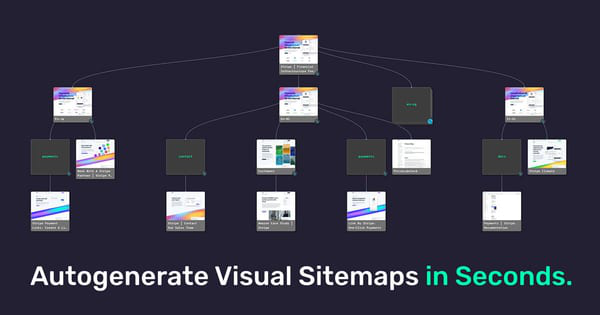
VisualSitemaps is a cloud-based automation tool that instantly generates visual sitemaps complete with high-resolution screenshots for any public or private website. Users simply enter a URL, and the platform crawls the site to produce a thumbnail-based visual architecture map, enabling quick analysis of page structure, design elements, and content layout. Primary use cases include comprehensive site audits for UI/UX design, SEO architecture reviews, marketing research, competitor analysis, content planning, visual QA tracking across releases, and creation of user flows (such as sales funnels or email campaigns). It also supports password-protected sites, staging environments, and large-scale crawls exceeding 1,000 pages.
The tool targets web design directors, UI/UX designers, developers, SEO specialists, digital strategists, product managers, agencies, and marketing teams who need a holistic visual overview of website architecture to inform redesigns, improve user experience, plan content strategies, or monitor competitors. It stands out for turning complex site data into an intuitive, shareable visual format that facilitates collaboration and decision-making in digital projects.
This review is based on official documentation, pricing details, user reviews from established platforms, and support resources as of March 2026.
Key Features & Capabilities
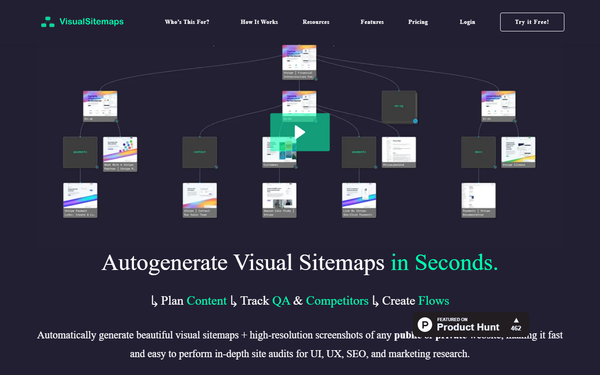
Core functionality revolves around automated crawling that produces interactive visual sitemaps with real page screenshots rather than text-only diagrams. Users can explore, zoom, collapse sections, and click through to full-resolution views. Standout features that differentiate it from text-based or diagram-only competitors (such as basic XML generators or general collaboration tools like Miro) include:
- Drag-and-drop sitemap editing to reorganize architecture and add sections.
- Screenshot annotations with comments, statuses, and team feedback.
- Scheduled crawls and visual change tracking for ongoing QA and competitor monitoring.
- Custom tags, filters, and batch organization for large maps.
- Content & SEO planner with Google Drive integration for copywriting, meta data editing, and asset management.
- Support for password-protected and private sites via encrypted credentials.
- VisualFLOWs for mapping user journeys beyond standard sitemaps.
- Exports in PDF, CSV, JSON, individual screenshots, and import options for tools like Figma.
- AI-optimized map generation (tier-limited).
These capabilities make it particularly strong for visual audits that reveal design inconsistencies, rendering issues, or navigation gaps missed by traditional crawlers.
Limitations include tiered page quotas (e.g., Free plan caps at 25 pages per month and 2-level depth), potential incomplete captures on highly dynamic JavaScript-heavy sites or those blocking crawlers via robots.txt, and less granular technical SEO data compared to specialized tools like Screaming Frog. Advanced customization of map layouts is limited beyond drag-and-drop, requiring export for further work in design software. No native mobile app exists, and very large sites may experience minor slowdowns during processing.
User Experience
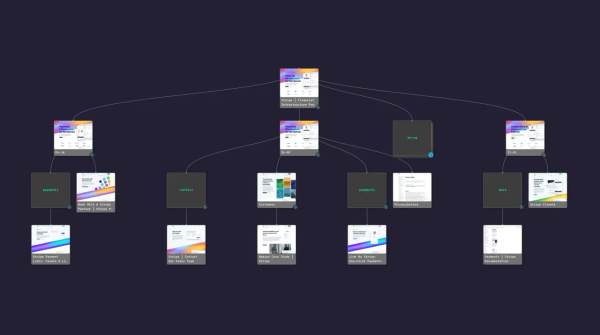
The interface is modern, clean, and highly intuitive, with a straightforward dashboard for creating new sitemaps. The learning curve is minimal for basic crawling and viewing—most users can generate their first map in under a minute—though advanced features like annotations, content planning, and scheduled tracking benefit from a short orientation. Navigation within maps (zoom, pan, collapse/expand) feels responsive and visual-first, making it excellent for presentations and team reviews.
Documentation is comprehensive via the dedicated support portal (support.visualsitemaps.com), which includes step-by-step articles, FAQs, and embedded YouTube tutorials. Live chat support during business hours (9-7pm ET) receives consistent praise for being responsive and helpful. Overall, the experience prioritizes speed and collaboration, with strong mobile-friendly viewing of exported maps.
Performance & Reliability
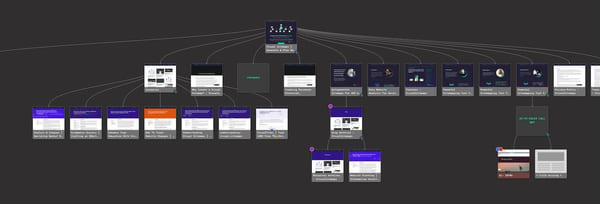
Generation is impressively fast: sites with 1,000+ pages typically complete in about 10 minutes, delivering high-resolution screenshots and accurate hierarchies. Reliability is high for standard public and private sites, with encrypted credential handling ensuring secure private crawls. Visual change tracking works reliably for QA consistency.
Common user feedback highlights occasional incomplete crawls on complex single-page apps or sites with heavy animations, and rare hierarchy misalignments that users can manually correct via editing. No widespread outages or major reliability complaints appear in recent 2025–2026 reviews; performance issues are typically site-specific rather than platform-wide. Support offers credits for technical failures.
Pricing & Value
VisualSitemaps offers a generous Free plan and clear tiered subscriptions (monthly or yearly with ~25% savings):
- Free: $0 – 25 pages/month, 25-page max sitemap, 3 users, 2-level depth, basic exports and AI maps.
- Mini: $29/month – 1,500 pages/month, 500-page max, 3 users, 4-level depth.
- Pro: $79/month – 4,000 pages/month, 1,500-page max, 10 users, unlimited depth.
- Team: $399/month – 25,000 pages/month, 4,000-page max, 20 users.
- Agency: Custom (unlimited options, priority support).
Users can purchase a paid plan then pause/cancel to retain all created sitemaps while dropping back to Free-tier limits (plus ongoing 25–50 free pages monthly). Refunds are available for crawls under 100 pages; credits for technical issues. Nonprofits receive discounts on Agency plans.
Value is excellent for teams performing frequent visual audits or competitor research, as the time savings (hundreds of hours versus manual screenshotting) far outweigh costs compared to hiring help or using less visual alternatives. The Free tier suits light testing, while Pro/Team plans deliver strong ROI for agencies and enterprises. Lower tiers may feel restrictive for heavy users, but the pause option adds flexibility over strict subscriptions.
Practical Tutorial
A common task is generating, editing, and exporting a visual sitemap for a public website audit (e.g., analyzing a competitor or your own site). Here is a step-by-step walkthrough based on the official process (real example using a public site like https://visualsitemaps.com itself or any target domain):
- Visit visualsitemaps.com and sign up for a free account (no credit card required).
- From the dashboard, click “New Sitemap” and enter the target URL (e.g., https://example.com). For private sites, toggle “Crawl private website” and securely input credentials via the encrypted form.
- Adjust optional settings: set crawl depth (limited by plan), exclude directories via filters, or enable AI optimization. Click “Start Crawl”—the cloud process runs automatically (expect minutes for small sites, ~10 minutes for larger ones).
- Once complete, open the interactive map: zoom/pan to explore, click thumbnails for full high-res screenshots, and collapse/expand sections to focus on key areas.
- Edit and enhance: Drag-and-drop pages to reorganize structure, add custom tags (e.g., “SEO priority” or “redesign needed”), annotate screenshots with comments or status labels for team feedback.
- Use advanced tools if on a paid plan: open the Content & SEO Planner to edit metadata or link to Google Drive; set up scheduled crawls for change tracking.
- Export: Choose PDF for client presentations, CSV/JSON for data analysis, or download all screenshots. Import into Figma for further customization.
For visual guidance, watch the official “How It Works” video: https://youtu.be/3uxiSFsgPN0. Additional official tutorials are available at https://support.visualsitemaps.com (e.g., content planner guide and private-site crawling instructions). This process typically takes 5–15 minutes end-to-end and produces a professional, shareable deliverable.
Final Verdict
VisualSitemaps earns a strong 4.5 out of 5 rating. It excels for UI/UX designers, web strategists, agencies, and marketing teams needing fast, visual insights into site architecture and competitor landscapes—delivering massive time savings, collaboration features, and unique screenshot-based clarity that text tools cannot match. Users who should avoid it include solo developers focused solely on XML/SEO data crawls on tiny budgets or those requiring ultra-deep customization without exporting to other tools, as the page limits and occasional dynamic-site quirks may frustrate light or purely technical users.
Highly recommended for anyone tired of manual screenshot audits—start with the free tier and upgrade for serious projects.