Voicenotes Review: The Ultimate AI Second Brain for Your Ideas
Overview & Purpose

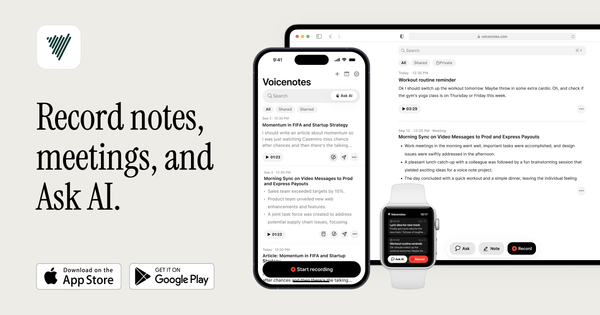
Voicenotes (https://voicenotes.com/) is an AI-powered voice recording and note-taking app that transcribes spoken input into searchable text, analyzes content with AI, and transforms notes into various formats like summaries, to-do lists, blogs, or emails. It functions as a "second brain" by allowing users to query all past recordings for insights and recall. Primary use cases include capturing spontaneous ideas, recording meetings (in-person or online without a bot), journaling personal reflections, student lecture notes, and generating content from voice input.
Target audience includes professionals (e.g., sales teams, managers for meeting follow-ups), students, creatives (writers, entrepreneurs for idea capture), and anyone preferring voice over typing for productivity. It's ideal for busy individuals who think aloud or need hands-free note-taking.

Key Features & Capabilities
Core functionality revolves around high-accuracy transcription of voice notes and meetings in 100+ languages, automatic summarization, and AI-powered search across all notes. Standout features:
- 'Ask AI' for natural language queries retrieving info from any recording.
- 'Create' tool to generate new content (e.g., blog posts, emails) from notes using prompts.
- Cross-platform support (iOS, Android, web, desktop, Apple Watch, Wear OS) with seamless sync.
- WhatsApp integration for forwarding voice memos.
- Privacy emphasis: data encrypted, not used for training AI.
Differentiators from competitors like Otter.ai or Evernote: Deep AI memory and transformation capabilities, no-bot meetings, voice-first design, and claimed superior accuracy over built-in options like Apple Voice Memos.
Limitations: Limited rich text editing compared to full note apps; occasional AI inaccuracies or hallucinations in noisy environments; some features may feel web-first. Missing: Advanced offline mode, robust collaboration beyond the Teams plan, and deeper integrations with every productivity tool.

User Experience
The interface is praised for being clean, simple, and intuitive, with a low learning curve for basic recording and transcription. Users appreciate the quick record button and fast processing. However, some new users report initial confusion with AI features per Reddit feedback. Documentation includes a helpful help center (help.voicenotes.com) with getting started guides and feature articles; community YouTube tutorials abound. Support is responsive via email but can have occasional delays.

Performance & Reliability
Transcription is fast and highly accurate, often outperforming built-in options, with efficient AI processing for summaries and queries. Multi-device performance is strong with good sync. Known issues include occasional recording interruptions (especially outdoors or in motion), minor bugs, and less reliable performance for code-switched or heavily accented speech. Overall reliable for most users, but not flawless in all environments. Complaints are minor compared to widespread praise for speed and productivity gains.

Pricing & Value
Voicenotes offers a limited free tier for short notes (e.g., under 1 minute) to try core features. Paid Individual plan is $14.99/month or $99.99/year for unlimited usage. Teams plan is a flat $49/month (unlimited users, after 1-week trial). Value is strong for frequent voice users as it saves significant time on transcription and organization compared to manual methods or alternatives like Otter (per-minute pricing) or general AI tools. Good ROI for professionals boosting productivity.
Practical Tutorial
A common task is capturing ideas and turning them into a to-do list or email summary.
Step-by-step for creating and transforming a voice note (based on official help and user guides):
-
Open the Voicenotes app on your device (mobile, web, or desktop) and sign in. Tap the prominent 'Record a note' button (or equivalent on watch).
-
Speak your content naturally. Example: 'Brainstorm for Q2 marketing campaign: Focus on social media, target millennials, budget $5000. Ideas: influencer collab, user-generated content.'
-
Tap stop when done. The app automatically transcribes with high accuracy and generates an initial summary.
-
Review the transcript. To transform: Tap 'Ask AI' at the bottom. Toggle to 'Create' mode.
-
Enter a prompt like 'Turn this into a prioritized to-do list and a professional email draft to my team.' The AI will generate outputs based on your note and past context if relevant.
-
Save, edit if needed, share, or integrate with tools like Notion or Todoist via integrations.
For more, see official guide at help.voicenotes.com or YouTube beginner tutorials. This process typically takes under a minute post-recording.
Final Verdict
Overall rating: 4.5/5. Voicenotes excels as an intelligent voice-to-knowledge tool for those who generate ideas verbally or handle frequent meetings. It shines for students, professionals, and creatives seeking effortless capture and retrieval. Users who type extensively or need complex document collaboration may prefer alternatives like Notion AI or specialized meeting tools. Avoid if on a tight budget without testing the free tier or if in environments with poor recording conditions.
This review is based on research conducted as of March 2026 from the official site, help center, App Store, Product Hunt, Reddit, and independent reviews. One-sentence recommendation: Voicenotes is a powerful second brain that turns your voice into organized, actionable intelligence—highly recommended for voice-oriented thinkers looking to boost productivity.