Voicepen Review: Turn Audio and Video into SEO Blog Posts Fast
Overview & Purpose
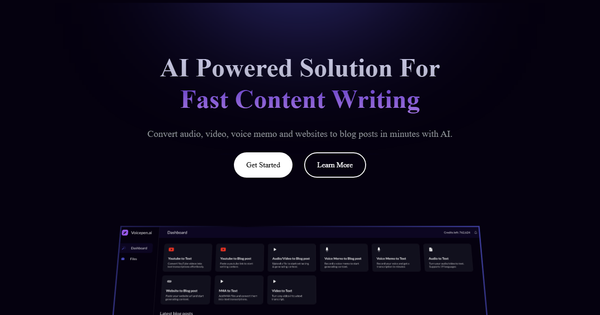
VoicePen is an AI-powered web tool designed to transform audio and video files, voice memos, YouTube clips, websites, Zoom recordings, podcasts, webinars, and tutorials into accurate transcripts and fully formed, SEO-optimized blog posts. It leverages OpenAI’s Whisper model for transcription and GPT-4 for content generation, automatically converting spoken content from 96+ languages into English-language blog posts while preserving the original meaning and structure.
Primary use cases include repurposing podcast episodes or webinar recordings into website blog content for SEO benefits, turning lecture or meeting audio into shareable articles, and quickly generating written summaries from voice memos or video tutorials. The target audience encompasses content creators, bloggers, podcasters, marketers, businesses looking to repurpose client meetings or webinars, journalists, students converting lectures into study notes, and anyone needing to efficiently turn spoken content into professional written material without manual transcription or writing.

Key Features & Capabilities
Core functionality revolves around a simple four-step workflow: upload a supported file or URL, receive a fast Whisper-based transcription, let AI generate a blog post (with options to select topics or styles), and recreate or edit the output as many times as needed until it matches your vision. Supported formats include MP3, MP4, WAV, M4A, and direct links from YouTube, Zoom, and other web sources. Standout features include multi-language audio support (96+ input languages with English blog output), claimed “fastest transcription on the market,” unlimited AI recreations for refinement, and built-in SEO optimization to make posts ready for publication.
Differentiators from competitors include the direct audio-to-polished-blog pipeline (beyond basic transcription tools like Otter.ai or Descript) and the credit-based flexibility that blends one-time purchases with subscriptions. Limitations include English-only blog generation (no native multi-language output for posts), reliance on credit consumption for each conversion, no mentioned API or native integrations with tools like WordPress or Notion, and the need for occasional human editing to handle nuances, heavy accents, or background noise.
User Experience
VoicePen is praised for its intuitive, clean interface that requires minimal learning curve—even first-time users can upload and generate content in minutes. The web-based design works across devices without downloads, and the process feels streamlined with clear progress indicators during transcription and generation. Related iOS app reviews (for the companion VoicePen AI Note Taker) highlight the same ease of use, accuracy, and responsive design, suggesting the web experience mirrors this quality.
Documentation includes an FAQ knowledge base, tutorials, and email support, though it is relatively lightweight compared to enterprise tools. No extensive video library or community forum was prominently featured in available sources. Overall, the learning curve is low for anyone familiar with basic web apps, making it accessible for non-technical users like marketers or solo creators.
Performance & Reliability
Transcription is powered by OpenAI Whisper, delivering high accuracy and speed—often completing in just a few minutes even for longer files. Users report impressive results with minimal editing required, and the AI blog generation produces coherent, engaging posts that capture key points effectively.
Common complaints are limited due to the tool’s niche positioning, but include occasional struggles with heavy accents, noisy environments, or very long recordings, as noted in general transcription tool feedback. Reliability appears solid for its core purpose, with no widespread outage reports or major issues surfacing in 2025–2026 reviews. As a standalone web app, uptime depends on standard cloud infrastructure, and credit-based processing ensures consistent performance without unexpected throttling for paid users.
Pricing & Value
VoicePen uses a credit-based system with flexible options: a one-time pay-per-conversion purchase of $6.99 for 16K credits (roughly 1–3 blog posts depending on length), a Basic monthly plan at $14.99 for 240K credits, a Pro plan at $29.99/month for 480K credits, and custom enterprise options. Yearly billing is available on subscription tiers, aligning with common SaaS practices for savings. No generous free tier is highlighted, though occasional promotions or limited trials may exist.
Value is strong for moderate-to-high volume users who regularly repurpose content—credits stretch further than many per-minute transcription services, and unlimited recreations add efficiency. Compared to alternatives like Descript (higher per-minute costs) or manual services, VoicePen offers better automation at an affordable entry point, especially for creators turning one podcast into multiple blog assets. It may feel pricey for very occasional users, but the pay-per option mitigates this.
Practical Tutorial
VoicePen provides built-in guidance and tutorials on its site; the following is a practical, real-world walkthrough for a common task—converting a podcast episode into a blog post (based on official process descriptions as of April 2026).
-
Sign up or log in: Visit https://voicepen.ai/ and create a free account (or log in). New users can start with a one-time credit purchase if needed.
-
Upload your content: Click the upload button and select an audio file (e.g., MP3 podcast), video (MP4), or paste a YouTube/Zoom link. Supported formats process quickly.
-
Wait for transcription: The tool automatically transcribes using Whisper—expect results in minutes. Review the raw transcript for accuracy.
-
Generate the blog post: Choose a blog style or topics (e.g., “SEO-optimized listicle” or “narrative summary”). AI (GPT-4) creates a complete post with headings, paragraphs, and calls-to-action.
-
Refine and export: Use the “recreate” button for unlimited variations until satisfied. Edit inline if needed, then export as HTML, Markdown, or plain text for your website or CMS.
For visual guidance, official how-it-works animations and a quick demo are available directly on the homepage. Example: Uploading a 30-minute English podcast typically yields a 1,500–2,000-word blog post ready for minor tweaks and immediate publishing.
Final Verdict
VoicePen earns a solid 4.5 out of 5 stars for its focused, time-saving automation that turns spoken content into publication-ready blog posts with impressive speed and quality.
Content creators, marketers, podcasters, and small businesses who regularly produce audio or video should use this tool—it excels at SEO repurposing and eliminates hours of manual writing. Avoid it if you need multi-language blog output, deep CRM/CMS integrations, or handle extremely noisy/accents-heavy recordings without post-editing.
One-sentence recommendation: If you want to effortlessly turn podcasts, webinars, or videos into SEO-ready blog posts, VoicePen is a fast, affordable, and highly effective choice worth trying today.