Voiset Review: The AI Voice Assistant for Smart Auto-Scheduling
Overview & Purpose

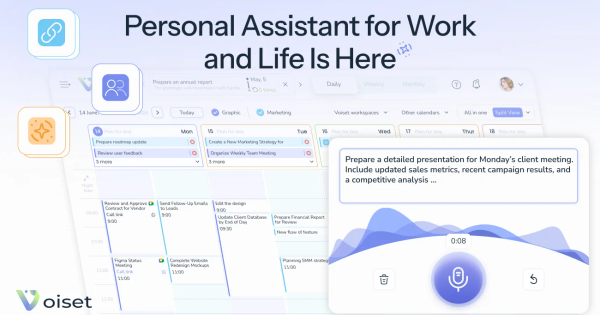
Voiset is an AI-powered task manager and daily planner that converts voice commands into structured tasks and notes, then automatically schedules them based on priorities, deadlines, workload, availability, and user habits. It unifies personal, work, and team calendars into one smart master view, adapts dynamically to changes, and provides productivity analytics to prevent burnout and optimize routines. Beyond simple list storage, it functions as a 24/7 personal assistant that learns from your patterns to suggest ideal focus times and distribute recurring tasks intelligently.
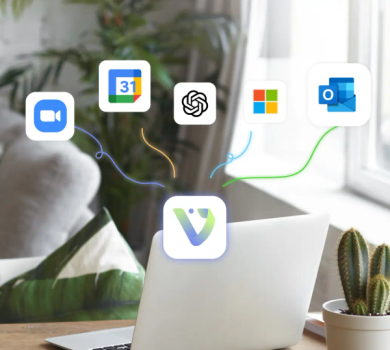
Primary use cases include hands-free idea capture during commutes or meetings, auto-scheduling for freelancers and students facing shifting deadlines, team task assignment without micromanagement, and family chore coordination. It eliminates the mental load of replanning by syncing with existing tools like Google Calendar and Outlook.
As of research in March 2026, the target audience spans individuals (freelancers, students, busy professionals), small-to-mid-sized teams, families, and niche users such as real estate agents, sales teams, field workers, hospitality operators, and ADHD coaches who benefit from voice-first workflows and unified personal/work planning. It appeals to anyone overwhelmed by scattered notes and manual scheduling rather than specialized developers or designers needing advanced Kanban or code-specific tools.
Key Features & Capabilities
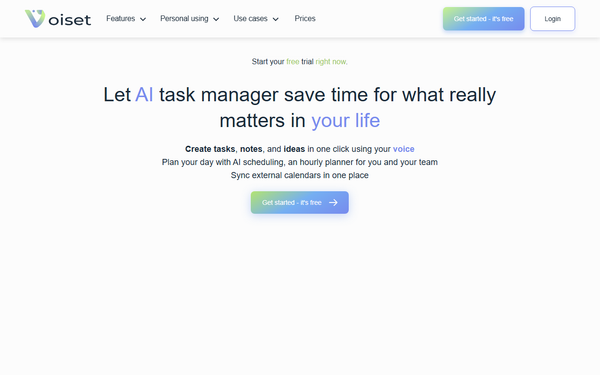
Core functionality revolves around voice-to-task conversion (speech-to-text with natural language understanding for titles, deadlines, priorities, and assignees), AI auto-scheduling that analyzes calendars and workload to place tasks optimally, smart notes that turn voice memos or text into actionable items, real-time calendar sync, team collaboration via shared workspaces, file attachments, reminders via messengers, and detailed productivity analytics with time-tracking graphs. The platform supports mobile (iOS/Android) and web access with color-coded workspaces to separate contexts.
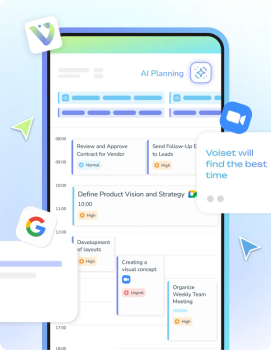
Standout features include proactive AI that dynamically reschedules when plans change, learns user patterns for personalized suggestions, breaks large tasks into subtasks, and prevents overload—unlike passive competitors that only store items. Voice input saves up to 50% typing time and works in multiple languages; the unified master calendar merges personal and professional life; recent Smart Booking lets clients self-select slots without double-booking. A GPT plugin and Telegram bot extend automation.
Limitations include capped voice minutes (30 min/month on Base), storage limits (1 GB Base, 2 TB Premium), reliance on accurate user input for optimal AI performance, and a lighter feature set for complex project management—no advanced dependencies, Gantt charts, or extensive automation rules compared to tools like Asana or ClickUp. Zoom integration is maturing, and there is no unlimited free tier (only a free trial).
User Experience
Voiset offers a low learning curve with an intuitive, clean interface and coachmarks that guide new users through voice input and scheduling. Setup involves quick calendar connections and workspace creation; most users report starting productively within minutes. The mobile app excels for on-the-go voice capture, while the web dashboard provides overview clarity. Micro-animations and widgets enhance polish, though occasional reports note minor widget lag or past connectivity hiccups (addressed in frequent updates).
Documentation is practical rather than exhaustive: blog guides cover voice workflows and optimization, the app includes in-app tips, and support responds quickly via email or premium channels. Overall feedback highlights the balance of automation with user control and helpful daily summaries.
Performance & Reliability
The AI processes voice commands and schedules quickly, with users reporting 1–2 hours saved daily on planning and reliable real-time sync/adjustments. App updates (e.g., 2025 versions) emphasize faster performance, improved stability, and better voice recognition. Calendar integrations and notifications perform consistently across devices.
Known issues are minor and diminishing: early connectivity or visual bugs have been fixed; no widespread outages or critical complaints appear in reviews or forums as of March 2026. The small but growing user base (over 4,000 businesses cited) reports high reliability for daily use, with analytics providing actionable insights into workload patterns.
Pricing & Value
Voiset offers a risk-free free trial (cancel anytime) followed by two main plans billed monthly or annually (with discounts). Base (€9.99/month or ~€8 annually) suits personal use with AI tasks/scheduling/notes, 30 voice minutes/month, up to 3 workspaces, 5 users, and 1 GB storage. Premium (€31.99/month or ~€27 annually) targets teams with unlimited AI features, 240 voice minutes, 10 workspaces, 50 users, 2 TB storage, booking system, and premium support. In-app purchases align similarly in USD. No permanent free tier exists beyond the trial.
Value is strong for the price—equivalent to “less than two cups of coffee” monthly for an always-on AI assistant that outperforms basic task apps in automation while remaining simpler than enterprise tools. It delivers clear ROI through time savings and reduced stress, especially versus manual methods or hiring help, though users needing unlimited voice or heavy project features may find caps restrictive.
Practical Tutorial
No single official video tutorial hub exists, but the site’s blog and app coachmarks provide guidance. Below is a step-by-step walkthrough for a common task—voice-capturing and auto-scheduling a work deliverable (tested conceptually from official descriptions and blog examples).
- Sign up for the free trial at voiset.io or via the iOS/Android app and complete quick onboarding (Google/Apple sign-in optional).
- Connect your calendar: Go to settings → Integrations → link Google Calendar or Outlook to import existing events (two-way sync activates instantly).
- Create or select a workspace: Tap “New Workspace,” name it (e.g., “Q3 Campaign”), assign color, and invite team members if needed.
- Capture via voice: Open the app or web dashboard, tap the microphone button, and speak naturally: “Prepare competitor analysis report for client X, needs two focused hours, deadline Friday EOD, high priority.” The AI transcribes, extracts details, and prompts confirmation.
- Let AI schedule: Confirm or edit; Voiset analyzes your calendar, workload, and habits, then auto-places the task in an optimal slot (e.g., 10–12 a.m. Thursday) while suggesting breakdowns or reminders. Review the master calendar view.
- Track and adapt: Add notes/files, monitor progress in analytics, and receive push notifications. If priorities shift, drag the task or speak a new command—the AI readjusts automatically.
Real example: A real estate agent says, “Schedule three property viewings next week with clients A, B, C,” and Voiset assigns times avoiding overlaps, notifies clients via booking link, and logs to the shared workspace. For official supporting guides, see the Voiset blog posts on schedule optimization and voice tasks (voiset.io/blog).
Final Verdict
Voiset earns a solid 4.5 out of 5 for its innovative voice-first AI that genuinely reduces planning friction and adapts intelligently.
Individuals, freelancers, small teams, and professionals tired of scattered notes and manual replanning should use it for seamless voice capture, proactive scheduling, and unified life/work organization that saves hours weekly. Those requiring a completely free plan, advanced enterprise project management tools (e.g., detailed dependencies or extensive reporting), or heavy visual boards may want to avoid it in favor of more specialized alternatives.
Try Voiset if you want an affordable AI assistant that turns spoken chaos into an optimized calendar—highly recommended for busy professionals ready to reclaim focus.