Wav2Lip For Automatic1111 Review: Pro AI Lip-Syncing Guide
Overview & Purpose
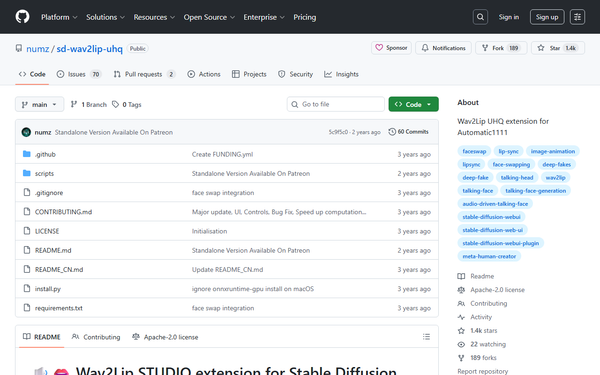
Wav2Lip UHQ is an open-source extension for Automatic1111's Stable Diffusion WebUI that creates high-quality lip-synchronized videos from any input video containing a visible face and an accompanying audio file (WAV or MP3). It builds on the original Wav2Lip project by adding Stable Diffusion-powered post-processing, including face restoration, custom mouth and face masks, and optional enhancements like face swapping or text-to-speech generation. Primary use cases include dubbing foreign-language videos, animating AI-generated characters (e.g., from AnimateDiff or Deforum), creating talking-head content for YouTube/TikTok, and producing realistic avatars for marketing or entertainment. The target audience is experienced Stable Diffusion users, AI video hobbyists, indie filmmakers, digital marketers, and content creators who already run Automatic1111 and want local, offline control without relying on paid cloud services.
Research conducted as of March 2026.
Key Features & Capabilities
Core functionality revolves around accurate lip synchronization using either the standard Wav2Lip or Wav2Lip-GAN checkpoint, followed by automatic quality enhancement. Standout features include GFPGAN or CodeFormer face restoration, mask-based blending (with adjustable dilation, erosion, and blur) that preserves natural facial expressions outside the mouth area, experimental face swapping via FaceFusion (inswapper_128.onnx model), and integrated Bark text-to-speech for generating audio directly from prompts. Additional capabilities cover resume-from-step processing, debug-mode intermediate outputs, resize factor for speed, “only mouth” tracking, and seamless integration with other Automatic1111 extensions like AnimateDiff for full avatar pipelines.
These differentiate it from standalone Wav2Lip or competitors like SadTalker by delivering UHQ results through Stable Diffusion post-processing while keeping everything inside the familiar WebUI. Limitations include experimental status for face swap and Bark TTS (inconsistent results), strict requirement for a detectable face in every video frame, no native multi-speaker support, and dependency on high-quality clean audio. The extension is not actively maintained beyond 2023 updates, which can lead to compatibility friction with newer Automatic1111 versions.
User Experience
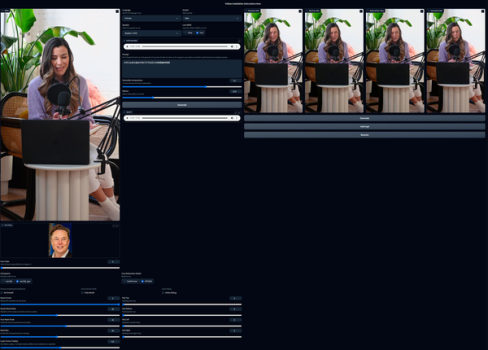
Installation has a medium-to-high learning curve: users must manually add the latest Automatic1111, install FFmpeg (and add it to PATH), download five specific model weights into exact folders, and on Windows install Visual Studio with Python/C++ components for face swap. Once set up, the dedicated “Wav2Lip UHQ” tab offers a clean, intuitive interface with file uploads, dropdowns for models/checkpoints, sliders for parameters, and preview audio samples for Bark. The learning curve drops sharply after the first successful run thanks to clear tooltips and resume functionality. Documentation consists of a comprehensive GitHub README with step-by-step instructions and parameter explanations; community support lives on r/StableDiffusion threads and YouTube tutorials. No official website or dedicated forum exists, but users report issues are usually resolved via shared workarounds on Reddit or GitHub.
Performance & Reliability
Processing speed varies: a 5–10 second 512×512 video typically takes 1–3 minutes on a mid-range GPU (RTX 3060/4070 class), but scales poorly with higher resolution or length—users are advised to lower the resize factor to 0.5–0.75 for acceptable speed. Memory management is reasonable with Low VRAM options for Bark, and the pipeline includes automatic cleanup. Reliability is solid once installed, with dramatic quality improvements (sharper faces, seamless mouth blending, reduced artifacts) over base Wav2Lip. Known issues include Torch/CUDA version conflicts that can break the entire Automatic1111 installation, occasional face-detection failures on low-quality or side-profile videos, rare flickering at low CodeFormer fidelity settings, and slower performance on Mac (M1/M2) due to runtime errors. Community feedback highlights that these are mostly one-time setup hurdles rather than ongoing bugs.

Pricing & Value
Completely free and open-source with no tiers, subscriptions, or enterprise options. Value is exceptional for users already invested in the Stable Diffusion ecosystem: unlimited local generation, full privacy, unlimited customization, and integration with other free tools deliver professional results without the recurring costs of cloud platforms like HeyGen ($30+/month) or commercial alternatives. The time saved on manual dubbing or avatar creation far outweighs the initial setup investment for frequent creators.
Practical Tutorial
A complete step-by-step walkthrough for a common task—lip-syncing a short talking-head video with new audio—follows the official GitHub README and mirrors popular YouTube tutorials.
-
Ensure Automatic1111 is up to date and FFmpeg is installed and in your system PATH. On Windows, also install Visual Studio with Python and C++ packages if using face swap.
-
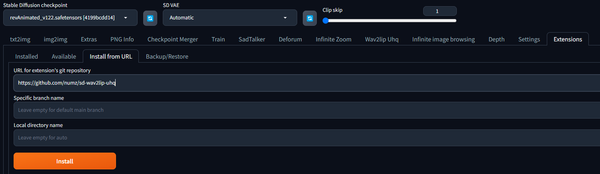
In Automatic1111, go to the Extensions tab → Install from URL, paste
https://github.com/numz/sd-wav2lip-uhq, and install. Restart the WebUI; the “Wav2Lip UHQ” tab should appear. -
Download the required models and place them exactly:
- Wav2Lip-GAN checkpoint →
extensions/sd-wav2lip-uhq/scripts/wav2lip/checkpoints/ - s3fd.pth →
extensions/sd-wav2lip-uhq/scripts/wav2lip/face_detection/detection/sfd/ - shape_predictor_68_face_landmarks.dat →
extensions/sd-wav2lip-uhq/scripts/wav2lip/predicator/ - inswapper_128.onnx (optional) →
extensions/sd-wav2lip-uhq/scripts/faceswap/model/
- Wav2Lip-GAN checkpoint →
-
In the Wav2Lip UHQ tab, upload a short MP4 video (example: 5-second neutral talking-head clip at 512×512, 30 fps) and an MP3/WAV audio file (example: new English narration). Optionally upload a face image for swapping and select index 0.
-
Choose “wav2lip_gan” checkpoint, set CodeFormer fidelity to 0.75, Mouth Mask Dilate to 4, Face Mask Erode to 2, Mask Blur to 8. Enable “Only Mouth” if you want minimal cheek movement. For audio generation instead, switch to Bark, pick English/Male speaker, enter prompt, and use [split] for longer text.
-
Click Generate. The pipeline runs face swap (if selected), Wav2Lip, restoration, masking, and FFmpeg compilation. Use the resume button afterward to tweak masks or switch restoration models without restarting.
-
Output appears in the WebUI gallery; upscale further with img2img batch (denoising 0.05) if desired.
Real-world example: Creators combine this with AnimateDiff-generated avatar videos to produce singing or speaking characters synced to music, as shown in community demos. Official tutorial video: “Wav2Lip Studio Tutorial EN” on YouTube (https://www.youtube.com/watch?v=B84A5alpPDc). Full parameter reference and troubleshooting are in the GitHub README.
Final Verdict
8/10. Wav2Lip UHQ shines for experienced Stable Diffusion users who want powerful, customizable, local lip-sync capabilities with genuine quality upgrades over the original tool. It is ideal for AI video creators, animators, and dubbing enthusiasts already comfortable with Automatic1111. Avoid it if you are a complete beginner, need instant one-click results, or prefer cloud services—setup friction and the lack of recent maintenance can frustrate newcomers. One-sentence recommendation: If you live in the Automatic1111 ecosystem and need pro-level talking-head videos without paying monthly fees, install this extension today.