Wave Video Review: The Ultimate All-in-One Video Creation Tool
Overview & Purpose
Wave.video is an all-in-one browser-based video platform that combines video editing, recording, live multistreaming, hosting, thumbnail creation, and a massive stock media library into a single tool. It enables users to create, customize, publish, and broadcast professional-looking videos without downloading software or juggling multiple apps. Primary use cases include producing short-form social media content, marketing videos, podcasts, webinars, live events, and repurposed long-form videos for platforms like YouTube, Instagram, LinkedIn, and Facebook. It also supports AI-assisted features such as text-to-speech, auto-captions, and video generation from templates or blog posts.
The target audience is primarily content creators, digital marketers, small business owners, solopreneurs, and social media managers who need quick, accessible video production tools. It is not aimed at professional video editors or developers requiring advanced post-production capabilities like those in Adobe Premiere Pro, nor is it a primary tool for graphic designers focused solely on static visuals.
Key Features & Capabilities
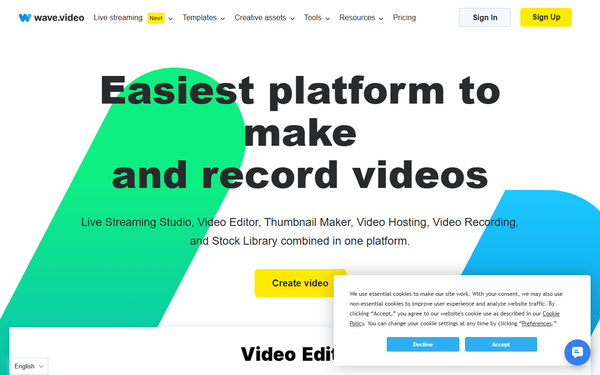
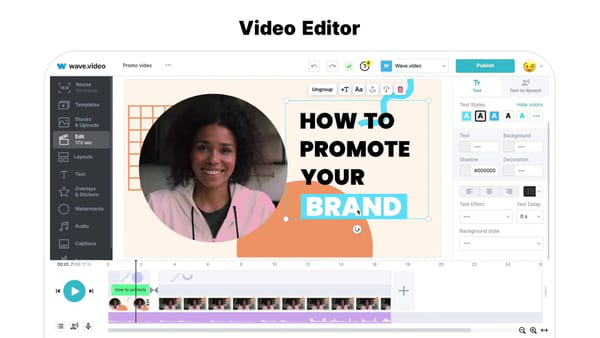
Core functionality revolves around five integrated tools: a cloud-based video editor (resize, trim, combine clips, layouts, text animations, stickers, transitions, captions, and subtitles), a customizable live streaming studio for simultaneous broadcasting to multiple channels (live or pre-recorded), a free thumbnail maker with background removal and templates, secure video hosting with customizable landing pages, embeds, and analytics, an online recording studio with scene management and guest support, and a built-in stock library of millions of videos, images, and audio tracks.
Standout features that differentiate Wave.video include seamless multistreaming without coding or extra software (a rare all-in-one capability), AI-powered elements like stylish captions and text-to-speech, unlimited social publishing on free and paid plans, and discounted access to premium stock assets. The platform's "bundle of tools for the price of one" approach eliminates the need for separate services like StreamYard for streaming or Canva for thumbnails.
Limitations include restrictive free-tier caps (e.g., 15-second videos, watermarks, low storage/traffic), occasional reports of platform instability or crashes during complex edits, limited mobile editing capabilities (desktop preferred), and less depth in advanced audio layering or pro-level effects compared to dedicated desktop software. Some users note that while templates speed creation, heavy customization can feel template-bound.
User Experience
Wave.video earns high marks for ease of use, with an intuitive drag-and-drop interface and low learning curve for beginners and intermediate users. Many reviewers describe it as "the easiest platform to make videos" and praise the clean, modern layout that feels accessible without overwhelming options.
The interface quality is solid for a web app—responsive timeline editing, preview modes, and quick access to stock assets and effects. Documentation includes an official tutorials section with dozens of short video guides covering everything from basic edits to advanced features like live streaming setup. Support resources feature email/chat (with mixed responsiveness noted in reviews), a knowledge base, and an active user community. Customer service ratings average 4.5/5, though some users report slower responses on complex issues.
Performance & Reliability
As a cloud-based tool, Wave.video performs efficiently for most everyday tasks like editing short clips or streaming, with fast rendering for standard exports and stable live broadcasts up to 1080p. Bandwidth and storage scale with paid plans, and many users highlight "no noticeable lag" in the editor.
Known issues include occasional platform crashes or lag reported by a subset of users during intensive projects or long recordings, particularly on lower-end hardware. Some complaints mention export delays or temporary livestream instability, though these appear less common in recent 2026 reviews. Overall reliability is strong for its category, with no widespread outages noted in major review aggregators.
Pricing & Value
Wave.video offers four main plans with annual billing discounts of 20% (prices shown are monthly equivalents):
- Free: $0 – Basic editor (15-second limit), thumbnail maker, stock library (2M assets), watermarked streaming/hosting, 10 GB storage/traffic.
- Streamer: $16/mo – Up to 5-minute videos, improved streaming limits, no watermarks on core exports.
- Creator: $24/mo – Up to 30-minute videos, 200M stock assets, advanced captions/background removal/text-to-speech, better hosting (150 GB traffic, 30 GB storage).
- Business: $48/mo – Up to 2-hour videos at 60fps, advanced streaming (10 channels, longer durations), robust hosting (500 GB traffic/storage), marketing tools, and pay-as-you-go extras for embeds/captions.
Enterprise options are custom. Additional overages apply for extra storage, traffic, or captioning on higher plans. There is no free trial, but the free plan allows testing basics.
Value is excellent for the all-in-one bundle, often praised as more affordable than combining tools like Descript, StreamYard, and Vimeo. Paid plans remove watermarks and unlock professional features, delivering strong ROI for marketers producing regular content. It compares favorably to alternatives in cost and convenience, though power users may find it less feature-rich than pricier pro suites.
Practical Tutorial
Wave.video provides official video tutorials at https://wave.video/tutorial. Below is a step-by-step walkthrough for a common task—creating an attention-grabbing video thumbnail (based on official guidance, suitable for YouTube, social posts, or hosted videos).
- Log in to your Wave.video account (free plan works for this) and either open an existing video project or start a new one from the dashboard.
- In the editor interface, navigate to the "Thumbnails" or export-related tools section (often accessible via a dedicated tab or sidebar).
- Select a template or blank canvas sized for your platform (e.g., 1280x720 for standard video thumbnails or 1080x1920 for Instagram Stories).
- Upload your own image/video frame or choose from the stock library as the background.
- Add text: Click the Text tool, enter your headline or CTA, then customize font, color, size, and apply animations if desired.
- Incorporate elements: Use the Graphics/Stickers section to drag in shapes, icons, or logos; align everything with drag-and-drop for visual balance.
- Preview: Check the thumbnail in context to ensure readability and appeal across devices.
- Export: Download as JPEG or PNG at high resolution, or save directly to your media library for use with videos.
This process typically takes under 5 minutes and produces platform-ready thumbnails. For full video editing tutorials (e.g., resizing, adding captions), refer to the official library, which includes guides on combining clips, auto-captions, and live recording.
Final Verdict
Overall rating: 4.5/5. Wave.video excels as an accessible, feature-packed solution for quick professional video production and is ideal for marketers, creators, and small teams seeking an affordable all-in-one platform without steep learning curves or multiple subscriptions. It should be avoided by advanced video professionals needing deep customization, pro-level effects, or zero tolerance for occasional web-app instability, or by users reliant on heavy mobile editing. One-sentence recommendation: If you're a content creator or marketer looking for a cost-effective, easy-to-use bundle of editing, streaming, and hosting tools, Wave.video is a smart choice worth trying on the free plan.