Wellpin Review: The Best Free AI-Powered Scheduling Tool
Overview & Purpose

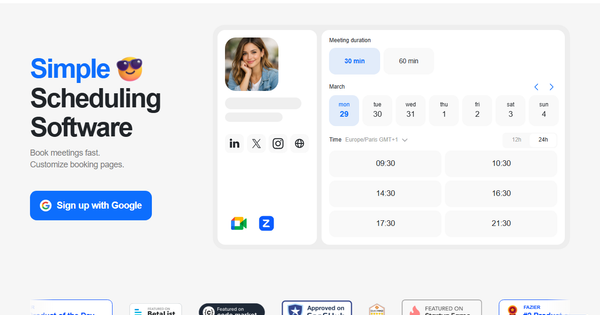
Wellpin is a free, AI-powered scheduling platform designed to eliminate back-and-forth emails and manual calendar coordination. Users create personalized booking links that display real-time availability, allow guests to self-select times, and automatically sync with connected calendars while generating Zoom or Google Meet links. It handles individual appointments, recurring sessions, and group meetings by detecting conflicts across multiple calendars and suggesting optimal slots.
Primary use cases include booking client calls, interviews, team syncs, consultations, and paid sessions (with monetization options in development). Professionals use it to share availability via email signatures, websites, or social media, reducing no-shows through automated reminders.
The target audience spans freelancers, recruiters, educators, sales teams, managers, and small businesses—anyone juggling multiple calendars or time zones without needing enterprise-level complexity. As of March 2026 research from the official site and user platforms, it positions itself as an accessible alternative for solo users and small teams seeking professional scheduling without cost or steep learning curves.
Key Features & Capabilities
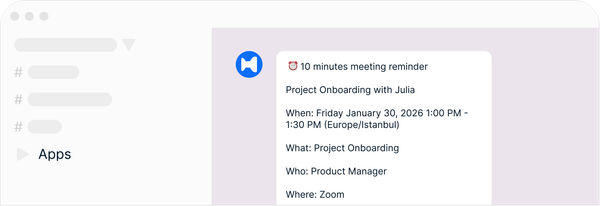
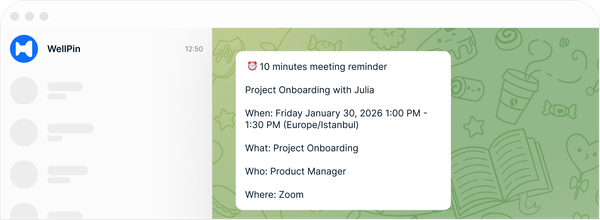
Core functionality revolves around instant booking links, calendar synchronization (Google Calendar native; Outlook upcoming), meeting platform integration (Zoom, Google Meet), customizable availability (working hours, durations, buffers, notice periods), booking limits (daily caps), and automated email/Slack/Telegram reminders. Group scheduling stands out with AI-driven conflict detection that scans participants’ calendars, handles time zones, and proposes the earliest mutually available slot.
Standout differentiators include a truly unlimited free plan with group features and AI assistance included (unlike many competitors that gate these behind paywalls), embeddable “Book a Demo” widgets, document attachment during booking, and whitelist controls for private access. Users can also customize booking pages with bios, social links, and branded fields for a professional client experience.
Limitations include a narrower set of integrations compared to market leaders (no native Salesforce, Microsoft Teams, or advanced CRM routing yet), no fully mature payment collection despite “paid slot” teasers, and upcoming rather than live features like broader team automation. No enterprise SSO or advanced analytics are available, keeping it lightweight but less scalable for large organizations.
User Experience
Wellpin boasts an exceptionally low learning curve—most users report being fully operational within minutes thanks to Google single-sign-on and a clean, minimalist dashboard. The interface feels modern and intuitive, with drag-and-drop availability grids, real-time previews of what guests see, and mobile-friendly booking pages. Navigation is straightforward, avoiding the overwhelming settings menus found in more feature-heavy tools.
Documentation is light: no comprehensive help center or video library exists, but the blog offers practical guides on topics like group scheduling best practices. Support is email-based ([email protected]) and generally responsive for a free tool, though one user noted slower replies during account issues. Overall, the experience prioritizes speed and simplicity over depth.
Performance & Reliability
The platform performs efficiently with near-instant link generation, real-time availability updates, and reliable calendar syncing. Automated reminders reduce no-shows effectively, and AI conflict detection works quickly even for multi-person groups. Users consistently praise its speed and lack of lag.
Known issues are minimal given the tool’s relatively recent growth. Trustpilot reviews (4.0/5 from 11 users as of early 2026) highlight consistent uptime and smooth operation. The only notable complaint involved an isolated privacy incident where unsolicited invites were allegedly sent; the company responded publicly, but this highlights the need for careful permission management during setup. No widespread outages or performance degradation reported across G2 snippets or recent user feedback.
Pricing & Value
Wellpin operates on a completely free model with no paid tiers required for core or advanced features such as group scheduling, AI assistance, unlimited users/calendars, or reminders. There is no traditional pricing page, and all essential functionality—including widgets and custom pages—is available immediately upon signup. No enterprise options or usage-based fees appear to exist as of March 2026.
The value proposition is exceptionally strong against paid competitors: users receive Calendly-like functionality (plus built-in AI group booking) at zero cost, making it ideal for budget-conscious freelancers and SMBs. The trade-off is fewer premium integrations and support depth, but for most individual and small-team needs, it delivers outstanding ROI by saving hours weekly without any financial commitment.
Practical Tutorial
Official video tutorials are not yet available, but the platform’s simplicity makes self-guided setup easy. Below is a complete walkthrough for the most common task—creating and sharing a personalized 30-minute consultation link (example: a recruiter booking candidate interviews). All steps are based on current live functionality observed on the site.
- Visit https://wellpin.io/ and click “Sign up with Google” (instant account creation with calendar access granted).
- On the dashboard, connect your primary calendar if not already synced, then click “Set Up Schedule.”
- Define availability: select working hours (e.g., Monday–Friday 9 AM–5 PM in your timezone), choose meeting duration (30 minutes), add a 10-minute buffer between slots, and set a 24-hour notice period.
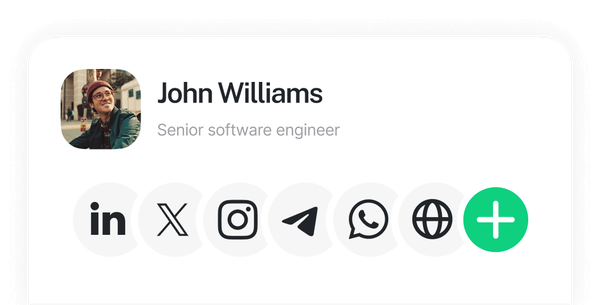
- Customize your page: upload a profile photo, add a bio (“Recruiter at Acme Corp – 15-min intro calls”), include social links, and create custom fields (e.g., “LinkedIn profile”).
- Enable group or single mode (for interviews, keep single), set a daily cap if desired (e.g., max 8 calls), and toggle automated reminders.
- Click “Generate Link” to receive your unique URL (e.g., wellpin.io/john-smith). Copy it or embed the widget on your website.
- Share via email signature, LinkedIn, or calendar invite. Guests visit the link, see only your open slots, pick a time, and the meeting auto-books with Zoom link and reminder emails sent to both parties.
The entire process takes under 5 minutes. For group meetings, simply add participant emails in the booking flow—the AI will auto-suggest conflict-free times. Test by booking a slot with a secondary email account before sharing widely.
Final Verdict
Overall rating: 4.5/5
Wellpin excels for freelancers, recruiters, educators, and small teams who want professional, AI-assisted scheduling without cost or complexity—its free group features and lightning-fast setup provide genuine time savings and a polished client experience.
Avoid it if you run a large enterprise requiring deep CRM integrations, advanced routing, dedicated support, or extensive customization, as these areas remain underdeveloped.
One-sentence recommendation: Try Wellpin today if you’re ready to replace email tennis with a free, intelligent booking link that just works.