WhatPlugin.ai Review: The Best Way to Discover Top AI Tools

Overview & Purpose

WhatPlugin.ai is a curated directory and discovery platform originally designed to simplify exploration of ChatGPT plugins, offering a more intuitive interface than OpenAI's native plugin store. It provides access to over 200 plugins (or their evolved equivalents in custom GPTs), with tools for category browsing, keyword search, and favoriting to help users quickly identify and prioritize useful extensions for ChatGPT.
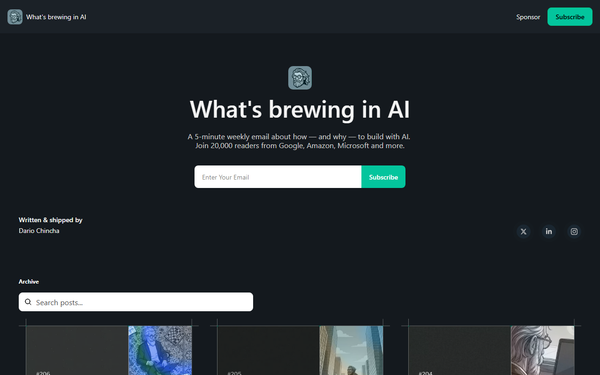
Its primary use cases include discovering productivity enhancers, content generators, data analyzers, or niche tools that connect ChatGPT to external services like calendars, e-commerce platforms, or research databases. As of April 2026 research, the platform—created by indie maker Dario Chincha—has evolved beyond plugins (which OpenAI deprecated in March 2024 in favor of custom GPTs) into a broader AI tools review hub and newsletter ("What's brewing in AI," with 21,000+ subscribers). It now features ranked lists of top AI tools tested hands-on, 1,000+ custom GPT rankings across categories, and practical insights for AI adoption.
The target audience includes ChatGPT power users, developers building AI workflows, marketers seeking automation tools, content creators, researchers, and small business owners who want to maximize ChatGPT (or similar LLMs) without sifting through scattered options. It appeals to non-technical users overwhelmed by the official stores as well as professionals needing curated, reviewed recommendations.
Key Features & Capabilities
Core functionality revolves around organized discovery: users can filter by categories (e.g., productivity, marketing, research), perform keyword searches, and save favorites for a personalized dashboard of go-to tools. The platform curates and reviews plugins/GPTs/tools, often with quality checks, user ratings, and practical testing notes.
Standout features differentiating it from competitors (like the official GPT Store or generic directories such as FutureTools) include its focus on human-tested reviews with no "mediocre products," regular updates, and the combination of legacy plugin insights with current custom GPT rankings. The favorites system and clean categorization make it more user-centric than raw lists. It has also expanded into a blog with detailed AI tool comparisons and a newsletter for ongoing trends.
Limitations include the impact of OpenAI's plugin deprecation—while the directory adapted to GPTs and broader AI tools, some older plugin-specific links or references may feel dated. Quality of listed items can vary (users must still verify compatibility), and the sheer volume (hundreds of entries) may overwhelm beginners without strong filtering. There is no built-in installation or direct integration with ChatGPT; it serves purely as a discovery layer. No API access or enterprise features are mentioned.

User Experience
The interface earns high marks for ease of use and a low learning curve. Navigation relies on intuitive category selectors, search bars, and one-click favoriting, making it accessible even for non-technical users. The design is clean and modern, emphasizing readability with concise descriptions, ratings, and direct links to try tools in ChatGPT.
Documentation is lightweight but effective: the site itself acts as self-explanatory, with blog posts and newsletter archives providing context on new additions or trends. Support resources include the active newsletter for updates and occasional YouTube overviews (e.g., "WhatPlugin.ai: Your Ultimate Guide to ChatGPT Plugins"). No dedicated help center or live chat was evident, but community feedback via LinkedIn and X (from the creator) fills gaps. Overall, it feels polished and focused on quick value delivery.
Performance & Reliability
As a directory site, WhatPlugin.ai loads quickly with efficient search and filtering, even across hundreds of entries. Curation and regular updates (noted in reviews) ensure relevance, with the blog reflecting current 2026 AI landscape testing.
No widespread known issues or common complaints surfaced in user feedback or searches; it is praised for being a reliable "centralized hub." Minor notes include potential outdated plugin references post-deprecation and reliance on third-party ratings (which could be gamed, as acknowledged in older creator posts). Reliability is high for discovery purposes, though users should cross-check tool status directly in ChatGPT or the GPT Store.
Pricing & Value
WhatPlugin.ai is completely free to use, with no tiers, paid plans, or enterprise options identified. Monetization appears limited to affiliate links in reviews and newsletter sponsorships, keeping the core directory and tools list accessible without barriers.
The value proposition is excellent for a free resource: it saves hours of manual searching compared to browsing raw stores or scattered lists. Alternatives like official GPT Store searches or generic directories lack the hands-on testing and favorites system. It delivers strong ROI for heavy ChatGPT users by surfacing high-quality, categorized options—especially valuable given the ecosystem's rapid evolution. The newsletter adds ongoing free education, enhancing long-term utility without any cost.
Practical Tutorial
While no official step-by-step video tutorials are hosted directly on the site, the platform's features are straightforward. Here is a custom walkthrough for a common task—discovering and saving a marketing-focused tool (as of April 2026; the site now emphasizes GPTs alongside legacy plugin insights):
-
Visit https://www.whatplugin.ai/ and explore the main directory or "All GPTs" / tools section (or use the blog's categorized lists at blog.whatplugin.ai/tools).
-
Use the category filters (e.g., select "Marketing" or "Content Generation") or type a keyword like "SEO" or "social media" in the search bar to narrow results.
-
Browse the curated cards: each includes a brief description, ratings, use cases, and pros/cons from hands-on testing. Click into any entry for deeper review details.
-
For a practical example, search "marketing GPT" to surface options like specialized content planners or ad copy generators. Read the review notes on integration with ChatGPT.
-
Mark favorites by clicking the heart/star icon on promising tools—this builds your personalized list for quick future access (visible in a dedicated favorites view).
-
Test directly: Copy the GPT name or link into ChatGPT's custom GPT interface (or plugin store if referencing legacy). Experiment with prompts like "Generate a social media campaign for [product]" using the tool.
-
For ongoing learning, subscribe to the free "What's brewing in AI" newsletter on the homepage for weekly updates on new additions or tool comparisons.
This process typically takes under 5 minutes and yields immediately actionable discoveries. For video context, search YouTube for "WhatPlugin.ai guide" (e.g., the 2025 overview video).
Final Verdict
Overall rating: 4.5/5 (strong curation and usability offset by the broader ecosystem shift away from original plugins).
Who should use this tool: AI enthusiasts, developers, marketers, designers, researchers, and productivity-focused professionals who rely on ChatGPT/GPTs and want a trusted, organized discovery layer with tested recommendations—especially those tired of cluttered official stores.
Who should avoid this tool: Users needing active plugin installation support (post-deprecation) or enterprise-level features; those seeking only the absolute latest uncurated GPTs may prefer the native OpenAI store.
One-sentence recommendation: WhatPlugin.ai remains a top free resource for intelligently discovering and organizing ChatGPT plugins, custom GPTs, and AI tools, making it essential for anyone serious about leveling up their AI workflow.