WhisperTranscribe Review: Fast AI Transcription and Content Creation
Overview & Purpose

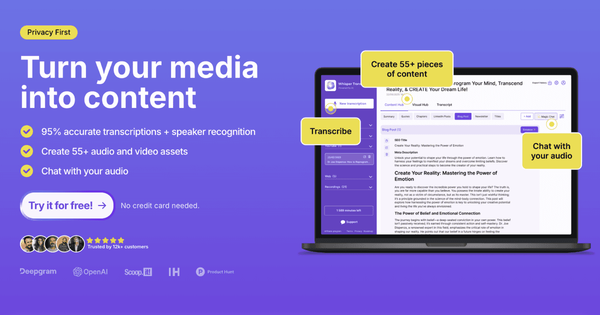
WhisperTranscribe is a desktop application for Mac and Windows that leverages OpenAI’s Whisper AI (combined with AssemblyAI) to convert audio and video files into accurate text transcripts. It goes beyond basic transcription by enabling users to generate 57+ types of content from a single upload—such as social media posts, blog articles, summaries, newsletters, show notes, and video clips—while supporting speaker detection, translation, subtitles, and an interactive “Magic Chat” for querying the transcript. Primary use cases include transcribing podcasts, interviews, YouTube videos, meetings, and lectures; repurposing audio into marketing assets; creating accessible subtitles; and extracting insights or action items from long recordings.
The tool targets content creators (podcasters, YouTubers, influencers), marketers, researchers, journalists, coaches, HR professionals, and educators who need to save time on manual transcription and content repurposing. It is not primarily aimed at developers (no public API) or casual mobile users, but rather professionals and teams seeking an all-in-one workflow for audio-to-content pipelines. As of March 2026, it positions itself as a privacy-focused, high-accuracy alternative to generic transcription services.

Key Features & Capabilities
Core functionality centers on uploading local files (MP3, MP4, WAV, etc., up to 5 GB) or pasting links from YouTube, Vimeo, or podcast RSS feeds. Processing delivers 95% accurate transcripts with speaker labels, even in noisy conditions or with accents, typically completing a 60-minute file in 3–4 minutes. Standout features that differentiate it from competitors include:
- Instant AI content generation trained to mirror the user’s unique writing style.
- Text-based clip editor for creating platform-optimized shorts (TikTok, YouTube, LinkedIn) without video-editing skills.
- Magic Chat interface for asking natural-language questions (“What were the action items?” or “Summarize pricing discussion”).
- Subtitle generation (SRT/VTT) and translation to 99+ languages while preserving formatting and speaker labels.
- Flexible exports (TXT, Word, subtitles) and podcast-specific tools (chapter markers, episode titles).
Privacy is emphasized: transcripts and generated content remain 100% user-owned, data is not used for AI training, and files are stored locally on the user’s device with SSL/TLS encryption.
Limitations include usage caps tied to subscription tiers, no offline processing (requires internet), maximum 5 GB file size, and occasional minor punctuation or capitalization quirks in generated text. It lacks advanced team collaboration tools beyond “unlimited team members” on higher plans and does not offer a web or mobile version.
User Experience
The native desktop app offers a clean, intuitive interface designed for non-technical users. Setup involves a quick download and sign-up (no credit card required for the free tier), after which uploading or linking content is straightforward via drag-and-drop or URL paste. The learning curve is minimal—most users report being productive within minutes thanks to clear in-app prompts and one-click actions for content generation or clip creation.
Interface quality is praised for its speed and simplicity; the text-based editor for clips and the Magic Chat sidebar feel modern and responsive. Documentation consists of an embedded FAQ, a growing blog with use-case guides, and email support (response within 24 hours on paid plans, priority on higher tiers). No extensive video library or knowledge base exists yet, but community sentiment on platforms like AppSumo highlights “top-notch support” and ease of use. Overall, the experience feels polished and focused on rapid results rather than complex configuration.
Performance & Reliability
Transcription speed is a major strength: most files process in under five minutes, far faster than manual methods or many cloud competitors. Accuracy consistently hits the advertised 95% for clear-to-moderate audio, with strong handling of accents, background noise, and multiple speakers. Users on AppSumo and independent reviews frequently describe it as “lightning-fast” and “impressive” even for hour-long podcasts or YouTube videos.
Known issues are minor and infrequent: occasional punctuation inconsistencies in generated content, slight variations in processing time during peak hours, and the need for clear source audio for optimal results. There are no widespread reports of data loss, crashes, or major accuracy failures. Reliability is bolstered by the underlying Whisper model, and the desktop-native architecture avoids browser-related lag. As of March 2026, user feedback across review platforms remains overwhelmingly positive with no recurring outages or critical bugs noted.
Pricing & Value
WhisperTranscribe offers a generous free tier (sign-up only, limited minutes) with full access to the interface and basic features. Paid monthly plans (billed annually for maximum savings) include:
- Starter: $19.99/month (320 minutes, 2 GB max file).
- Pro: $29.99/month (800 minutes, 5 GB max, unlimited translation and team members).
- Grow: $69.99/month (2,500 minutes, priority support, custom templates).
- Scale: $139.99/month (6,000 minutes, more templates).
Pay-as-you-go credits start at $9 per hour. Enterprise options provide custom contracts, volume discounts, and on-premise deployments.
Value is excellent for heavy users: the combination of transcription plus unlimited content generation and clipping (no extra per-use fees) delivers strong ROI compared to separate tools like Descript, Otter.ai, or manual services. At roughly $0.023–$0.062 per minute on annual plans, it undercuts many premium alternatives while adding powerful repurposing features. The 60-day money-back guarantee on lifetime deals (when available via AppSumo) further reduces risk. Light users may find the quotas restrictive, but most professionals recoup costs quickly through time saved.
Practical Tutorial
A common task is transcribing a YouTube podcast episode and generating ready-to-post social media content plus subtitles. Here is a step-by-step walkthrough (tested conceptually from official site mechanics; for latest visuals, visit the blog post on podcast transcription):
- Download and install the Mac or Windows app from whispertranscribe.com (free sign-up required).
- Open the app and click “Upload” or “Get from web.” Paste a YouTube link (e.g., a 45-minute interview) or drag a local MP4 file.
- Select options: enable speaker detection and choose target language if non-English. Click “Transcribe” — expect completion in 2–3 minutes.
- Review the transcript in the editor. Use the Magic Chat sidebar: type “Extract the three key takeaways and turn them into LinkedIn posts” or “Generate a Twitter thread summary.”
- Click “Generate Content” → choose “Social Media Posts” or “Blog Post.” Customize the prompt to match your style if desired; the AI produces formatted output instantly.
- For subtitles or clips: switch to the Clip Maker tab, highlight engaging transcript sections, and generate platform-ready video snippets with auto-captions (SRT export available).
- Export everything: download TXT/Word transcript, SRT subtitles, or copy generated posts directly.
This entire process typically takes under 10 minutes. For podcast-specific tips (chapter markers, show notes), see the official guide at https://www.whispertranscribe.com/blog/podcast-transcription-roi-guide.
Final Verdict
Overall rating: 4.6 out of 5.
Content creators, marketers, podcasters, and researchers who regularly repurpose audio into multiple formats will benefit most—WhisperTranscribe’s speed, accuracy, and all-in-one content tools deliver genuine time savings and creative output. Teams needing enterprise privacy and scalability will also appreciate the options.
Avoid it if you require completely free unlimited usage, offline-only processing, mobile-first access, or advanced developer integrations—cheaper basic transcribers or open-source Whisper setups may suffice.
One-sentence recommendation: If you want lightning-fast, accurate transcription paired with powerful AI content repurposing in an intuitive desktop app, WhisperTranscribe is an outstanding choice worth trying today.