WriteText AI Review: Automate WooCommerce Product SEO Content
Overview & Purpose

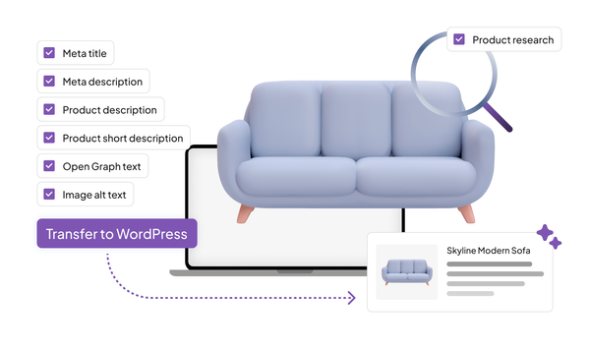
WriteText.ai is an AI-powered WordPress plugin specifically built for WooCommerce stores (with support for Shopify and Magento as well). It generates, structures, and optimizes product and category content directly inside the WooCommerce admin dashboard, including long/short product descriptions, meta titles, meta descriptions, Open Graph text, image alt text, and category pages. The tool pulls from existing store data, performs real-time web research and image analysis to fill gaps, and enables one-click publishing to live or draft products without any manual copy-pasting or external tools.
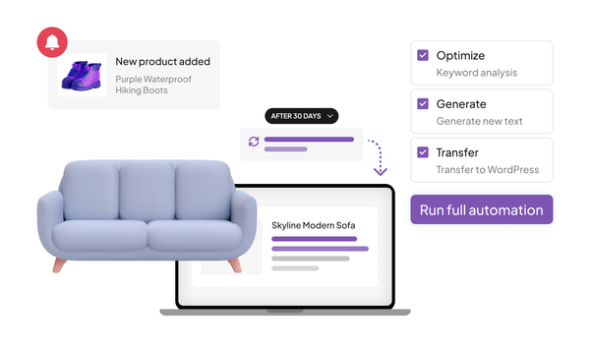
Primary use cases include automating content for large catalogs (handling millions of SKUs), refreshing outdated listings, expanding into new markets with multilingual support (25+ languages), optimizing for SEO and Answer Engine Optimization (AEO), and running bulk operations for new product launches or performance-based updates. It also detects new products automatically and sends email notifications for immediate content generation.
The target audience is primarily WooCommerce store owners, e-commerce marketers, and managers who manage product catalogs and want to improve SEO, customer engagement, and conversion rates without hiring copywriters or spending hours in ChatGPT. It is not aimed at developers (though minor theme tweaks may require one for custom layouts) or designers, but rather at non-technical users focused on scaling sales through better listings.
Key Features & Capabilities
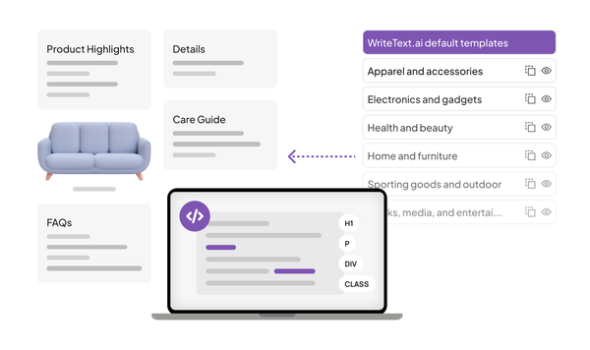
Core functionality revolves around instant content generation from product/category pages using store data, AI image analysis, and optional keyword prompts. Users can create structured output via reusable templates (with sections like introductions, features, FAQs, bullets, and paragraphs), apply custom tones, styles, and audience targeting, and use built-in product research to enrich sparse data.
Standout features that differentiate it from generic AI writers or basic plugins include:
- Deep native WooCommerce integration for direct editing and one-click transfer/publishing (works with any theme or custom layout).
- Full SEO automation: keyword analysis (volume, competition, intent, gaps), a “keyword ladder” pipeline that starts with easy wins and auto-updates higher-competition terms based on rankings.
- Bulk and automation workflows: generate, analyze, and publish thousands of items in one flow; automatic updates on schedule or performance; new-product detection.
- Advanced options like negative keywords, competitor gap analysis, web research levels (Basic/Advanced), custom prompts/image blocks, and multi-brand/multi-market support.
These make it more than a text generator—it’s a complete content lifecycle tool with AEO focus for ranking in AI search results.
Limitations include a credit-based system (no unlimited generation), the need to always review AI output before publishing, and occasional front-end developer help for complex custom theme styling. Missing features compared to some competitors: no built-in A/B testing inside the tool (manual recommended) and no native analytics dashboard beyond keyword tracking. Credit consumption can feel higher than expected for repeated generations on the same products.
User Experience
Installation is straightforward via the official WordPress plugin directory or direct download after signup. Users select WooCommerce during registration, install the plugin in their dashboard, and link the account—typically completed in minutes. The interface is clean and embedded directly in WooCommerce product/category edit screens, with intuitive controls for templates, tones, keyword analysis, and generation buttons. Learning curve is low for anyone familiar with WooCommerce; beginners benefit from the knowledge base flowchart and essential guide.
Interface quality is professional and e-commerce-focused, with preview options, bulk selectors, and one-click transfers. Documentation is excellent: comprehensive knowledge base articles, installation guides, a getting-started flowchart, blog tutorials, and YouTube demos for single/bulk modes. Support includes a ticket system, discovery calls, and responsive replies in reviewed cases (though one user reported delays and spam-folder issues). Overall, users praise the “seamless” and “time-saving” experience.
Performance & Reliability
Generation is fast—seconds per product or minutes for bulk batches of hundreds. Users report completing meta titles, descriptions, and content for 1,500 products in under two days with full automation. The keyword pipeline and automatic updates run reliably in the background, and the tool handles large catalogs without reported crashes. Real-time web research and image analysis add richness even for incomplete listings.
Known issues are minimal: no widespread performance complaints in public reviews. The main reliability concern stems from credit management (users occasionally exceed estimates on repeated edits) and the need for manual review to avoid generic AI phrasing. Automation is “set-and-forget” but still recommends staging-server testing first. As of March 2026, the plugin receives regular updates with no major outages noted.
Pricing & Value
WriteText.ai uses a flexible credit system (credits never expire on Starter; monthly plans have included credits). Plans (as of March 2026):
- Free trial: Access to test features (limited credits provided upfront).
- Starter: Pay-as-you-go credit packages (e.g., ~$90 for 1,000 credits at $0.09/credit).
- Pro (most popular): $149/month (or $1,490/year) includes 2,000 credits (~$0.075/credit, 17% savings) plus full automation, keyword tools, API, and advanced features.
- Managed Setup: $999 one-time (includes 6,000 credits, guided onboarding, dedicated manager, training).
Credit costs: 1 credit for meta title/description/OG text/image alt text; 2 credits for short/long description (template-based, first 500 words +1 per additional 250). Keyword analysis: 6 credits. Additional credits can be purchased anytime.
Value is strong for medium-to-large stores: significant time and labor savings (hundreds of hours/month) outweigh the cost, especially with automation. For tiny stores or sporadic use, the credit model can feel expensive and less startup-friendly compared to pure free tools or manual methods. Compared to alternatives (generic AI + manual SEO tools or agencies), it offers superior integration and ongoing optimization at a fraction of outsourced copywriting fees.
Practical Tutorial
Official tutorials and a detailed blog guide are available. Here is a complete step-by-step walkthrough for the common task of bulk-generating product descriptions (adapted from the official blog and knowledge base, current as of March 2026). For the latest visuals or video demos, see the official bulk guide or essential starting guide.
-
Install and Set Up: Sign up at login.writetext.ai, select WooCommerce, download/install the plugin from WordPress dashboard or plugin directory. Link your store in the “Linked webshops” section. (Detailed install: official WooCommerce KB page.)
-
Prepare Data: Ensure product titles, images, attributes, and categories are organized. Group similar products (e.g., by category or tag) for consistent tone.
-
Open Bulk Mode: From your WordPress dashboard, navigate to WriteText.ai. Select multiple products (or an entire category) for batch processing.
-
Customize Settings: Choose tones/styles/audience, set desired text length, select product attributes to include, enable optional bulk keyword analysis, and apply a template (or custom prompts/special instructions).
-
Generate: Click “Generate Selected.” The AI processes everything (including optional research and keyword optimization).
-
Review and Transfer: Preview results, edit if needed, then click to transfer. Content publishes live if the product is published, or saves as draft otherwise. (Tip: Transfer to staging server first.)
-
Optimize Ongoing: Enable the automatic keyword optimization pipeline for future updates based on performance/rankings. Set up new-product alerts for hands-off scaling.
Example outcome on a sample backpack product: Structured sections with benefits, features, FAQs, and SEO-optimized headings—all styled to your brand and ready to rank. This process typically takes minutes per batch versus hours manually.
Final Verdict
Overall rating: 4.2 out of 5. WriteText.ai excels for WooCommerce users who need scalable, SEO-optimized content creation with zero-friction integration and automation. It is ideal for growing or established e-commerce stores (hundreds to millions of products) seeking to save dozens of hours monthly while improving rankings and conversions—especially marketers who value templates, keyword pipelines, and one-click publishing. Avoid it if you run a very small store with infrequent updates (credit costs add up quickly) or prefer completely free/unlimited tools without any review step, as the pricing model and AI-output verification may frustrate beginners.
One-sentence recommendation: If you run a WooCommerce store and want professional, automated product content without leaving your dashboard, WriteText.ai is a powerful time-saver worth the investment—research conducted as of March 13, 2026.