Xylo AI Review: Boost Outlook Email Productivity with EQ
Overview & Purpose
Xylo AI, specifically its Writing Assistant add-in (powered by EQ and behavioral psychology), is an AI-powered email enhancement tool designed for business professionals. It integrates seamlessly with Microsoft Outlook to improve email writing by offering real-time suggestions for clarity, tone, and style while maintaining the user's authentic voice. The software helps align communication with company norms or recipient preferences, enhances empathy and engagement through psychologically informed insights, and includes productivity features like auto-summarizing lengthy threads and task/action item extraction.
Primary use cases include drafting professional responses, refining client or team emails, summarizing complex conversations, and extracting actionable items to streamline workflows. Users might choose Xylo AI to improve email communication effectiveness, increase productivity, and ensure messages are clear, professional, and well-received—all while prioritizing data security and privacy via enterprise-grade Microsoft Azure infrastructure.
The target audience includes business professionals such as sales representatives, customer service teams, managers, executives, and anyone heavily reliant on Microsoft Outlook for daily communications. It suits roles requiring empathetic, high-stakes correspondence rather than specialized fields like developers or designers.

Key Features & Capabilities
Core functionality centers on an intuitive AI assistant embedded in Outlook for composing, editing, and analyzing emails. Users receive instant suggestions for rephrasing, tone adjustment (professional, casual, or empathetic), and personalization based on recipient emotional cues or behavioral styles.
Standout features that differentiate it from competitors (such as basic Grammarly or Microsoft Copilot) include its "AI with EQ" layer: it simulates emotional intelligence by analyzing context for empathy, suggesting phrasing that builds relationships, and adapting to audience preferences—going beyond grammar to foster genuine engagement. Additional capabilities encompass thread summarization into concise insights, automated task extraction (e.g., deadlines or follow-ups added to calendars), smart templates, and proactive coaching for conflict resolution or status updates.
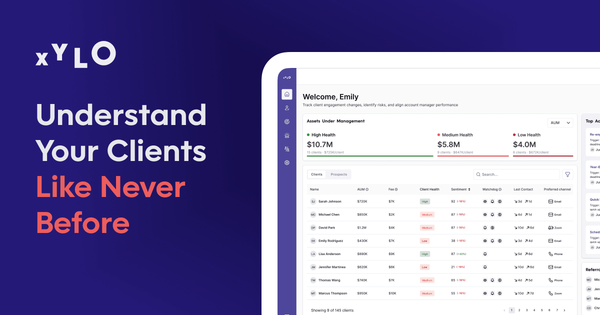
Limitations include its Outlook 365 exclusivity (no native support for Gmail or other platforms) and the occasional need for human oversight to perfectly match voice or handle highly nuanced scenarios. Missing features may involve broad CRM syncing or advanced multi-user analytics dashboards (though these exist in Xylo's related client intelligence platform).

User Experience
Xylo AI offers excellent ease of use with a minimal learning curve—most users can install the lightweight add-in from the Microsoft Marketplace and begin receiving suggestions within minutes. The interface quality is clean and native to Outlook, appearing as a non-intrusive sidebar or ribbon toolbar that blends seamlessly without cluttering the email view.
Documentation consists of practical blog articles on the official site explaining features and best practices, while support resources include demo scheduling, privacy policy access, and potential onboarding assistance for teams. Overall, it feels accessible and workflow-friendly for busy professionals.

Performance & Reliability
The tool delivers strong real-time performance, processing suggestions and summaries instantly to reduce email handling time by up to 60% in some claims, enabling users to focus on higher-value work. Efficiency is high, with no noticeable slowdowns reported in Outlook.
Known issues or common complaints are scarce due to the product's relative newness and limited public user base; available feedback is overwhelmingly positive with high ratings on marketplace listings. No major reliability problems, crashes, or accuracy complaints surfaced in research, though typical AI caveats (such as occasional generic suggestions) apply. Privacy-focused design (zero unnecessary data retention) enhances trust.
Pricing & Value
Xylo AI offers a generous 7-day free trial with complete feature access through the Microsoft Marketplace. Post-trial pricing is flexible but not fully transparent on the main site (which emphasizes the related advisor platform); third-party directories indicate individual or team plans starting around $10–12 per user per month, with scalable enterprise options available upon request.
The value proposition stands out for Outlook-heavy users compared to alternatives like premium Grammarly or full Microsoft 365 Copilot suites, delivering specialized EQ-driven improvements and measurable productivity gains at a reasonable cost. ROI is compelling through time savings, higher engagement rates (claimed up to 20% better responses), and reduced miscommunication risks in professional settings.
Practical Tutorial
Official video tutorials are limited, but blog posts provide practical guidance on EQ-enhanced writing. Here's a step-by-step walkthrough for a common task—rewriting an email draft for improved tone, clarity, and empathy (created based on documented functionality; results may vary slightly by version).
- Install Xylo Writing Assistant from the Microsoft AppSource/Marketplace directly in Outlook (search "Xylo AI" or "Xylo Writing Assistant" and click Add).
- Open Outlook, start a new email or reply to an existing thread, and type your initial draft.
- Activate the Xylo pane (usually appears automatically in the compose window or via the ribbon toolbar icon).
- Highlight the draft text and select options like "Rewrite," "Tone Adjust," or "Improve with EQ." Choose a style (e.g., "Empathetic Professional") and any recipient insights if prompted.
- Review AI-generated suggestions in the side panel—e.g., original blunt draft: "The deadline is Friday—send the report now." Suggested version: "To keep our project on track, could you please share the report by end of day Friday? I'm happy to hop on a quick call if any support is needed."
- For added productivity, click "Summarize Thread" or "Extract Tasks" on incoming emails to generate bullet-point insights and auto-populate action items (e.g., "Follow up: Schedule review meeting by March 15").
- Accept preferred edits, make final manual tweaks to preserve your voice, and send.
Example drawn from real-world EQ application: A project update email refined for de-escalation turns potential tension into collaborative tone. For more guidance, see the official blog at https://xylo.ai/blog/eq-applied-to-real-world or book a demo via xylo.ai.
Final Verdict
Overall rating: 4.3 out of 5. Xylo AI stands out for Outlook users seeking to elevate everyday emails with thoughtful, psychology-backed intelligence that boosts clarity, empathy, and results.
It is ideal for business professionals and teams in client-facing or collaborative roles who want to save time, reduce miscommunications, and build stronger relationships through more engaging correspondence—especially those already invested in the Microsoft ecosystem.
Users should avoid it if they rely on non-Outlook email clients, need extensive third-party reviews before adoption, or prefer fully transparent pricing and broader platform support without trial commitment.
One-sentence recommendation: If you're an Outlook power user looking to make your emails more empathetic, effective, and efficient, Xylo AI's free trial is worth testing today.