YapThread Review: Turn Your Spoken Ideas Into Polished Content
Overview & Purpose

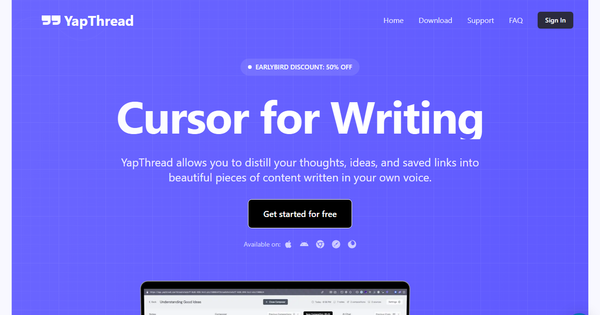
YapThread is an AI-powered "second brain" app that captures spoken thoughts via voice recordings ("yaps"), automatically transcribes them with high accuracy, organizes them into thematic "Threads," integrates external sources like links, web clips, and images, and uses AI to refine everything into polished, structured written content in the user's own voice. It transforms scattered ideas, research, meetings, and notes into scripts, docs, drafts, and shareable outputs without manual typing or heavy editing.
Primary use cases include turning on-the-go rambles (while walking, driving, or in bed) into content scripts, summarizing meetings with action items, journaling for personal reflection, synthesizing research from social media or videos, and brainstorming startup ideas or marketing campaigns. The tool emphasizes creation over consumption, making it ideal for anyone who thinks fastest out loud.
Target audience spans content creators and writers (for posts and scripts), marketers and small business owners (for campaigns and insights), startup founders and managers (for notes and team feedback), students and researchers (for lectures and synthesis), and ambitious professionals with racing thoughts who need instant capture and organization.
Research conducted as of March 10, 2026.

Key Features & Capabilities
Core functionality revolves around one-tap voice recording anywhere, instant high-accuracy transcription (with offline support and 27+ language options), automatic threading for project organization, and an AI Editor that cleans transcripts, generates summaries, and produces polished drafts or markdown content using customizable presets.
Standout features include:
- Guided follow-up questions after each recording to deepen ideas and maintain creative flow.
- AI Chat to query your entire collection of notes and sources for summaries, connections, and insights.
- Seamless source integration via Chrome extension (save links from Twitter, LinkedIn, YouTube, Instagram, TikTok, or any site) or in-app web clips and images.
- Tagging, transcript cleanup, thread sharing, and context-aware refinement that learns your personal style.
These differentiate YapThread from competitors like basic voice memo apps or pure transcription tools (e.g., Otter.ai) by focusing on end-to-end creation—capturing raw thoughts, connecting research, and outputting professional content—rather than just storage or summarization.
Limitations include primary availability on Apple devices (iOS 16+, iPad, Mac with M1+, Vision Pro) with web and Android versions in development or limited; potential transcription inaccuracies with heavy accents, background noise, or complex jargon (standard for AI tools); and no advanced enterprise collaboration features like team workspaces yet. Missing elements for some users: native desktop-first experience or deep integrations with tools like Notion or Google Docs beyond export.
User Experience
YapThread offers an exceptionally low learning curve with a clean, intuitive interface focused on speed and zero friction—one tap to record, immediate AI processing, and simple taps for adding sources or refining notes. Users praise the smooth flow, helpful haptics, animations, and how it feels like an enhanced native voice memos app that actually turns ideas into action.
The design prioritizes mobile-first use (iPhone/iPad) with quick actions for tagging, sharing, and chatting. Documentation is lightweight (privacy policy and terms via Notion), but abundant creator-led resources from founder Riley Brown (YouTube, TikTok, Instagram) fill the gap with demos and tips. Support feels responsive through frequent updates and in-app feedback. Early users report it "unlocks creativity" and replaces multiple tools, though the small user base (new app launched late 2024) means community forums are still growing.
Performance & Reliability
Transcription and AI processing are fast and efficient for on-the-go use, with offline transcription support added in updates and multi-language capabilities enhancing accessibility. The app receives regular improvements—recent versions (through March 2025) added better chat features, tagging, transcript cleanup, and bug fixes for crashes or splash-screen issues.
No widespread major complaints surfaced in available reviews; performance is described as reliable for daily journaling and content workflows. Common early issues (e.g., stuck loading or permission glitches) were quickly resolved. One minor user note: AI summaries are "helpful but not perfect," typical for voice AI. Overall, it reliably captures and organizes thoughts without data loss, though heavy users may notice battery impact during extended recording sessions.
Pricing & Value
YapThread follows a freemium model: free to download and start with limited access or a trial period (historically 7 days, with "Start Free Trial" prominently featured). Unlimited plans unlock full AI features, unlimited threads/storage, and advanced editing via in-app subscriptions: Weekly Unlimited ($3.99), Monthly Unlimited ($9.99), or Yearly Unlimited (around $29.99–$99 depending on platform promotions, often discounted for best value at roughly $8.25/month).
Value is strong for creators and verbal thinkers—the affordable entry point delivers a complete voice-to-content pipeline that replaces several tools (voice memos + AI editor + research aggregator), often paying for itself quickly through time saved and creativity gains. Compared to pricier alternatives focused solely on transcription or note-taking, YapThread offers superior end-to-end creation at a competitive price. Weakness: Pricing transparency varies slightly between App Store and website, and free tier limitations are not always detailed upfront.
Practical Tutorial
Official tutorials are available via the founder's content, including a dedicated YouTube walkthrough for generating short-form scripts. Here is a step-by-step guide for a common task—turning a spoken idea into a polished short-form content script (e.g., TikTok/YouTube Short/Reel outline)—based on the app's core workflow:
-
Download and Set Up: Install YapThread from the App Store (iOS/iPad), sign up, and start the free trial. Grant microphone and notification permissions.
-
Record Your Yap: Open the app and tap the big record button (works while walking, driving, or multitasking). Speak freely for 1–5 minutes on your idea—e.g., "Brainstorm a thread on AI tools for content creators: key benefits, examples, and call to action."
-
AI Transcription and Guided Questions: The app auto-transcribes with high accuracy. Review the text, then answer AI-generated follow-up questions (e.g., "What specific pain points does this solve?") to expand and refine—tap record again for voice responses.
-
Organize and Add Sources: The note auto-saves to a Thread. Add relevant links or web clips via the Chrome extension (save tweets/videos) or in-app share sheet. Tag the thread (e.g., "Marketing") for easy retrieval.
-
Refine with AI Editor/Chat: Open AI Chat or select a preset (e.g., "Script" or "Short-Form Markdown"). Prompt: "Turn this thread into a 60-second video script in my casual voice with hook, benefits, and CTA." Edit the generated output, clean up transcripts if needed, and export/share.
-
Finalize and Iterate: Review connections across threads, generate variations, and export as text or share the thread. Example result from a real-style yap: Raw ramble becomes a structured script with timestamps, bullet points, and ready-to-record voiceover notes.
This process typically takes under 10 minutes and scales for longer projects like blog drafts or meeting recaps. For video demos, see the official tutorial linked above.
Final Verdict
Overall rating: 4.5 out of 5 stars—excellent innovation with room to grow as the platform matures.
Content creators, writers, marketers, founders, and verbal thinkers who capture ideas on the move should use this tool: it streamlines chaotic brainstorming into professional output faster than traditional note-taking apps, delivering genuine creativity boosts at an accessible price.
Avoid it if you need full cross-platform support today (Android/web still emerging), prefer text-first workflows, or require robust enterprise features and extensive third-party integrations.
One-sentence recommendation: YapThread is a game-changing voice-first second brain that turns spoken chaos into polished content effortlessly—essential for anyone who thinks out loud.